
Alpha Channel Extractor vs BatchPNGTools Generate PNG Alpha Mask
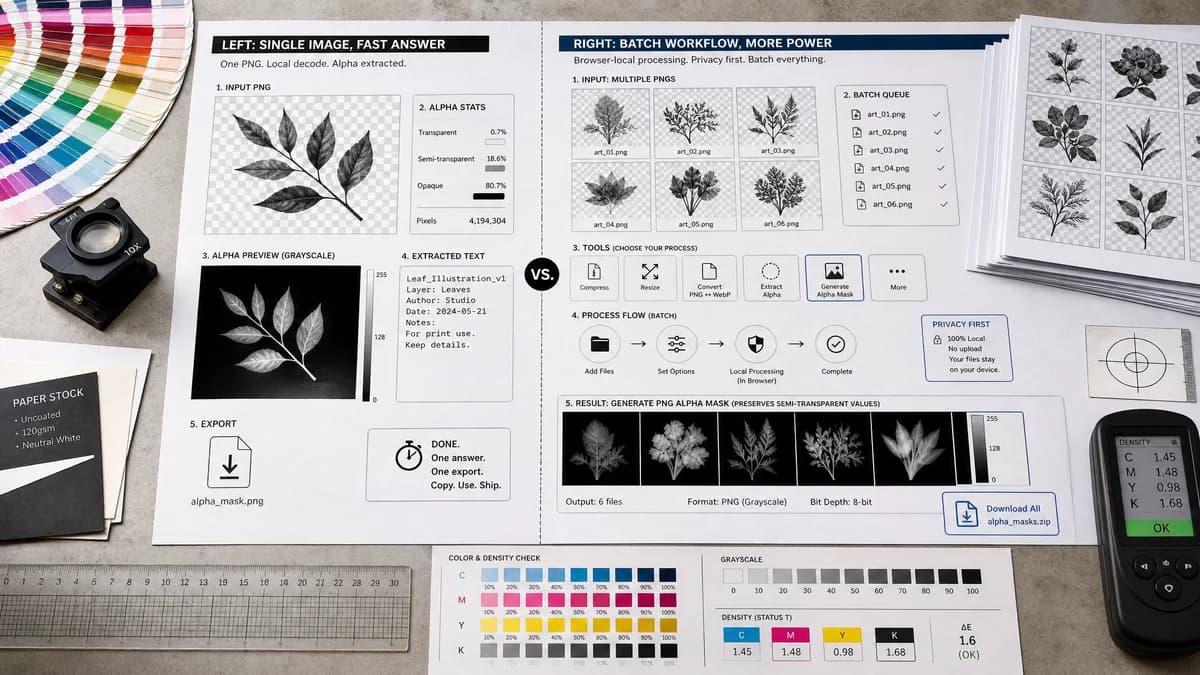
Alpha Channel Extractor is the baseline in this comparison: Extract an image alpha channel into a grayscale mask, see transparent and semi-transparent pixel percentages, and download the mask as PNG when transparency exists.
Compare TextFaker Alpha Channel Extractor with BatchPNGTools for alpha mask generation from PNG transparency channels.
Quick verdict
BatchPNGTools is stronger for batch PNG workflows. TextFaker is better positioned as a single-purpose inspection and extraction tool for users who need a quick answer and one export.
How Alpha Channel Extractor fits
TextFaker focuses on one uploaded image at a time, fast local decoding, clear alpha statistics, a grayscale preview, copyable text output, and PNG mask download when useful.
How BatchPNGTools Generate PNG Alpha Mask fits
BatchPNGTools offers a broader PNG processing suite with privacy-first browser processing, batch-oriented tools, and a Generate PNG Alpha Mask feature that can preserve original alpha values for semi-transparent pixels.
Side-by-side comparison
| Decision point | Alpha Channel Extractor | BatchPNGTools Generate PNG Alpha Mask | Takeaway |
|---|---|---|---|
| Batch support | Our workflowDesigned as a focused single-image alpha extractor unless implementation later adds batch support. | Competitor workflowThe researched site positions itself around batch PNG processing and unlimited files. | BatchPNGTools is the stronger fit for bulk production runs. |
| Alpha fidelity | Our workflowShould preserve 0-255 alpha levels in the grayscale exported mask. | Competitor workflowThe official page mentions preserving original alpha channel values for semi-transparent pixels when real alpha mask is enabled. | TextFaker must preserve semi-transparent alpha values to compete on quality. |
| Supported scope | Our workflowCan support browser-decodable image files and report no-alpha cases cleanly. | Competitor workflowThe product is PNG-centered with many PNG-specific utilities. | TextFaker can serve broader image uploads; BatchPNGTools serves deeper PNG workflows. |
| Result text | Our workflowPlanned result includes alpha exists, transparent count, semi-transparent count, opaque count, and percentages with copy-all. | Competitor workflowThe researched page emphasizes mask generation and suite capabilities more than copyable diagnostic text. | TextFaker wins for audit-style reporting. |
| Privacy | Our workflowLocal browser processing through image decode and canvas pixel reads. | Competitor workflowThe official site states browser processing with no uploads. | Both are privacy-friendly; TextFaker does not overclaim uniqueness. |
| Adjacent tools | Our workflowRelated TextFaker tools cover transparency checking, image color, metadata, and resizing tasks. | Competitor workflowBatchPNGTools lists many PNG operations, including transparency histogram, alpha replacement, alpha removal, and channel extraction. | The competitor is a wider PNG workshop; TextFaker remains simpler and clearer. |
Use Alpha Channel Extractor when
- One-off image QA before handing off a logo, icon, UI asset, or cutout.
- Users who want a concise result summary and one copy-all text button.
- Users who do not need batch PNG pipeline controls.
Use BatchPNGTools Generate PNG Alpha Mask when
- Users processing many PNG files in one session.
- Users who want a PNG-only suite with many adjacent transformations.
- Users who specifically need batch mask generation and transparency tooling.
Detailed comparison
Quick Verdict
BatchPNGTools is not only an alpha extractor; it is a broad PNG processing environment. TextFaker's comparison tells users to choose BatchPNGTools for bulk PNG pipelines and TextFaker for a clean single-image extraction result.
- TextFaker advantage: focused result and simpler decision path.
- Competitor advantage: batch depth and many PNG-specific companion tools.
Batch Versus Focus
Batch support changes the product expectation. A batch tool needs file lists, repeated outputs, and bulk download behavior. TextFaker can avoid that complexity initially and still satisfy the core alpha extractor intent.
- Do not promise batch behavior unless implemented.
- Use the comparison to frame TextFaker as quick inspection plus export.
Alpha Fidelity
The competitor's real-alpha-mask positioning validates the importance of preserving semi-transparent edge data. TextFaker does not simplify alpha extraction into a black-and-white mask because that would fail common UI, shadow, antialiasing, and texture workflows.
- Use exact alpha byte values in the output mask.
- Show semi-transparent percentage prominently.
No-Alpha Result
A batch suite may treat alpha mask generation as an operation regardless of whether a file has meaningful transparency. TextFaker makes missing alpha a first-class diagnostic outcome and avoid charging the user for it.
- Return an informational card for all-opaque images.
- Disable or de-emphasize mask download if it would be only solid white.
Research notes
- Official BatchPNGTools page lists Generate PNG Alpha Mask and many adjacent PNG transparency tools.
- The site states privacy-first browser processing, so privacy comparisons must be neutral.
- BatchPNGTools is a useful competitor type because alpha extraction users may have production PNG batches.
- TextFaker does not imply batch parity unless the implementation includes it.
Official source
The only outbound competitor link on this page is placed here for source checking after the comparison.
Official BatchPNGTools Generate PNG Alpha Mask source