
Alpha Channel Extractor vs FFmpeg alphaextract
Alpha Channel Extractor is the baseline in this comparison: Extract an image alpha channel into a grayscale mask, see transparent and semi-transparent pixel percentages, and download the mask as PNG when transparency exists.
Compare TextFaker Alpha Channel Extractor with FFmpeg alphaextract for grayscale alpha extraction in image sequence and video workflows.
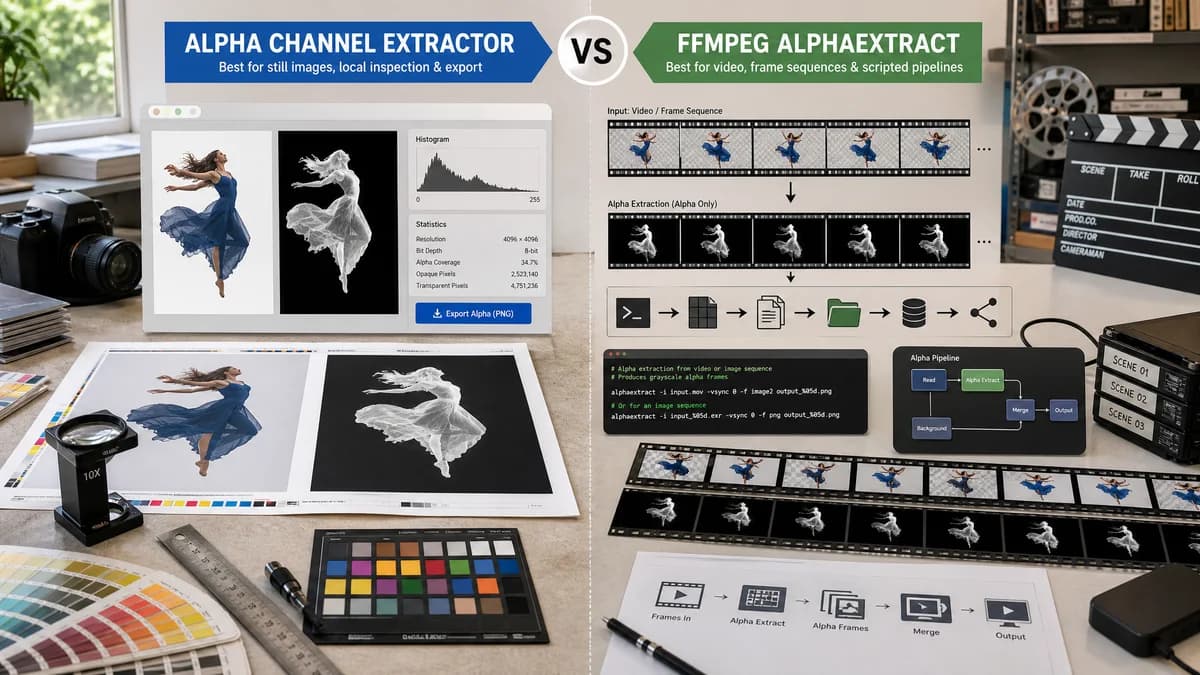
Quick verdict
FFmpeg is the better fit for video, frame sequences, and scripted media pipelines. TextFaker is the better fit for still-image alpha masks and browser-local inspection.
How Alpha Channel Extractor fits
TextFaker handles still-image alpha extraction in the browser with preview, statistics, and PNG mask export. It is not a video alpha pipeline tool.
How FFmpeg alphaextract fits
FFmpeg's alphaextract filter extracts the alpha component from an input as grayscale video and is intended to work with alphamerge for storing or transmitting alpha separately in media workflows.
Side-by-side comparison
| Decision point | Alpha Channel Extractor | FFmpeg alphaextract | Takeaway |
|---|---|---|---|
| Media type | Our workflowStill image alpha extraction. | Competitor workflowVideo filter that extracts alpha as grayscale video. | Use TextFaker for images and FFmpeg for moving media. |
| Output | Our workflowOne downloadable grayscale PNG alpha mask for the uploaded image. | Competitor workflowA grayscale video or stream output produced through filter graphs. | The outputs serve different production contexts. |
| Interface | Our workflowBrowser UI with upload drop zone, preview, statistics, and copy-all result text. | Competitor workflowCommand-line filter syntax inside FFmpeg processing commands. | TextFaker is easier for non-terminal users. |
| Alpha merge workflow | Our workflowNo planned merge-back feature; export mask for use elsewhere. | Competitor workflowOfficial docs describe alphaextract as especially useful with alphamerge. | FFmpeg wins for split-and-recombine media pipelines. |
| Statistics | Our workflowReports transparent, semi-transparent, and opaque pixel counts and percentages for one image. | Competitor workflowThe filter documentation describes extraction, not a built-in human-facing statistics page. | TextFaker is more useful for manual QA reporting. |
| Setup | Our workflowRequires a modern browser only. | Competitor workflowRequires FFmpeg installed or available in a media processing environment. | TextFaker lowers friction for still assets. |
Use Alpha Channel Extractor when
- Still PNG, WebP, or browser-decodable image alpha extraction.
- Design and web asset checks.
- Users who need a single grayscale PNG mask and text summary.
Use FFmpeg alphaextract when
- Video clips or frame sequences with alpha.
- Command-line processing and media automation.
- Workflows that later re-merge alpha with alphamerge.
Detailed comparison
Quick Verdict
FFmpeg is an adjacent but important comparison because alpha extraction is a known video filter operation. TextFaker is explicit that it targets still images, not video alpha channels.
- TextFaker: still image mask export.
- FFmpeg: video alpha extraction and merge workflows.
Media Workflow Split
Users working with ProRes, WebM, image sequences, or compositing passes need FFmpeg-style tooling. Users with a single transparent PNG, WebP, or icon need a simpler browser-local result.
- Do not market TextFaker as a video alpha extractor.
- Mention still-image scope in helper content.
Output Semantics
FFmpeg's alphaextract validates the grayscale-mask output concept. The same idea applies to TextFaker's still image export: alpha becomes luminance so it can be viewed, stored, or reused separately.
- Use grayscale output for compatibility.
- Preserve semi-transparent values.
Where FFmpeg Wins
FFmpeg wins for automation, video, frame sequences, and technical pipelines. TextFaker wins for immediate visual confirmation and a readable alpha report.
- Avoid comparing pricing; FFmpeg is open-source command-line software.
- Compare workflow and media scope instead.
Research notes
- Official FFmpeg filters documentation states alphaextract extracts the alpha component as grayscale video.
- The same source explains alphamerge as the companion operation.
- FFmpeg is adjacent because it handles video rather than a single browser-uploaded image.
- TextFaker restricts claims to still image extraction unless video support is implemented.
Official source
The only outbound competitor link on this page is placed here for source checking after the comparison.
Official FFmpeg alphaextract source