
Alpha Channel Extractor vs ImageOnline.io Alpha Channel Extractor
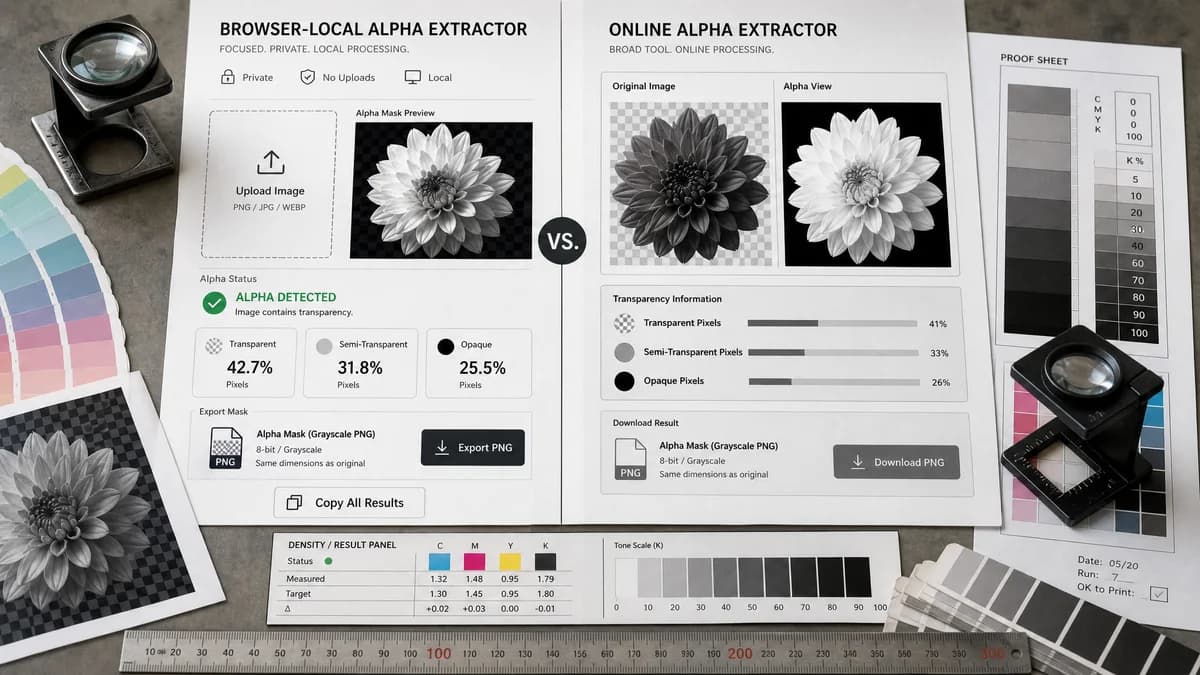
Alpha Channel Extractor is the baseline in this comparison: Extract an image alpha channel into a grayscale mask, see transparent and semi-transparent pixel percentages, and download the mask as PNG when transparency exists.
Compare TextFaker Alpha Channel Extractor with ImageOnline.io for extracting a grayscale transparency mask from PNG or WebP images.
Quick verdict
ImageOnline.io is a close direct competitor. TextFaker can compete by making local processing, usage gating rules, copy-all results, and no-alpha handling especially explicit while keeping the workflow tightly scoped.
How Alpha Channel Extractor fits
TextFaker provides a browser-local upload flow, grayscale alpha mask preview, clear alpha existence status, transparent, semi-transparent, and opaque pixel counts, PNG mask export, and one copy-all text result button. It is designed as a focused alpha extraction tool separate from transparency checking.
How ImageOnline.io Alpha Channel Extractor fits
ImageOnline.io offers a direct alpha channel extractor that shows original and alpha views, reports image information such as transparency categories, and downloads the extracted alpha as a grayscale PNG.
Side-by-side comparison
| Decision point | Alpha Channel Extractor | ImageOnline.io Alpha Channel Extractor | Takeaway |
|---|---|---|---|
| Primary workflow | Our workflowUpload an image, decode pixels locally, preview the extracted grayscale alpha mask, inspect alpha statistics, and download a PNG mask when transparency exists. | Competitor workflowUpload or drop an image, switch between original and alpha views, inspect image info, and download the alpha output. | Both target direct alpha extraction; TextFaker differentiates through clearer result reporting and billing-safe no-alpha outcomes. |
| Alpha statistics | Our workflowPlanned output includes whether alpha exists plus counts and percentages for fully transparent, semi-transparent, and opaque pixels. | Competitor workflowThe researched page shows dimensions, alpha presence, transparent pixels, and semi-transparent values in its info panel. | TextFaker keeps opaque counts visible too so the full pixel distribution is copyable. |
| Preview model | Our workflowGrayscale mask preview where black means transparent, white means opaque, and gray means partial alpha. | Competitor workflowThe competitor explains alpha as a grayscale image with white opaque and black transparent. | The visual model is standard and implemented consistently. |
| Export | Our workflowDownload the extracted alpha mask as PNG only when there is useful alpha information to export. | Competitor workflowThe competitor includes a download alpha action for the generated alpha image. | Export parity is required for this comparison to be credible. |
| Privacy and processing | Our workflowIntended to decode and analyze the uploaded image in the browser using local canvas pixel data. | Competitor workflowThe page states processing happens locally in the browser. | Both can appeal to privacy-sensitive users; TextFaker states the local flow clearly in helper copy. |
| No-alpha handling | Our workflowMissing alpha or no transparency shows an informational result and avoids consuming the free successful use. | Competitor workflowThe researched page reports alpha state, but its access or usage counting model was not established in the source. | TextFaker can stand out by treating no-alpha images as diagnostic, not value-producing extraction. |
Use Alpha Channel Extractor when
- Users who want a privacy-forward browser-local alpha mask extraction workflow.
- Design and QA users who need counts and percentages for alpha categories.
- Users who need a clear informational outcome when the image has no useful alpha.
Use ImageOnline.io Alpha Channel Extractor when
- Users who want an existing direct alpha extractor with original and alpha view modes.
- Users who are comfortable with ImageOnline.io's tool page and output style.
- Users who need quick grayscale alpha download without broader TextFaker result copy behavior.
Detailed comparison
Quick Verdict
ImageOnline.io is the most direct web-tool comparison because it already frames the job as alpha extraction, not just transparency checking. TextFaker needs a similarly immediate output while emphasizing its own copy-all result, explicit no-alpha policy, and separate identity from Image Transparency Checker.
- Best TextFaker angle: focused local diagnostics plus downloadable alpha mask.
- Best competitor angle: existing direct alpha extractor with familiar preview controls.
Workflow Fit
Both tools serve designers, developers, and image QA users who already have a transparent asset and want the alpha data separated. This is different from background removal, where the tool creates new transparency rather than extracting an existing channel.
- Keep the TextFaker upload drop zone compact and immediate.
- Show both result text and mask preview after a successful extraction.
Output Quality
A useful alpha extractor must preserve all 256 alpha levels in the exported mask. If the preview or export collapses semi-transparent pixels to a binary edge, it loses value for soft shadows, antialiasing, glow effects, and game textures.
- Use grayscale PNG output for the extracted mask.
- Report semi-transparent pixels separately from fully transparent pixels.
Privacy And Access
ImageOnline.io states a local browser workflow, so TextFaker cannot rely on privacy alone as the differentiator. The stronger distinction is pairing local processing with an explicit paid-access rule that counts only successful value-producing alpha extraction.
- Do not charge or consume a free use for images with no transparency.
- Make missing alpha a normal diagnostic outcome.
Research notes
- Direct competitor discovered through alpha extractor search intent.
- Official page describes PNG and WebP alpha visualization and grayscale mask download.
- The comparison does not imply ImageOnline.io uploads images because the researched page states local processing.
- TextFaker preserves all alpha levels rather than showing only a binary transparency map.
Official source
The only outbound competitor link on this page is placed here for source checking after the comparison.
Official ImageOnline.io Alpha Channel Extractor source