
Alpha Channel Extractor vs Online PNG Tools Alpha Channel Extractor
Alpha Channel Extractor is the baseline in this comparison: Extract an image alpha channel into a grayscale mask, see transparent and semi-transparent pixel percentages, and download the mask as PNG when transparency exists.
Compare TextFaker Alpha Channel Extractor with Online PNG Tools for PNG-focused alpha channel extraction and mask visualization.
Quick verdict
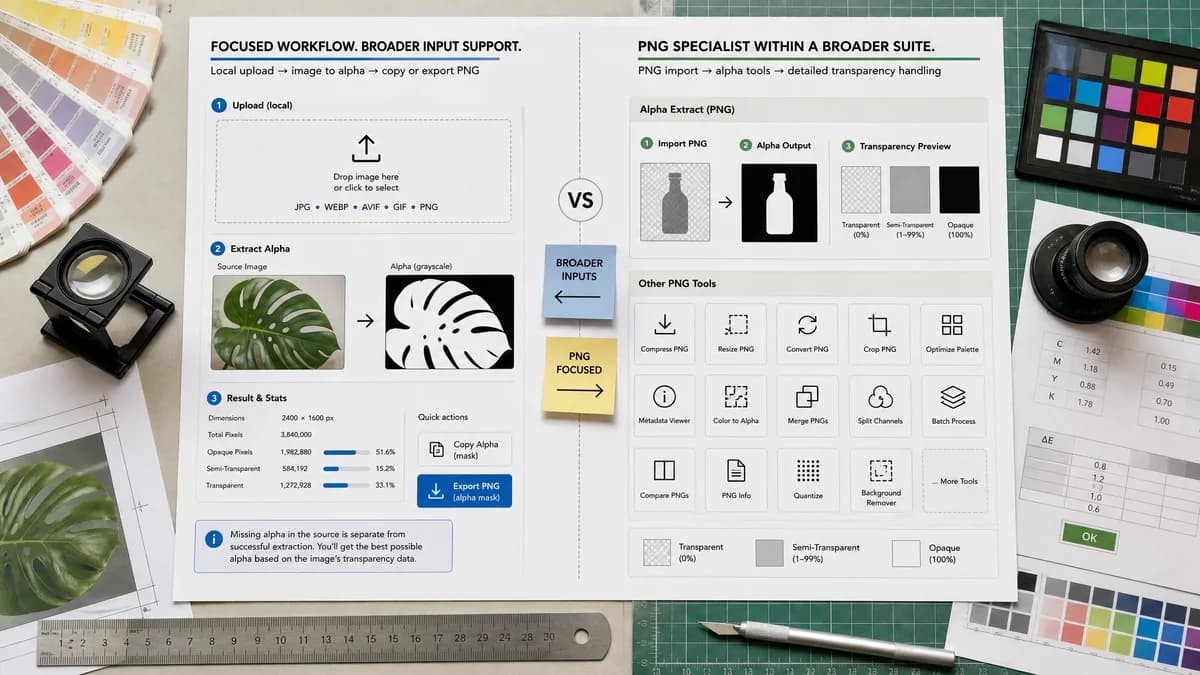
Online PNG Tools is a strong PNG-specific benchmark. TextFaker can be broader by accepting common browser-decodable image formats while still exporting a PNG alpha mask.
How Alpha Channel Extractor fits
TextFaker supports the direct image-alpha workflow with local upload, mask preview, text statistics, copy-all, and PNG export, while being clear that missing alpha is informational and separate from a successful extraction.
How Online PNG Tools Alpha Channel Extractor fits
Online PNG Tools provides a PNG alpha channel extractor inside a broader PNG utility collection. Its researched page describes importing a PNG and showing alpha output with distinct visual treatment for transparent, semi-transparent, and opaque areas.
Side-by-side comparison
| Decision point | Alpha Channel Extractor | Online PNG Tools Alpha Channel Extractor | Takeaway |
|---|---|---|---|
| Format scope | Our workflowCan be designed around browser-decodable images while exporting the mask as PNG. | Competitor workflowThe researched tool is explicitly framed around PNG alpha channel extraction. | TextFaker can handle wider image intent while keeping PNG export as the mask output. |
| Result style | Our workflowGrayscale alpha mask preview plus numeric alpha distribution and copy-all results. | Competitor workflowThe source describes showing alpha values with black, red, and white categories for transparent, semi-transparent, and opaque areas. | TextFaker prioritizes grayscale mask fidelity while using text stats to expose categories. |
| Tool ecosystem | Our workflowPart of TextFaker's image metadata, color, transparency, and utility tool family. | Competitor workflowPart of a PNG-focused suite from Browserling. | The competitor is better for PNG-only tool browsing; TextFaker is better for cross-format image utility consistency. |
| Access model | Our workflowUse shared access flow only after a successful value-producing extraction. | Competitor workflowThe researched page labels the alpha extractor as a premium tool. | TextFaker makes the free-use and no-alpha behavior transparent. |
| Download | Our workflowDownload a lossless PNG alpha mask when alpha data is useful. | Competitor workflowThe competitor produces the extracted alpha channel on the output side of the editor. | Downloadable output is table-stakes for alpha extractor comparisons. |
| User intent | Our workflowTargets alpha channel extractor, extract alpha channel from image, alpha mask extractor, and image alpha channel extractor language. | Competitor workflowTargets PNG alpha channel extractor language specifically. | TextFaker can capture broader image-alpha searches without diluting the page. |
Use Alpha Channel Extractor when
- Users with PNG, WebP, AVIF, BMP, or other browser-decodable images where alpha may exist.
- Users who want alpha category counts and percentages in copyable text.
- Users who need a separate TextFaker tool, not only a transparency checker.
Use Online PNG Tools Alpha Channel Extractor when
- Users specifically searching for a PNG-only alpha extraction utility.
- Users who already use the Online PNG Tools suite.
- Users who like visual category coloring for alpha states.
Detailed comparison
Quick Verdict
Online PNG Tools is a credible direct comparison for PNG users. TextFaker matches the core alpha extraction flow but avoid becoming PNG-only if the browser can decode additional image formats with alpha.
- Best TextFaker fit: mixed image formats and copy-ready diagnostics.
- Best competitor fit: PNG-only utility users.
Visualization Choice
The competitor's source describes category colors for alpha states. TextFaker uses the conventional grayscale mask as the primary preview because that exported image can be reused directly as a mask in editors and compositing tools.
- Black maps to alpha 0.
- White maps to alpha 255.
- Intermediate gray preserves semi-transparency.
SEO Angle
The page includes PNG-specific language but avoid making PNG the only supported path unless implementation limits require it. Many users search for image alpha extraction after receiving WebP, AVIF, or design exports.
- Use related terms naturally in helper content.
- Explain alpha mask extraction separately from transparency detection.
Implementation Notes
The comparison reinforces the need for a true output image, not only a transparency report. TextFaker generates a canvas containing alpha values copied into RGB channels and full opacity in the exported mask PNG.
- Keep the original image local.
- Make export unavailable or informational when all pixels are opaque.
Research notes
- Official Online PNG Tools page is a direct alpha extractor source.
- The competitor appears inside a large Browserling-style tool suite.
- Research found the competitor uses visual categories for alpha values rather than only a neutral grayscale explanation.
- TextFaker does not call itself a replacement for the full PNG tool suite.
Official source
The only outbound competitor link on this page is placed here for source checking after the comparison.
Official Online PNG Tools Alpha Channel Extractor source