
Alpha Channel Extractor vs Photopea
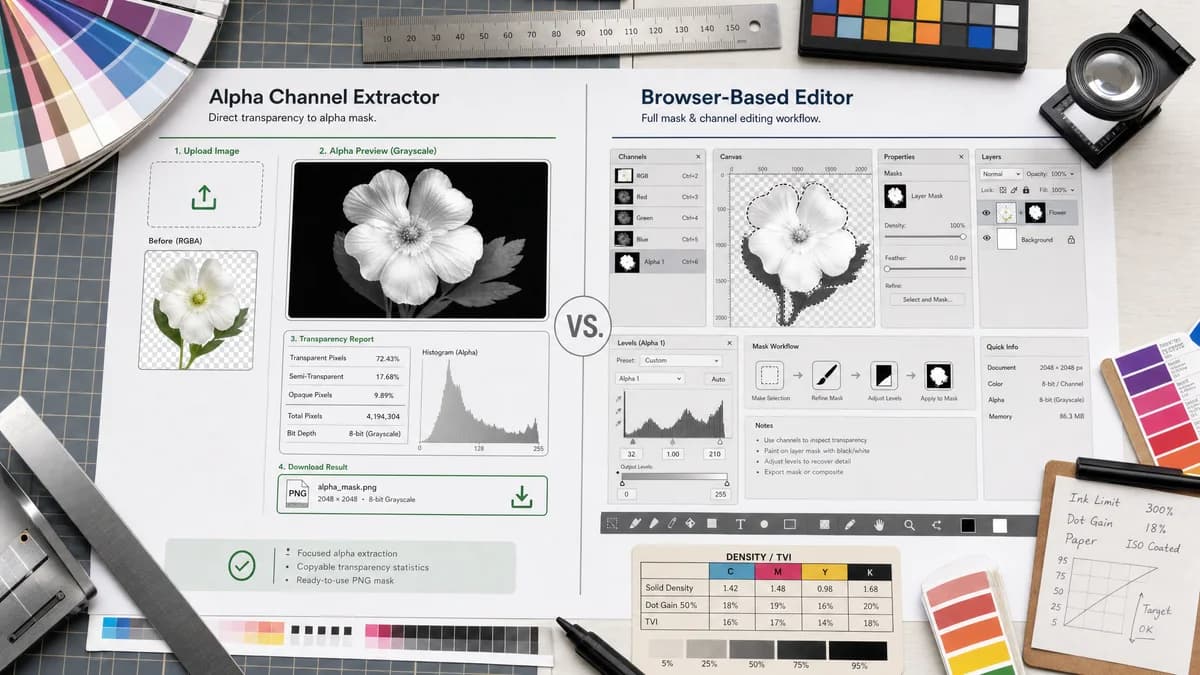
Alpha Channel Extractor is the baseline in this comparison: Extract an image alpha channel into a grayscale mask, see transparent and semi-transparent pixel percentages, and download the mask as PNG when transparency exists.
Compare TextFaker Alpha Channel Extractor with Photopea for viewing and working with image transparency, channels, and masks in the browser.
Quick verdict
Photopea is better when users need a browser editor. TextFaker is better when they need a direct alpha mask extraction result and copyable transparency statistics.
How Alpha Channel Extractor fits
TextFaker provides a focused local alpha extraction result without requiring users to learn editor panels. It turns uploaded image alpha into a previewable grayscale mask, numeric report, and downloadable PNG.
How Photopea fits
Photopea is a browser-based editor with documentation for masks and channels. It supports raster masks, transparency channels, and gray mask values as part of a full editing workflow.
Side-by-side comparison
| Decision point | Alpha Channel Extractor | Photopea | Takeaway |
|---|---|---|---|
| Product shape | Our workflowSingle-purpose alpha channel extractor. | Competitor workflowFull browser image editor with masks, channels, layers, selections, and document editing. | Photopea is broader; TextFaker is faster for one task. |
| Learning curve | Our workflowUpload, inspect result, copy text, download mask. | Competitor workflowRequires using editor concepts such as layers, masks, and channels. | TextFaker is easier for non-editor users. |
| Mask model | Our workflowShows the existing alpha as a grayscale preview and exported PNG. | Competitor workflowOfficial docs explain masks as black, white, and gray values controlling visibility. | Both use the same transparency model, but Photopea uses it for editing. |
| Statistics | Our workflowPlanned counts and percentages for three alpha categories. | Competitor workflowPhotopea documentation focuses on editing behavior rather than a simple pixel distribution report. | TextFaker can win for measurable QA. |
| Privacy and browser use | Our workflowDesigned for local browser decoding and analysis. | Competitor workflowPhotopea is browser-based; the official docs are about editing features, while storage and upload behavior depends on user actions and workflow. | Avoid unsupported privacy claims and focus on task scope. |
| Export use | Our workflowExports a standalone alpha mask PNG for reuse in editors, engines, or compositing tools. | Competitor workflowCan create and edit masks inside the editor and export documents or images through its broader workflow. | Photopea is more flexible; TextFaker is more direct. |
Use Alpha Channel Extractor when
- Users who only need to extract and download the alpha mask.
- Users avoiding editor setup and panel navigation.
- QA users who need transparent, semi-transparent, and opaque counts.
Use Photopea when
- Users editing masks or image layers in the browser.
- Users opening PSD-like documents or complex layered files.
- Users who need channel and mask tools beyond a single extracted output.
Detailed comparison
Quick Verdict
Photopea is a strong browser-native alternative for users who need editor power. TextFaker does not compete on editing depth; it competes on having the alpha mask and statistics ready immediately after upload.
- TextFaker is a utility.
- Photopea is an editor.
User Intent Split
A search for alpha channel extractor often means the user wants the mask image, not a full editing workspace. Photopea is still relevant because users may know they can turn transparency into masks there, but it adds steps.
- Keep TextFaker's first screen result-oriented.
- Do not hide extraction behind editor-style controls.
Output And Reporting
The planned TextFaker copy-all result button gives it a practical QA advantage. Photopea can display and edit transparency concepts, but users still need to manually inspect or export what they need.
- Copy image dimensions and alpha percentages.
- Make the mask preview visible without opening a panel.
Where Photopea Wins
Photopea is better for adjusting a mask, compositing layers, opening complex file formats, or continuing design work after extraction. The comparison is neutral and direct about that broader value.
- Recommend Photopea for editing.
- Recommend TextFaker for extraction-only tasks.
Research notes
- Photopea's official masks documentation explains gray-level raster masks and transparency behavior.
- Photopea's channels documentation states color images include RGB and transparency values.
- The competitor is browser-based but is not a single-purpose alpha extraction page.
- TextFaker uses the comparison to clarify direct extraction versus full editing.
Official source
The only outbound competitor link on this page is placed here for source checking after the comparison.
Official Photopea source