
Open Source Alternatives to Figma
Alpha Channel Extractor is a browser-based alternative for users who need this focused result without installing a proprietary desktop app or entering a larger hosted workflow.
This research compares that workflow with Figma while keeping the outbound source link at the bottom after the analysis.
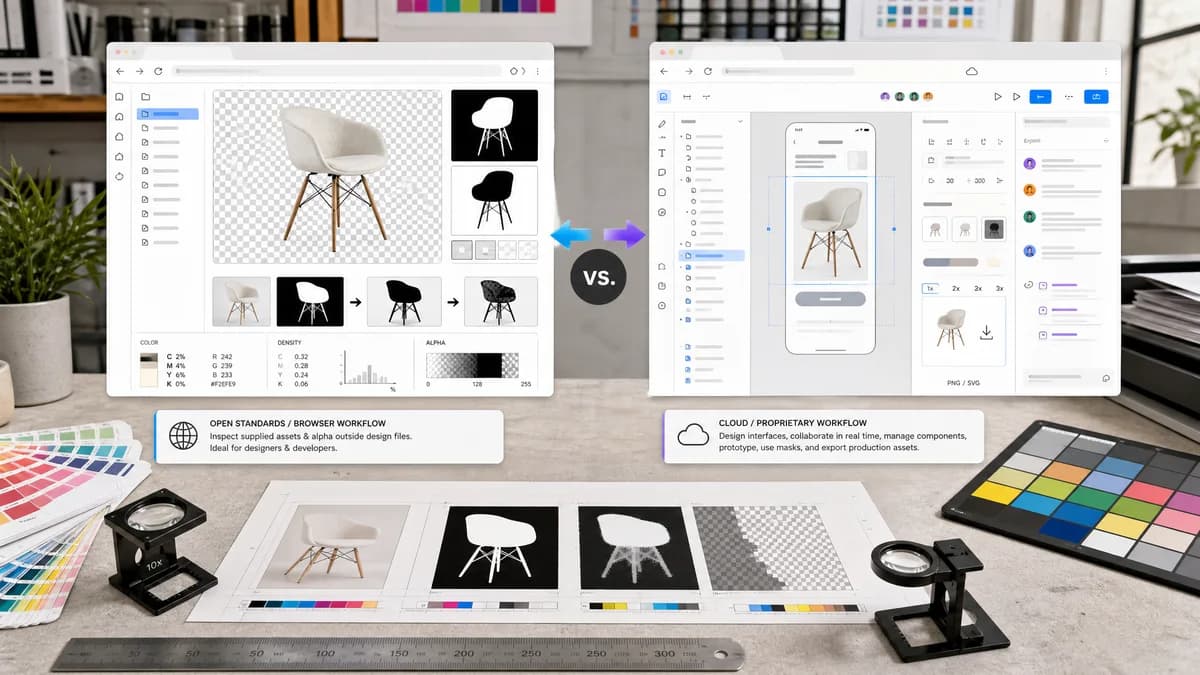
Why Alpha Channel Extractor fits
TextFaker serves designers and developers who need to inspect a supplied image's alpha mask outside a design file.
What Figma offers
Figma is built for interface design, collaboration, components, prototyping, masks, and asset export.
Open alternative signals
Processing model
Alpha Channel ExtractorLocal image upload and pixel scan
FigmaCloud-centered collaborative design document
Primary output
Alpha Channel ExtractorAlpha mask PNG and copyable result text
FigmaDesign assets, components, prototypes, and exports
Transparency focus
Alpha Channel ExtractorMeasures existing file alpha values
FigmaUses alpha as part of masks, fills, effects, and exports
Audience
Alpha Channel ExtractorDesign QA, developers, asset reviewers
FigmaProduct designers, teams, and design systems
Decision guide
Checking whether a design asset contains real alpha and exporting a grayscale mask for QA or handoff.
Designing interfaces, using masks in layouts, collaborating on files, and exporting production assets.
Side-by-side open source alternative comparison
| Decision point | Alpha Channel Extractor | Figma | Takeaway |
|---|---|---|---|
| Alpha intent | Our workflowExtracts and reports alpha values from one uploaded image. | Proprietary workflowUses alpha as part of design and masking behavior. | TextFaker fits asset verification outside the design canvas. |
| Metrics | Our workflowProvides transparent, semi-transparent, and opaque pixel percentages. | Proprietary workflowFigma does not center this kind of pixel-level alpha audit. | TextFaker can support QA handoffs and issue reports. |
| Collaboration | Our workflowSingle-user utility result. | Proprietary workflowReal-time collaborative design workspace. | Figma is better for team design work. |
| Export | Our workflowExports only the extracted grayscale alpha mask when useful. | Proprietary workflowExports design layers, frames, and assets in multiple formats. | TextFaker output is narrower and easier to validate. |
| No alpha | Our workflowReports no alpha or no transparency without consuming a successful extraction use. | Proprietary workflowFigma can still place and manipulate opaque images in a design. | TextFaker makes missing transparency a clear diagnostic state. |
| Setup | Our workflowNo design file creation needed. | Proprietary workflowTypically requires opening or creating a design file. | TextFaker is faster for a single asset check. |
Detailed research
Why compare it
Design teams often encounter transparency bugs after exporting assets from design tools. A Figma comparison page focuses on verifying a delivered image rather than replacing the design platform.
- Check if a rounded asset really has transparent corners.
- Check if anti-aliased edges are semi-transparent.
- Create an alpha mask for developer handoff.
Positioning angle
TextFaker can be framed as a companion QA utility for assets coming out of Figma or other design tools. The page makes the result concrete: mask preview, counts, percentages, and download.
- Keep comparisons factual.
- Do not claim collaboration features.
- Mention local processing for file privacy.
SEO content idea
Include copy for users searching for alpha mask extractor after a Figma export. Explain that a checkerboard preview is not enough; the alpha channel is measured from pixel data.
Verification idea
Generated test images include transparent rounded corners and soft shadows, because those are common Figma export cases where semi-transparent pixels matter.
- Validate exact counts for synthetic fixtures.
- Validate preview contrast and mask export dimensions.
Research notes
- Figma's official masks documentation says alpha channels represent transparency or opacity and that imported PNG, GIF, and WebP files can have transparency channels.
- Figma's official export documentation explains RGBA alpha for PNG exports.
- This is proprietary software and the comparison stays focused on alpha inspection, not design collaboration.
Official source
The proprietary product link is included once here for source checking after the alternative analysis.
Official Figma source