
Open Source Alternatives to Pixlr Remove Background
Alpha Channel Extractor is a browser-based alternative for users who need this focused result without installing a proprietary desktop app or entering a larger hosted workflow.
This research compares that workflow with Pixlr Remove Background while keeping the outbound source link at the bottom after the analysis.
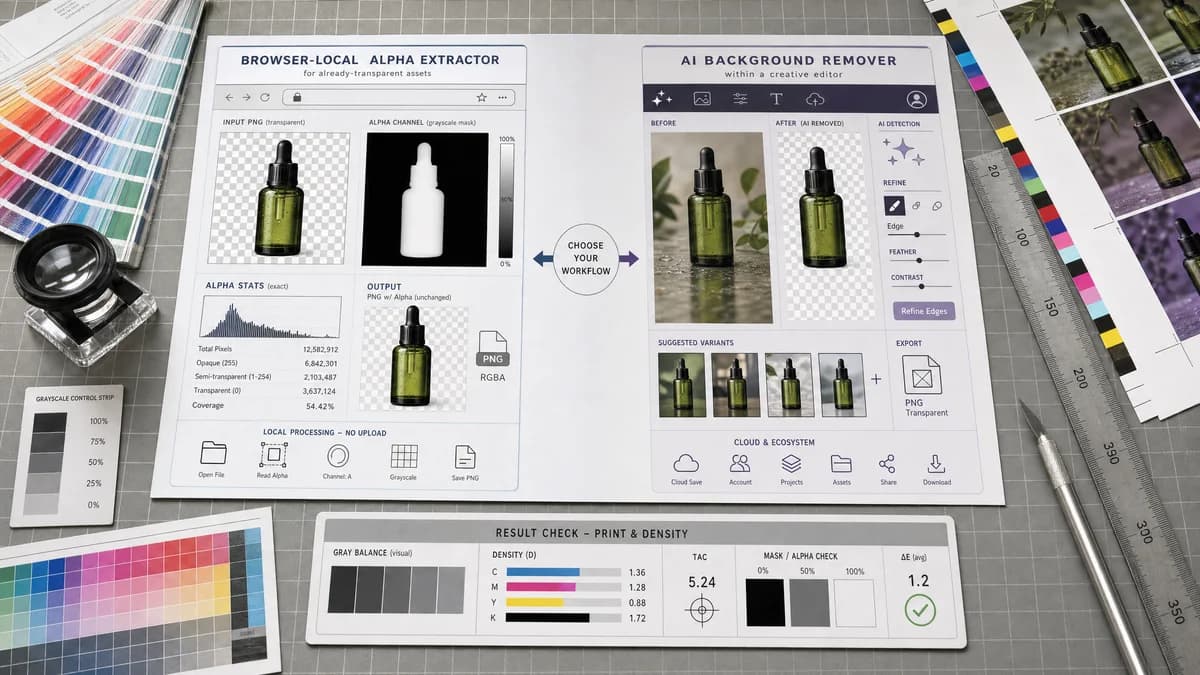
Why Alpha Channel Extractor fits
TextFaker is a browser-local alpha extractor for already-transparent assets, with an emphasis on exact alpha counts and grayscale mask output.
What Pixlr Remove Background offers
Pixlr Remove Background is an AI background removal workflow connected to the broader Pixlr editing ecosystem.
Open alternative signals
Core function
Alpha Channel ExtractorExtracts an existing alpha channel
Pixlr Remove BackgroundCreates a cutout by removing background
Result metrics
Alpha Channel ExtractorTransparent, semi-transparent, and opaque percentages
Pixlr Remove BackgroundVisual cutout result and optional refinement
Privacy emphasis
Alpha Channel ExtractorBrowser-local image scan
Pixlr Remove BackgroundOnline editing service workflow
Export type
Alpha Channel ExtractorGrayscale alpha mask PNG
Pixlr Remove BackgroundTransparent subject PNG or edited image
Decision guide
Validating the transparency result from Pixlr or another editor and exporting the alpha mask for review.
Automatically creating a transparent image from a photo and refining the cutout visually.
Side-by-side open source alternative comparison
| Decision point | Alpha Channel Extractor | Pixlr Remove Background | Takeaway |
|---|---|---|---|
| Cutout creation | Our workflowDoes not create a new cutout. | Proprietary workflowUses AI to erase backgrounds. | Pixlr is better when the original image lacks transparency. |
| Alpha inspection | Our workflowMeasures actual alpha values in the image file. | Proprietary workflowFocuses on visual background removal and editing. | TextFaker is better for verifying the output. |
| Semi-transparent edges | Our workflowQuantifies semi-transparent pixels that often appear around hair, shadows, and anti-aliased edges. | Proprietary workflowAllows visual refinement but does not center numeric alpha reporting. | TextFaker can help judge matte quality. |
| Workflow complexity | Our workflowUpload one image and get one result. | Proprietary workflowMay involve AI removal, fine tuning, and saving choices. | TextFaker is simpler for a finished file audit. |
| Access event | Our workflowOnly successful useful extraction counts against free use. | Proprietary workflowService usage maps to background removal operations. | TextFaker treats no-transparency as diagnostic. |
| Copyable result | Our workflowOne copy-all button for result text. | Proprietary workflowPrimarily visual editor output. | TextFaker is better for written QA records. |
Detailed research
Why compare it
Pixlr is relevant because users who remove backgrounds often later need to check if the output really has alpha. TextFaker is marketed as the inspection step after removal, not as a remover itself.
- Great for verifying transparent PNG downloads.
- Great for checking soft edge quality.
- Great for exporting a matte for another workflow.
Positioning angle
The strongest message is that alpha extraction answers a different question: what transparency is already in this file? Pixlr answers how to remove the background from a visual subject.
- Keep product claims narrow.
- Use browser-local language.
- Mention output mask dimensions match input dimensions.
UI note
A visual alpha mask preview uses grayscale only, with labels explaining black as transparent and white as opaque. Avoid decorative effects that could obscure the mask.
SEO note
Target users searching for alpha channel extractor after they have used a background remover and need to inspect or export the alpha mask.
Research notes
- Pixlr's official remove-background pages describe AI detection, background erasing, transparent backgrounds, and PNG downloads.
- Pixlr is proprietary software, even when a free web feature is available.
- The comparison distinguishes extraction from AI cutout generation.
Official source
The proprietary product link is included once here for source checking after the alternative analysis.
Official Pixlr Remove Background source