
AVIF to PNG Converter vs ImageKit AVIF to PNG
AVIF to PNG Converter is the baseline in this comparison: Convert AVIF images to PNG locally with image/png output checks, .png filenames, preserved dimensions, Blob validation, and alpha-preserving transparency handling.
Compare AVIF to PNG Converter with ImageKit AVIF to PNG for AVIF decoding, PNG output, privacy, transparency, and workflow fit.
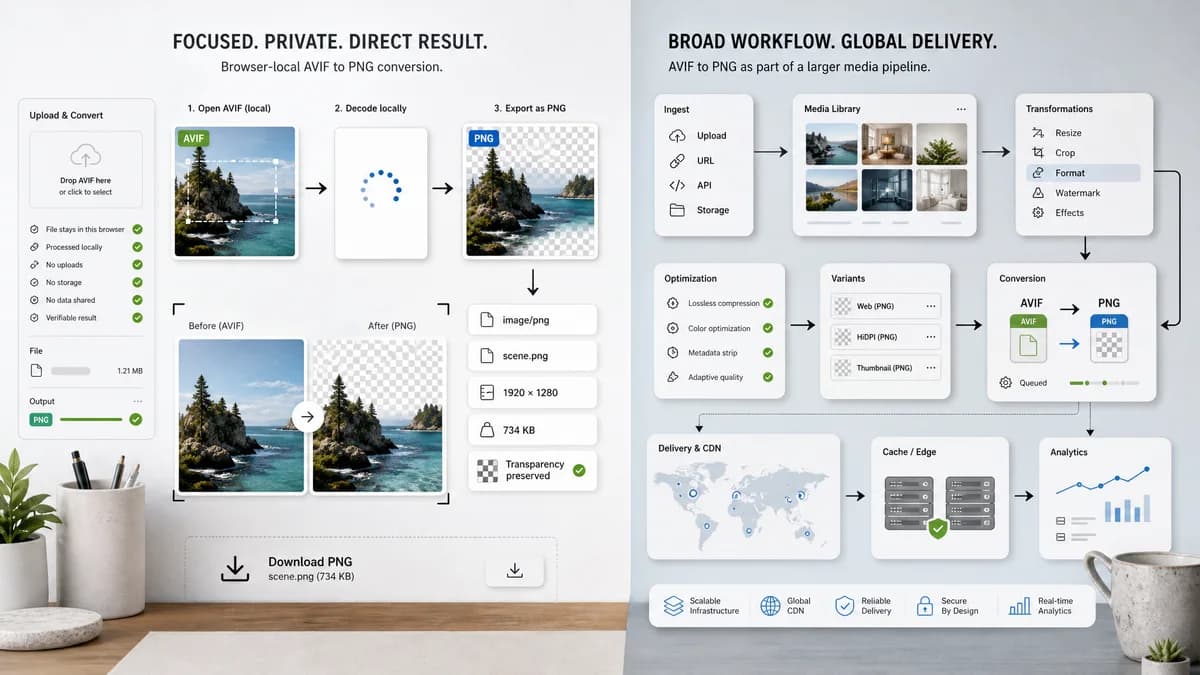
Quick verdict
AVIF to PNG Converter is the better fit when the job is one private AVIF-to-PNG conversion with visible output checks. ImageKit AVIF to PNG is better when its broader browser-side converter from an image cdn platform workflow matters more than a focused local result.
How AVIF to PNG Converter fits
AVIF to PNG Converter is a focused browser-local converter for opening an AVIF image, decoding it in the browser, exporting a PNG Blob, and showing objective checks for image/png MIME, .png filename, dimensions, file size, and alpha-preserving output.
How ImageKit AVIF to PNG fits
ImageKit offers an AVIF to PNG format converter connected to a broader media optimization product. It fits teams that may care about image delivery, CDN optimization, and product infrastructure.
Side-by-side comparison
| Decision point | AVIF to PNG Converter | ImageKit AVIF to PNG | Takeaway |
|---|---|---|---|
| Processing model | Our workflowDecodes the selected AVIF in the browser, draws it to canvas, and exports a PNG Blob locally when browser AVIF decode is available. | Competitor workflowBrowser-side format conversion page associated with ImageKit’s media tooling. | Choose TextFaker when local one-file conversion is the main requirement. |
| Privacy and file handling | Our workflowThe selected file is processed on the device in the current browser session. | Competitor workflowOfficial page describes secure browser-side format conversion. | Local processing is simpler to reason about for private source images. |
| PNG output contract | Our workflowShows image/png MIME, .png filename, dimensions, output size, size delta, and Blob generated status. | Competitor workflowReturns a converted PNG result but does not center the same copyable validation checklist. | TextFaker is stronger for QA-style proof that the output file is really PNG. |
| Transparency behavior | Our workflowKeeps alpha transparency in PNG output when the browser AVIF decoder preserves alpha. | Competitor workflowAccepts multiple media inputs and positions the tool as no daily limits and no credit card. | PNG is the right target when AVIF transparency must survive conversion. |
| Batch and automation | Our workflowFocused on a single selected file with explicit result facts and download. | Competitor workflowPart of a larger format-converter and image infrastructure ecosystem. | Competitor workflows can be stronger for high-volume or integrated jobs. |
| Account, pricing, and limits | Our workflowUses the site-wide TextFaker tool access model: one free anonymous use, one additional signed-in use, and one payment for unlimited tools. | Competitor workflowThe free converter exists alongside ImageKit product accounts and services. | The best choice depends on whether this is a quick local conversion or part of a broader service subscription. |
Use AVIF to PNG Converter when
- Private AVIF to PNG conversion without uploading the image
- Developers and creators who need a PNG file with visible MIME, extension, dimension, and Blob checks
- Transparent AVIF artwork that should remain transparent after conversion
- One-file compatibility fixes for editors, CMS uploads, screenshots, and QA workflows
Use ImageKit AVIF to PNG when
- Developers evaluating image optimization platforms
- Users who want ad-free browser-side conversion from a media platform
- Teams working with many web image formats
Detailed comparison
Quick verdict
ImageKit AVIF to PNG is useful when its broader workflow fits the job. AVIF to PNG Converter is designed for the narrower search intent: convert one AVIF to one PNG in the browser and show the exact output facts before download.
Why local AVIF to PNG conversion matters
AVIF is efficient for web delivery, but PNG is still easier to inspect, edit, upload to legacy systems, and share with tools that do not fully support AVIF. A local converter avoids adding an upload step when the only goal is compatibility.
- No cloud storage picker is needed for a local file.
- The result card can be copied into bug reports or handoff notes.
- PNG preserves transparency, which is often lost when people choose JPEG by mistake.
What the comparison should focus on
The important distinction is not whether both tools can produce a PNG. It is whether the page also verifies the MIME type, extension, dimensions, Blob generation, and alpha-preserving target format in a way that a developer, designer, or QA reviewer can trust.
Where the competitor can still win
ImageKit AVIF to PNG can be the stronger choice when users need its broader platform, batch conversion, service integrations, creative editor, or hosted workflow. TextFaker should stay focused instead of pretending to replace a full conversion or design product.
- Developers evaluating image optimization platforms
- Users who want ad-free browser-side conversion from a media platform
- Teams working with many web image formats
Practical recommendation
Use AVIF to PNG Converter for a private one-off conversion and use ImageKit AVIF to PNG when the surrounding workflow matters more than the single output file.
- Check the result MIME before uploading to a CMS.
- Use PNG for transparent assets, icons, overlays, and QA screenshots.
- Keep the original AVIF when web performance is the final delivery goal.
Research notes
- Official page says it is a browser-side AVIF to PNG converter.
- The upload area accepts several image/video formats.
- TextFaker differentiates with a single dedicated output contract and copyable checks.
Official source
The only outbound competitor link on this page is placed here for source checking after the comparison.
Official ImageKit AVIF to PNG source