
Open Source Alternatives to Canva Image Converter
AVIF to PNG Converter is a browser-based alternative for users who need this focused result without installing a proprietary desktop app or entering a larger hosted workflow.
This research compares that workflow with Canva Image Converter while keeping the outbound source link at the bottom after the analysis.
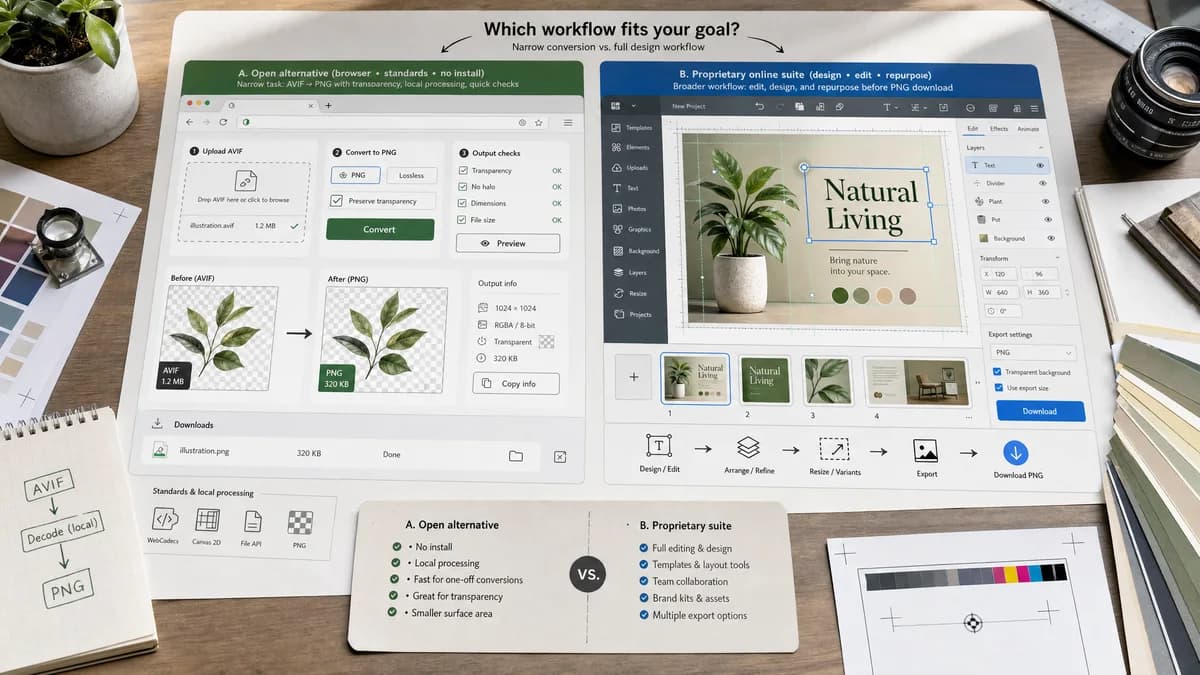
Why AVIF to PNG Converter fits
AVIF to PNG Converter is not presented as a full open-source clone of Canva Image Converter. It is a browser-based, standards-powered alternative for the narrow AVIF-to-PNG task: local decode, PNG export, visible output checks, and no install step.
What Canva Image Converter offers
Canva’s image converter is part of a design editor and export workflow. It fits users who want to edit, design, or repurpose an image visually before downloading PNG.
Open alternative signals
Source and openness
AVIF to PNG ConverterBrowser-based and powered by open web APIs such as File, canvas, Blob, and browser image decoding; not claimed as a full open-source hosted clone.
Canva Image ConverterCanva Image Converter is a proprietary product or hosted service workflow.
Deployment and setup
AVIF to PNG ConverterRuns from the web page with no desktop install for one-file conversion.
Canva Image ConverterUpload into a design/editor environment and export to supported image formats.
Pricing shape
AVIF to PNG ConverterUses TextFaker tool access with one free anonymous use, one signed-in free use, and one payment for unlimited tools.
Canva Image ConverterCanva feature availability can depend on account tier and editor capabilities.
Data control
AVIF to PNG ConverterKeeps the selected AVIF local to the browser conversion path when the browser supports AVIF decode.
Canva Image ConverterFiles enter Canva’s hosted design workflow and terms.
Feature scope
AVIF to PNG ConverterFocused AVIF input and PNG output with copyable validation facts.
Canva Image ConverterNot positioned as a focused AVIF-to-PNG validation utility.
Decision guide
Best when the user needs a focused AVIF to PNG conversion in the browser and does not need the proprietary product’s broader workflow.
Best when Canva Image Converter's broader product scope, batch behavior, integrations, creative editor, hosted account, or service-specific workflow is required.
Side-by-side open source alternative comparison
| Decision point | AVIF to PNG Converter | Canva Image Converter | Takeaway |
|---|---|---|---|
| Alternative fit | Our workflowGood alternative for the exact AVIF-to-PNG task, especially when local processing and result verification matter. | Proprietary workflowUse Canva Image Converter when its larger workflow is part of the job. | The alternative is task-specific, not a whole-platform replacement. |
| Source model | Our workflowOpen-web-API powered browser workflow; no false claim of a public source license. | Proprietary workflowProprietary hosted product or app/service surface. | This page should be honest about openness while still matching open-alternative search intent. |
| Setup and deployment | Our workflowOpen the tool, select an AVIF, convert to PNG, download. | Proprietary workflowUpload into a design/editor environment and export to supported image formats. | TextFaker is faster for a one-file conversion. |
| Feature parity | Our workflowCovers AVIF decoding, PNG export, transparency preservation where supported, and output checks. | Proprietary workflowConversion is paired with design editing, effects, text, and export choices. | Feature parity is intentionally narrow and concrete. |
| Editing and export parity | Our workflowNo creative editor or service pipeline; exports a verified PNG Blob. | Proprietary workflowNot positioned as a focused AVIF-to-PNG validation utility. | Use the proprietary product for workflows beyond conversion. |
| Data control | Our workflowBrowser-local conversion path for selected files. | Proprietary workflowFiles enter Canva’s hosted design workflow and terms. | Local processing is a practical reason to choose the alternative. |
| Migration path | Our workflowUse TextFaker for occasional one-off conversions and keep the proprietary tool only for batch, API, design, or platform workflows. | Proprietary workflowKeep Canva Image Converter when its broader scope is actively needed. | Migration can be partial rather than all-or-nothing. |
Detailed research
Open-source alternative fit
Open Source Alternatives to Canva Image Converter is a useful search pattern, but the right promise here is precise. AVIF to PNG Converter is a browser-based, open-web-standards-powered alternative for AVIF to PNG conversion, not a clone of Canva Image Converter.
- Use it when the conversion itself is the whole task.
- Do not use it as a replacement for account-based pipelines, design editors, or API automation.
- Treat the output card as the proof of what was generated.
Feature parity and limits
The core parity is AVIF input to PNG output. Canva Image Converter may offer batch handling, service integrations, image editing, or wider file-format catalogs that TextFaker intentionally does not duplicate on this page.
Data, setup, and pricing control
A browser-local utility reduces setup and keeps the file handling model simple. The pricing model is also shared across TextFaker tools rather than being tied to one converter vendor.
- One page for the exact task.
- One copyable result summary.
- One payment model across all tools after free uses.
Where the proprietary tool still wins
Canva Image Converter can still be the right choice for broader work. The goal is not to make the competitor look worse; it is to separate a narrow local conversion from a full product workflow.
- Design edits before export
- Marketing or social graphics workflows
- Users already working inside Canva projects
Practical migration guidance
Start by moving one-off AVIF to PNG jobs to AVIF to PNG Converter. Keep Canva Image Converter for jobs that need its broader service, editor, account, API, batch, or platform features.
- Use PNG for compatibility and transparent assets.
- Keep AVIF for final web-delivery optimization when the target system supports it.
- Document output MIME and dimensions with the copy-all result button.
Research notes
- Official image converter page lists JPG, PNG, SVG, and PDF outputs and broader editing features.
- The page references converting HEIC/HEIF, WebP, SVG, and other images.
- Canva is stronger for creative edits; TextFaker is stronger for technical conversion facts.
Official source
The proprietary product link is included once here for source checking after the alternative analysis.
Official Canva Image Converter source