
Data Matrix Reader
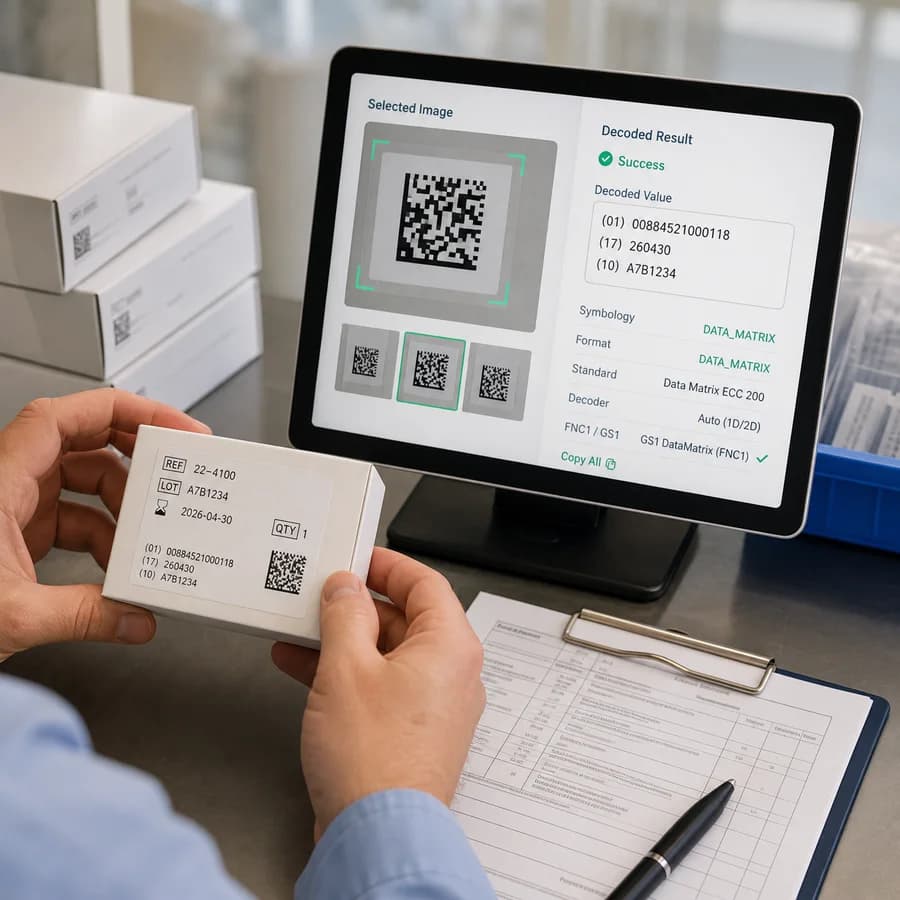
Data Matrix Reader scans selected images in your browser to decode Data Matrix and GS1 DataMatrix values without uploading the file.
Use this Data Matrix scanner from image files to read Data Matrix code from image input and get decoded values, decoder source, format details, and GS1/FNC1 hints when detectable.
Choose a Data Matrix image
JPG, PNG, WebP, GIF, BMP, or AVIF files up to 50 MB.
Images are decoded locally in the browser. No code found, unsupported files, and decode failures do not consume a tool use.
Decoded Data Matrix values appear here
Upload a product label, device mark, inventory tag, or screenshot to read Data Matrix and GS1 DataMatrix values.
Decode Data Matrix Codes From Images
What this Data Matrix reader scans
This page is focused on Data Matrix symbols rather than general barcode scanning. It is intended for product labels, healthcare and UDI-style marks, manufacturing parts, inventory tags, packaging proofs, and screenshots where a Data Matrix or GS1 DataMatrix symbol is visible.
The tool reads browser-decodable image pixels and returns each decoded value with the DATA_MATRIX format, decoder source, confidence when a browser provides it, raw byte length when available, image details, and GS1/FNC1 hints.
- Primary target: Data Matrix ECC 200 and GS1 DataMatrix images.
- QR codes, UPC, EAN, Code 128, PDF417, and other barcode families belong on separate tools.
- The copy icon in the success card copies every visible result as labeled lines.
- A successful tool use is counted only after at least one Data Matrix code is decoded.
Browser-local decoder path
The implementation first checks whether the browser Barcode Detection API reports data_matrix as a supported format. When native Data Matrix support is not available or does not find a result, the tool tries a browser-side ZXing fallback configured for DATA_MATRIX.
This constrained decoder path keeps the workflow distinct from a broad barcode reader. It avoids turning a Data Matrix page into a QR, UPC, EAN, or Code 128 scanner.
- Selected images are decoded locally in the browser; no server decode route is added.
- The fallback decoder is constrained to BarcodeFormat.DATA_MATRIX where possible.
- No code found, unsupported file errors, and image decode failures do not consume a tool use.
- Very large images are rejected before canvas scanning to avoid unreliable browser memory use.
GS1 DataMatrix hints
GS1 DataMatrix is Data Matrix used with GS1 Application Identifier syntax and FNC1 behavior. Browser decoders often expose only the final text, so the page treats GS1 detection as hints unless a visible marker is present.
The result keeps the raw decoded value unchanged and shows a readable escaped view for control characters. ASCII group separator characters are displayed as <GS> so variable-length GS1 fields are easier to notice.
- A preserved ]d2 symbology identifier is shown as strong GS1 DataMatrix evidence.
- FNC1 separator characters are reported when they are visible in decoded text.
- Common AI-like patterns such as 01 GTIN, 17 expiration date, 10 batch or lot, and 21 serial are labeled as hints, not full validation.
- Use a dedicated GS1 validation system when regulatory or production acceptance depends on the result.
How to improve a failed scan
Data Matrix readers need enough clean module detail to distinguish the solid L-shaped finder edge and alternating clock track. Blur, glare, extreme perspective, low contrast, a cropped quiet zone, or a tiny symbol in a large image can prevent reliable decoding.
If no Data Matrix code is found, try a sharper original, crop closer to one symbol while leaving its white margin, straighten the label, avoid reflections, and confirm the code is Data Matrix rather than a QR code or PDF417 label.
- Use the full-resolution photo instead of a compressed chat or social preview.
- Crop around one Data Matrix symbol when a label contains many codes.
- Keep the full square symbol and quiet zone visible.
- Use the existing Barcode Reader from Image for broad barcode formats and QR Code Decoder from Image for QR payload classification.