
GPS Coordinates from Video
GPS Coordinates from Video checks phone and camera clips for embedded video GPS metadata directly in your browser.
Drop a MOV, MP4, M4V, 3GP, AVI, MKV, WebM, MPEG, TS, or related video to see latitude, longitude, altitude when present, coordinate formats, and map links for verification.
Choose a video
MOV, MP4, M4V, 3GP, AVI, MKV, WebM, MPEG, TS, MTS, M2TS, WMV, FLV, OGV, and related video files. Large videos are scanned locally in chunks instead of being fully loaded.
Location result
Video GPS coordinates from the selected file.
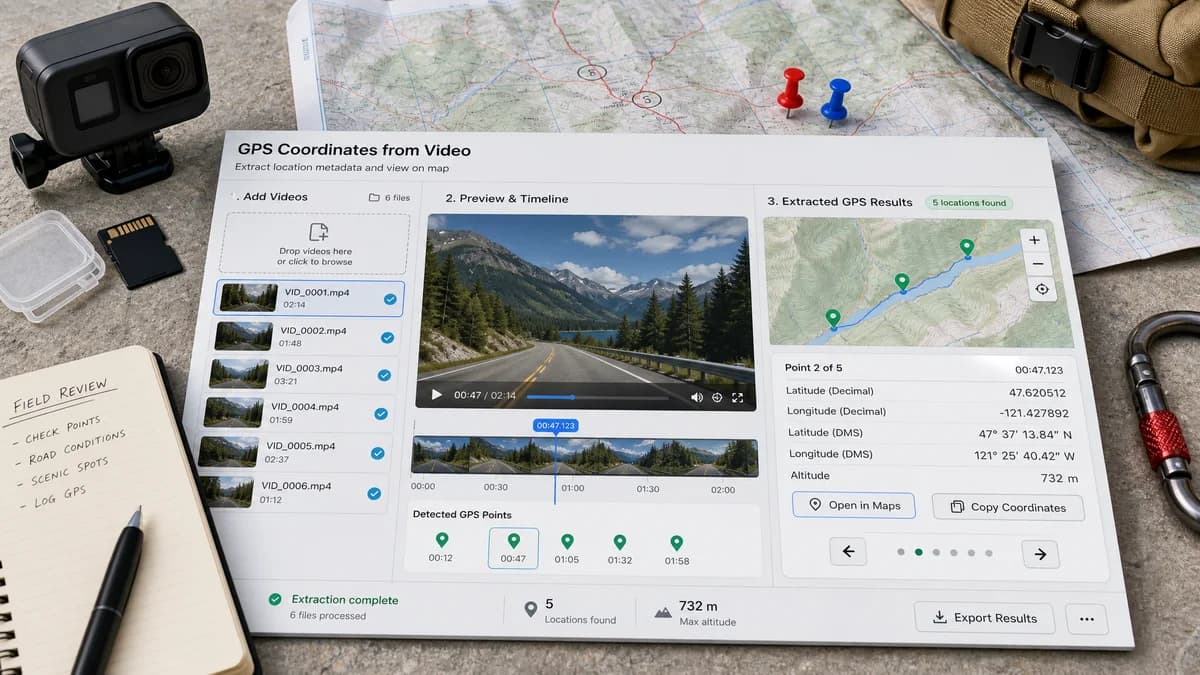
Sample result preview
A generated preview of the kind of metadata result this tool is designed to surface: coordinate formats, altitude when available, and map actions in one place.
Video GPS Metadata Guide
What video GPS metadata can contain
Phone and camera videos usually do not store location in the same EXIF GPS fields used by JPEG photos. MOV, MP4, M4V, and 3GP files commonly carry location in QuickTime or ISO base media metadata boxes, with iPhone-style files often using a location string based on ISO 6709. The browser scanner also accepts common containers such as AVI, MKV, WebM, MPEG, TS, MTS, M2TS, WMV, FLV, and OGV when they contain readable coordinate strings.
Some action cameras, dashcams, and mapping cameras also write timed GPS samples or vendor telemetry, so a result may represent the whole clip, the first readable point, or a detected track depending on which metadata is present.
- QuickTime metadata keys such as com.apple.quicktime.location.ISO6709 or location.ISO6709.
- Legacy UserData or ItemList GPSCoordinates values, including the a9xyz tag used by some QuickTime files.
- Optional altitude, horizontal accuracy, location name, creation date, camera make, and model when those fields are stored.
- Timed GPS tracks such as CAMM, GoPro, DJI, Garmin, dashcam, or action-camera telemetry should be labeled separately from a single clip location.
How to use the coordinates
Decimal degrees should be the primary output because map apps, spreadsheets, GIS tools, and field reports accept signed latitude and longitude directly. The raw stored value should stay visible beside the normalized coordinate so technical users can verify how the location was encoded.
- Positive latitude is north; negative latitude is south.
- Positive longitude is east; negative longitude is west.
- ISO 6709 strings can include latitude, longitude, optional altitude, and a trailing slash.
- Map links should use the normalized decimal latitude and longitude, not the raw tag text.
When missing metadata is normal
A no-location result is common with videos because many files are exports rather than original camera captures. Social apps, editors, transcoders, and cloud downloads can remove or rewrite QuickTime metadata even when the original clip had a location.
- Location services were disabled for the camera app or recording device.
- The clip was sent through a messenger, social platform, cloud export, or video editor that stripped metadata.
- The file is a screen recording, trimmed export, compressed copy, or re-encoded version without the original metadata boxes.
- The device stored GPS as proprietary timed telemetry that a basic QuickTime metadata pass cannot decode.
- The camera had no GPS fix at the time of recording.
Privacy checks before sharing
Video GPS metadata can reveal where a clip was recorded even when no location appears in the frame. For home, school, workplace, trip, or field-report footage, checking the original file before sharing is the safest first step.
Reading the file locally in the browser matters because video files are often larger and more sensitive than photos.
- Show a clear privacy note that selected files are read in the browser when implemented client-side.
- Do not send map lookups automatically; create map links only after coordinates are found.
- Explain that viewing coordinates does not remove them from the video.
- Warn that missing headline GPS does not guarantee every proprietary telemetry stream is absent.
How this differs from the photo tool
GPS Coordinates from Photo can focus on EXIF GPS fields in still images. GPS Coordinates from Video needs a different parser because the most useful location is usually stored in QuickTime or ISO media metadata boxes and may be attached to the file or to timed metadata tracks.
- Keep the video tool separate so users searching for MOV, MP4, iPhone video, or camera clip metadata land on video-specific guidance.
- Reuse coordinate formatting, copy buttons, and map link helpers from the photo workflow where possible.
- Avoid promising EXIF-only behavior for videos, because EXIF is not the normal primary metadata container for MP4 or MOV location.
- Treat route extraction as an advanced video feature, not the same as a single photo geotag.
Output users expect
Broad metadata viewers and desktop utilities usually show a large technical table. This page should lead with the location answer first, then offer expandable technical tags for users who need audit-level detail.
- Latitude and longitude in decimal degrees.
- Optional degrees-minutes-seconds format for copying into reports.
- Source tag name and raw stored coordinate string.
- Google Maps, Apple Maps, and geo URI links when a valid coordinate is available.
- Missing-location explanation that does not count as a successful use.
Compare GPS Coordinates from Video
Review this tool beside related online utilities, dedicated apps, and adjacent workflows.
Compare GPS Coordinates from Video with other toolsOpen Source Alternatives
Compare this focused browser workflow with proprietary software and online tools that solve similar jobs.
View GPS Coordinates from Video open source alternatives