
Grayscale Converter vs Adobe Express
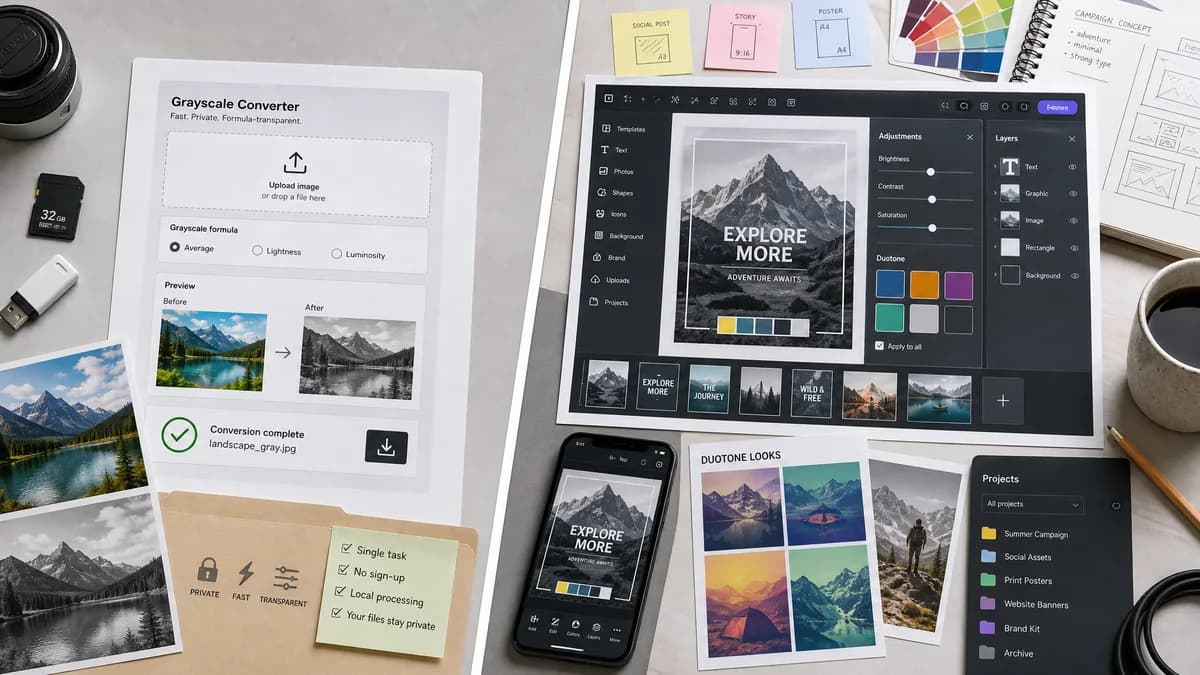
Grayscale Converter is the baseline in this comparison: Convert an uploaded image to grayscale in your browser, compare the original and converted result, then download the black-and-white output without sending the file to a server.
Adobe Express offers black-and-white filters inside a broader design and content creation app.
Quick verdict
Adobe Express is better for people who want grayscale as one step in a larger design workflow. TextFaker is better for fast, private, formula-transparent grayscale conversion.
How Grayscale Converter fits
TextFaker Grayscale Converter focuses on a narrow browser-local workflow: upload an image, choose a grayscale formula, preview before and after, and download the converted file without turning the task into a full design project.
How Adobe Express fits
Adobe Express supports a Grayscale filter, Duotone, adjustment sliders, continued editing, desktop and mobile use, project storage, and a free plan with broader design assets.
Side-by-side comparison
| Decision point | Grayscale Converter | Adobe Express | Takeaway |
|---|---|---|---|
| Primary job | Our workflowDedicated grayscale conversion only | Competitor workflowBlack-and-white filtering inside a multi-purpose editor | TextFaker stays faster and less distracting for single-purpose conversion. |
| Processing model | Our workflowLocal pixel conversion in the browser | Competitor workflowApp-based editing workflow with uploaded project assets | TextFaker emphasizes local handling when privacy is the main concern. |
| Conversion control | Our workflowExplicit luminance and average-style modes | Competitor workflowGrayscale and Duotone filters plus general adjustments | TextFaker explains the math more directly. |
| Preview | Our workflowBefore/after preview focused on the conversion result | Competitor workflowEditor canvas with continuing design edits | Adobe is broader; TextFaker makes comparison easier. |
| Download path | Our workflowDirect converted-image download | Competitor workflowDownload or continue editing in the Adobe Express project | TextFaker reduces steps for users who only need the file. |
| SEO content fit | Our workflowCan explain grayscale formulas, privacy, formats, and limitations | Competitor workflowMarkets a creative black-and-white filter workflow | TextFaker targets practical conversion and technical intent. |
Use Grayscale Converter when
- Browser-local image conversion
- Users who want clear luminance and average-style choices
- Simple before/after preview and download
- Privacy-sensitive one-off image edits
Use Adobe Express when
- Design projects with templates and assets
- Mobile editing
- Users who want duotone and creative filters
- People already using Adobe Express projects
Detailed comparison
Positioning
Adobe Express is a strong comparison because it is a recognizable editor with a documented black-and-white workflow. It is not only a grayscale converter; it is a broader design app.
- Frame TextFaker as the faster single-task option.
- Avoid implying Adobe lacks grayscale; the difference is scope and privacy posture.
Feature Gap
Adobe Express includes design assets, templates, duotone, and adjustment controls. TextFaker does not try to match the whole editor, but is clearer about pixel-level conversion methods.
- Add luminance and average choices.
- Show readable file output details.
- Keep the interface centered on upload, preview, and download.
Privacy Angle
The competitor workflow is app-centric. TextFaker can differentiate by stating that conversion happens in the browser and by reusing shared local upload components.
- Use ToolUploadDropZone.
- Avoid server upload for conversion.
- Include privacy copy in SEO sections.
Implementation Notes
Tests verifies that the selected grayscale formula produces expected RGB equality and preserves alpha where supported by the canvas output path.
- Test luminance conversion on known pixels.
- Test average conversion on known pixels.
- Test before/after rendering and download availability.
Research notes
- Official Adobe Express page documents Grayscale as a filter effect and mentions Duotone and adjustment menus.
- The comparison does not claim Adobe Express is browser-local in the same way as TextFaker unless implementation behavior is independently verified.
- Generated images show a clear color-to-grayscale before/after result rather than a generic design-editor screenshot.
Official source
The only outbound competitor link on this page is placed here for source checking after the comparison.
Official Adobe Express source