
Grayscale Converter vs Canva
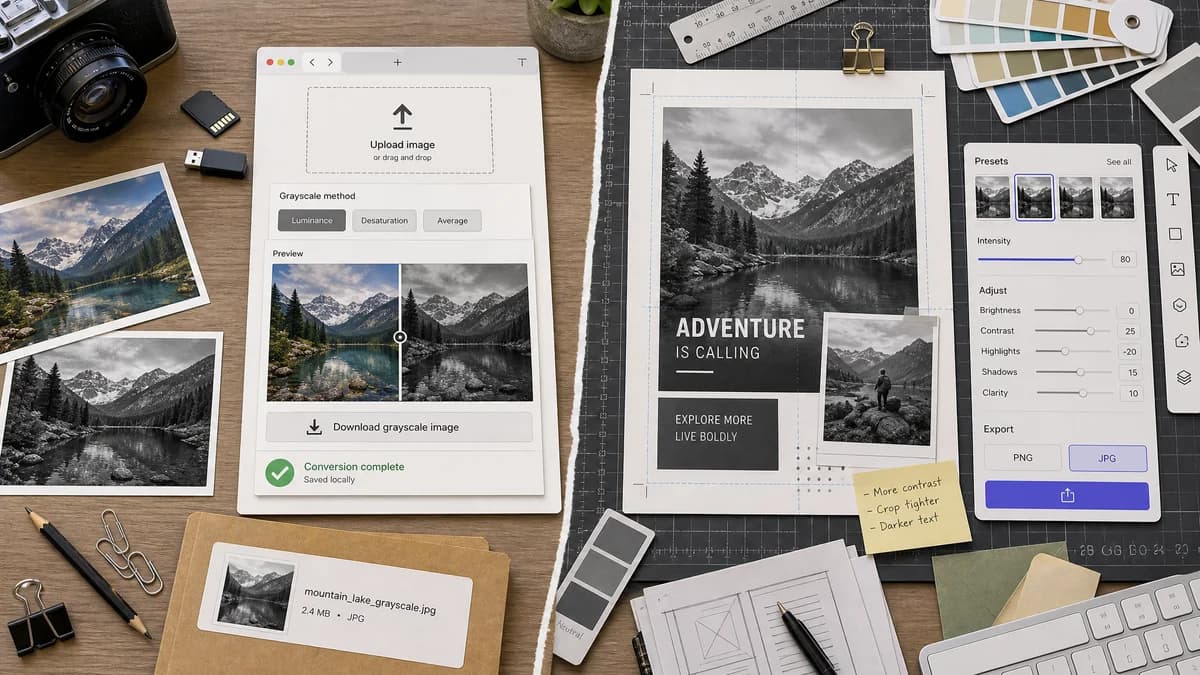
Grayscale Converter is the baseline in this comparison: Convert an uploaded image to grayscale in your browser, compare the original and converted result, then download the black-and-white output without sending the file to a server.
Canva provides Mono black-and-white filters with presets, intensity control, and broader design tools.
Quick verdict
Canva is best when the grayscale image belongs in a design. TextFaker is better when the user wants a straightforward local conversion file.
How Grayscale Converter fits
TextFaker Grayscale Converter is a utility page for converting an uploaded image locally, choosing a grayscale method, comparing before and after, and downloading the result.
How Canva fits
Canva documents a black-and-white filter workflow with Mono presets, an intensity slider, image enhancement controls, PNG/JPG download, and integration with Canva designs and sharing.
Side-by-side comparison
| Decision point | Grayscale Converter | Canva | Takeaway |
|---|---|---|---|
| Workflow | Our workflowUpload, convert, preview, download | Competitor workflowOpen Canva, upload to a design, apply Mono filter, edit, download or share | TextFaker can reduce friction for one-off conversion. |
| Presets | Our workflowgrayscale methods based on pixel formulas | Competitor workflowSix Mono presets with an intensity slider | Canva is more creative; TextFaker is more deterministic. |
| Output formats | Our workflowShould support common browser canvas outputs such as PNG, JPEG, and WebP when available | Competitor workflowOfficial page mentions PNG or JPG download | TextFaker can expose output choice as a utility feature. |
| Privacy claim | Our workflowbrowser-local conversion | Competitor workflowDesign-platform upload workflow | TextFaker has a clearer privacy story for sensitive images. |
| Preview style | Our workflowSide-by-side before/after preview implemented | Competitor workflowEditor-based preview on the design canvas | TextFaker is optimized for visual QA. |
| Audience | Our workflowDevelopers, designers, students, and privacy-sensitive users needing a converted file | Competitor workflowCreators making designed content and social posts | The pages compare utility conversion against design production. |
Use Grayscale Converter when
- Quick conversion without designing a canvas
- Formula-specific grayscale output
- Browser-local privacy messaging
- Technical users comparing grayscale methods
Use Canva when
- Social media and design layouts
- Preset-based creative looks
- Users who want text, crop, flip, and design elements
- Teams already working in Canva
Detailed comparison
Positioning
Canva is an adjacent competitor because its black-and-white feature is embedded in a design platform. TextFaker is positioned as a direct file utility, not as a Canva replacement.
- Use language like conversion utility, not design suite.
- Mention Canva's strength in layouts and sharing.
Feature Focus
Canva's Mono presets are creative and adjustable. TextFaker can compete by naming conversion formulas and showing how different formulas affect brightness.
- Include luminance mode.
- Include average mode.
- Consider a short explanation of why green contributes more in luminance formulas.
SEO Angle
The comparison page is designed to target users searching for a Canva alternative for making an image grayscale, especially users who do not want to create a design just to download a file.
- Use neutral wording.
- Avoid claiming Canva is slow or unsuitable.
- Emphasize fewer steps for file conversion.
Testing Notes
The implementation includes tests around upload state, conversion mode switching, preview image update, and download filename generation.
- Verify mode changes update pixels.
- Verify download button is disabled before conversion.
- Verify alpha remains unchanged in PNG-style outputs.
Research notes
- Official Canva page documents Mono filters, six presets, intensity adjustment, PNG/JPG download, and broader edit controls.
- The comparison treats Canva as a design workflow competitor rather than a pure grayscale converter.
- Generated comparison imagery can show a plain utility conversion versus a design-editor style workflow without using Canva trademarks in the image.
Official source
The only outbound competitor link on this page is placed here for source checking after the comparison.
Official Canva source