
Grayscale Converter vs Cloudinary
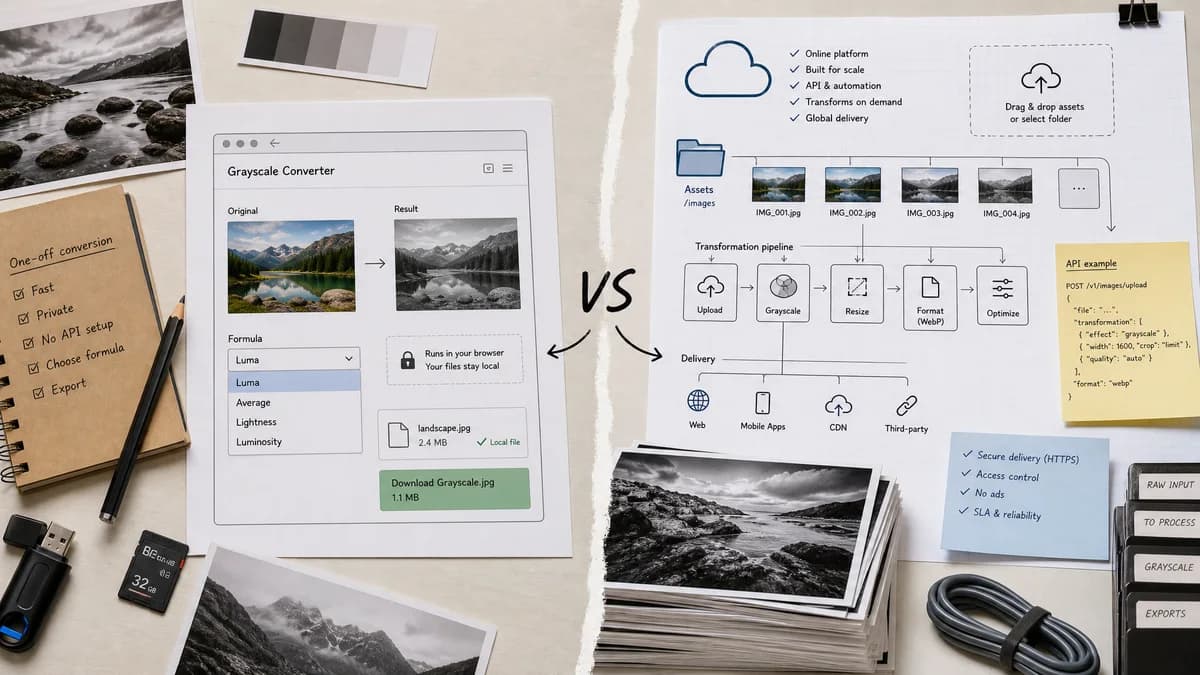
Grayscale Converter is the baseline in this comparison: Convert an uploaded image to grayscale in your browser, compare the original and converted result, then download the black-and-white output without sending the file to a server.
Cloudinary offers an online grayscale tool plus API-based image transformation and delivery features.
Quick verdict
Cloudinary is stronger for developers managing many production images. TextFaker is stronger for one-off private conversion and transparent formula selection.
How Grayscale Converter fits
TextFaker Grayscale Converter is a consumer-friendly browser-local utility, not a media platform, with no need to set up an API or asset pipeline for one-off grayscale conversions.
How Cloudinary fits
Cloudinary's official page describes drag-and-drop grayscale conversion, secure ad-free browser use, and API workflows for automatically grayscaling and delivering images at scale.
Side-by-side comparison
| Decision point | Grayscale Converter | Cloudinary | Takeaway |
|---|---|---|---|
| Scale | Our workflowOne-off browser-local utility | Competitor workflowOnline tool plus API for large-scale media workflows | Choose based on whether the job is a single file or an image pipeline. |
| Developer features | Our workflowNo API setup for this utility | Competitor workflowOfficial page promotes API transformations and delivery automation | Cloudinary is more powerful for engineering teams. |
| Conversion methods | Our workflowexplicit luminance and average-style choices | Competitor workflowGrayscale effect in a broader transformation system | TextFaker is clearer for learning and QA. |
| Privacy posture | Our workflowlocal processing in the browser | Competitor workflowOfficial page says secure, ad-free, and inside the browser while also promoting cloud APIs | The comparison distinguishes one-off browser tool use from API asset workflows. |
| Output flow | Our workflowPreview and download converted image | Competitor workflowConvert in tool or use transformed URLs and SDK snippets | TextFaker stays simpler for non-developers. |
| SEO opportunity | Our workflowCan target local grayscale converter and no-upload search intent | Competitor workflowTargets grayscale tool and developer transformation search intent | TextFaker leans into privacy and local conversion keywords. |
Use Grayscale Converter when
- Single-image local conversion
- Users who do not need an API
- Transparent grayscale method selection
- Simple downloadable output
Use Cloudinary when
- Programmatic transformations
- Large image pipelines
- Developers using Cloudinary delivery and optimization
- Batch or automated web image workflows
Detailed comparison
Different Audience
Cloudinary is a serious adjacent competitor because it combines an online tool with a production media platform. TextFaker does not compete on APIs; it is designed to compete on simplicity and local conversion.
- Mention Cloudinary is better for automation.
- Mention TextFaker is better for a single local file.
Feature Boundary
The TextFaker implementation avoids platform features such as delivery URLs, asset libraries, or SDK snippets. Those would distract from the utility's core purpose.
- Do not add cloud upload features.
- Do not require account setup.
- Keep conversion state local.
Formula Clarity
Cloudinary's page focuses on the transformation effect. TextFaker can add value by explaining luminance, luma, average, and why results differ.
- Expose selected formula in the UI.
- Include formula-specific tests.
- Explain grayscale versus binary black-and-white.
Verification
The tool is designed to be verified through deterministic pixel tests and manual browser checks after implementation.
- Test expected grayscale values.
- Test large-image guardrails.
- Run the shared tools verifier.
Research notes
- Cloudinary's official page explicitly promotes both a converter and API automation.
- This comparison avoids suggesting Cloudinary is only a consumer editor.
- TextFaker can include Cloudinary in proprietary alternatives while reserving open-source alternatives for GIMP and ImageMagick.
Official source
The only outbound competitor link on this page is placed here for source checking after the comparison.
Official Cloudinary source