
Grayscale Converter vs Fotor
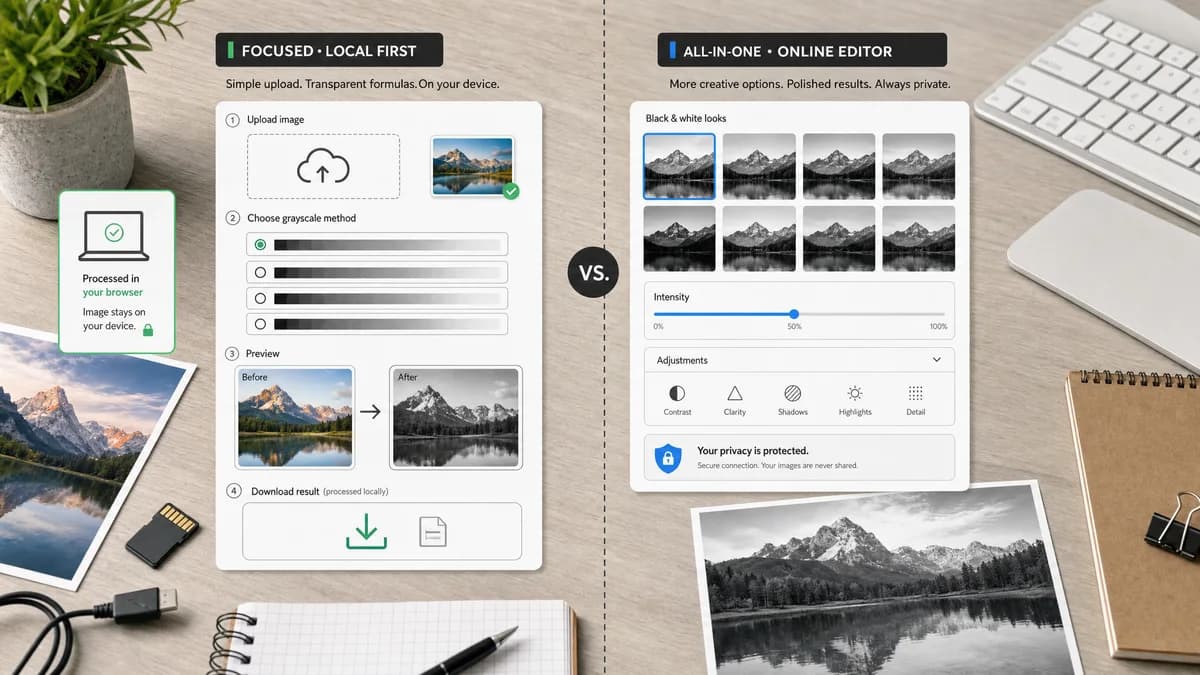
Grayscale Converter is the baseline in this comparison: Convert an uploaded image to grayscale in your browser, compare the original and converted result, then download the black-and-white output without sending the file to a server.
Fotor offers a free grayscale image converter with multiple black-and-white looks and adjustable intensity.
Quick verdict
Fotor is a close competitor for users who want polished filter looks. TextFaker can differentiate with local-first conversion and transparent formulas.
How Grayscale Converter fits
TextFaker Grayscale Converter provides a browser-local upload and conversion path with explicit grayscale method selection, before/after preview, and a downloadable output.
How Fotor fits
Fotor's official page describes a free grayscale converter with multiple filters, adjustable intensity, no watermarks, lossless-quality language, and secure/private positioning.
Side-by-side comparison
| Decision point | Grayscale Converter | Fotor | Takeaway |
|---|---|---|---|
| Tool type | Our workflowSingle-purpose grayscale converter | Competitor workflowPhoto editor feature page with grayscale filters | Both address the same user intent, but TextFaker is more technical. |
| Conversion modes | Our workflowluminance and average-style methods | Competitor workflowMultiple grayscale filters and intensity adjustment | Fotor emphasizes style; TextFaker emphasizes method clarity. |
| Privacy model | Our workflowbrowser-local processing | Competitor workflowOfficial page uses secure and private wording but does not provide the same local-only implementation detail in the crawled text | TextFaker makes local processing verifiable in copy and behavior. |
| Watermarking | Our workflowShould provide clean downloadable outputs under the shared access flow | Competitor workflowOfficial page states no watermarks | Both is designed to be compared on final file usability. |
| Preview | Our workflowbefore/after preview | Competitor workflowOfficial page shows before/after examples and upload flow | TextFaker needs a strong visual preview to match user expectations. |
| Tests | Our workflowCan include formula and UI regression tests in the tool suite | Competitor workflowExternal product behavior is not testable inside TextFaker | TextFaker quality is proven with local tests and verification. |
Use Grayscale Converter when
- Users who want deterministic grayscale methods
- Local conversion without server-side image handling
- Testing or QA scenarios using known pixel formulas
- Straight download after conversion
Use Fotor when
- Users who want multiple artistic grayscale filters
- Quick visual black-and-white effects
- People who prefer an established photo editor
- Users who value filter intensity controls
Detailed comparison
Close Match
Fotor is one of the closest direct competitors because its page is explicitly a grayscale image converter, not only a generic editor page.
- Use a direct comparison format.
- Avoid overstating differences where both offer previews and downloads.
Differentiator
The clearest TextFaker differentiator is transparent browser-local processing with selectable formulas. Fotor emphasizes filter quality and ease.
- Explain method differences in accessible language.
- Show output dimensions and file size after conversion.
Content Needs
The TextFaker page includes SEO sections that answer practical questions about grayscale, black-and-white, luma, luminance, alpha, and download formats.
- Add FAQ-style content.
- Add open-source alternatives page links.
- Add comparisons to close competitors.
Verification
Because this tool changes pixels, verification uses small synthetic test images with exact expected grayscale values.
- Test red, green, blue, white, black, and transparent pixels.
- Test switching formulas changes results.
- Run tools verification after implementation.
Research notes
- Fotor's official page explicitly mentions multiple filters, adjustable intensity, no watermarks, and privacy-oriented language.
- TextFaker avoids claiming Fotor uploads are unsafe; focus on local-first architecture.
- Generated images includes high-saturation source colors so formula differences are visible.
Official source
The only outbound competitor link on this page is placed here for source checking after the comparison.
Official Fotor source