
Grayscale Converter vs ImageMagick
Grayscale Converter is the baseline in this comparison: Convert an uploaded image to grayscale in your browser, compare the original and converted result, then download the black-and-white output without sending the file to a server.
ImageMagick supports grayscale conversion through command-line options and intensity methods.
Quick verdict
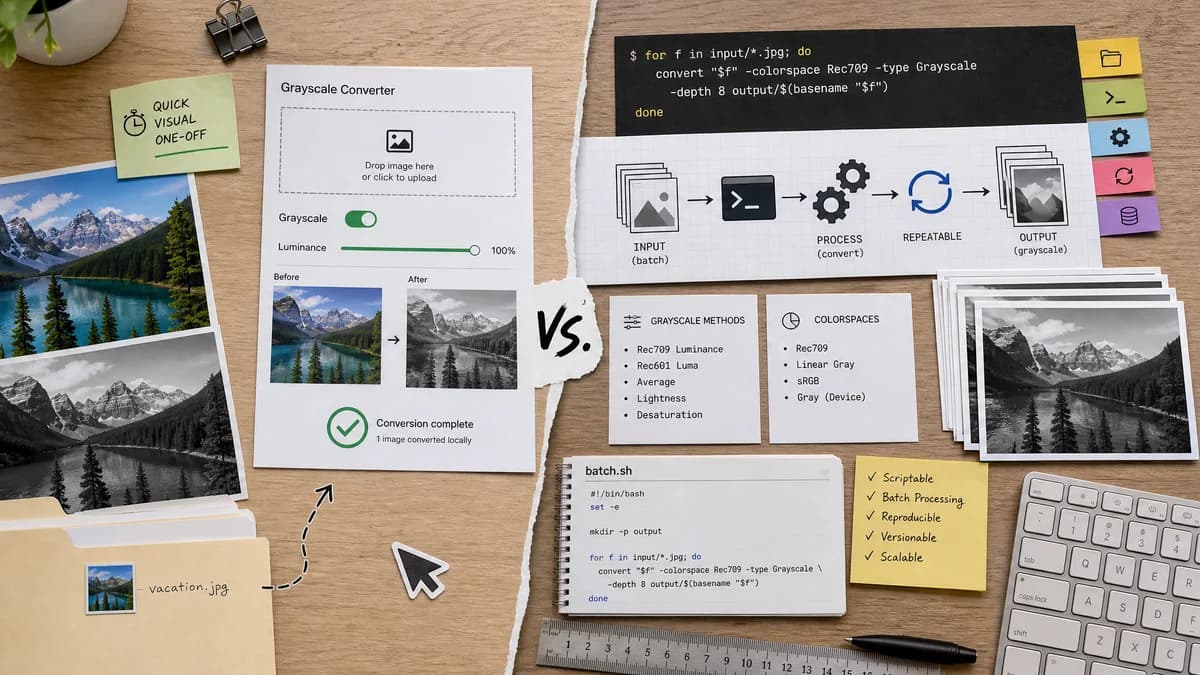
ImageMagick is better for automation and technical pipelines. TextFaker is better for non-CLI users who need a quick local visual conversion.
How Grayscale Converter fits
TextFaker Grayscale Converter serves users who want a visual browser interface for one-off conversion, while ImageMagick remains the better option for scripts, batch processing, and reproducible command-line workflows.
How ImageMagick fits
ImageMagick's official documentation describes the grayscale option, Rec709 luminance and luma methods, and relationships to linear gray and gray colorspaces.
Side-by-side comparison
| Decision point | Grayscale Converter | ImageMagick | Takeaway |
|---|---|---|---|
| Interface | Our workflowBrowser UI with upload and preview | Competitor workflowCommand-line options and scripts | TextFaker is more accessible for visual users. |
| Automation | Our workflowNo batch scripting for the basic tool | Competitor workflowStrong automation through CLI commands | ImageMagick is better for repeated or bulk work. |
| Methods | Our workflownamed methods such as luminance and average | Competitor workflowOfficial docs include grayscale methods such as Rec709 luminance and luma | Both can be method-aware, but ImageMagick is more technical. |
| Installation | Our workflowRuns in a browser | Competitor workflowRequires installing ImageMagick or using it in an environment where it is available | TextFaker is easier for casual users. |
| Preview | Our workflowBefore/after preview before download | Competitor workflowUsers typically inspect output separately after command execution | TextFaker provides immediate visual feedback. |
| Open-source status | Our workflowTextFaker tool implementation depends on project licensing and repository context | Competitor workflowWidely used open-source image processing project | ImageMagick belongs in open-source alternatives, not only competitor comparisons. |
Use Grayscale Converter when
- Visual before/after review
- Users uncomfortable with command-line tools
- Single-image browser conversion
- SEO-friendly educational workflow
Use ImageMagick when
- Batch conversion
- Scripts and automation
- Precise CLI workflows
- Developers and technical image-processing users
Detailed comparison
Automation Benchmark
ImageMagick is the benchmark for scriptable image conversion. It is designed to be presented as complementary to TextFaker rather than as a worse option.
- Recommend ImageMagick for batch jobs.
- Recommend TextFaker for visual one-off work.
Formula Accuracy
ImageMagick documentation highlights the difference between luminance and luma, which reinforces the need for TextFaker to label methods carefully.
- Use correct terminology.
- Avoid calling every grayscale method the same thing.
- Test known pixels.
User Experience
TextFaker makes grayscale conversion accessible to users who do not want to install software, write commands, or inspect files manually.
- Keep controls simple.
- Show before and after.
- Provide a direct download.
Alternative Page
ImageMagick is designed to appear on open-source alternative pages with examples described in prose, while avoiding unnecessary command-heavy content on the main tool page.
- Include CLI strengths.
- Mention batch processing.
- Mention installation and learning curve.
Research notes
- ImageMagick official command-line options document the grayscale method and Rec709 examples.
- ImageMagick is a strong open-source alternative and adjacent competitor for technical users.
- TextFaker does not try to match ImageMagick's automation surface in the browser tool.
Official source
The only outbound competitor link on this page is placed here for source checking after the comparison.
Official ImageMagick source