
Grayscale Converter vs OnlinePNGTools
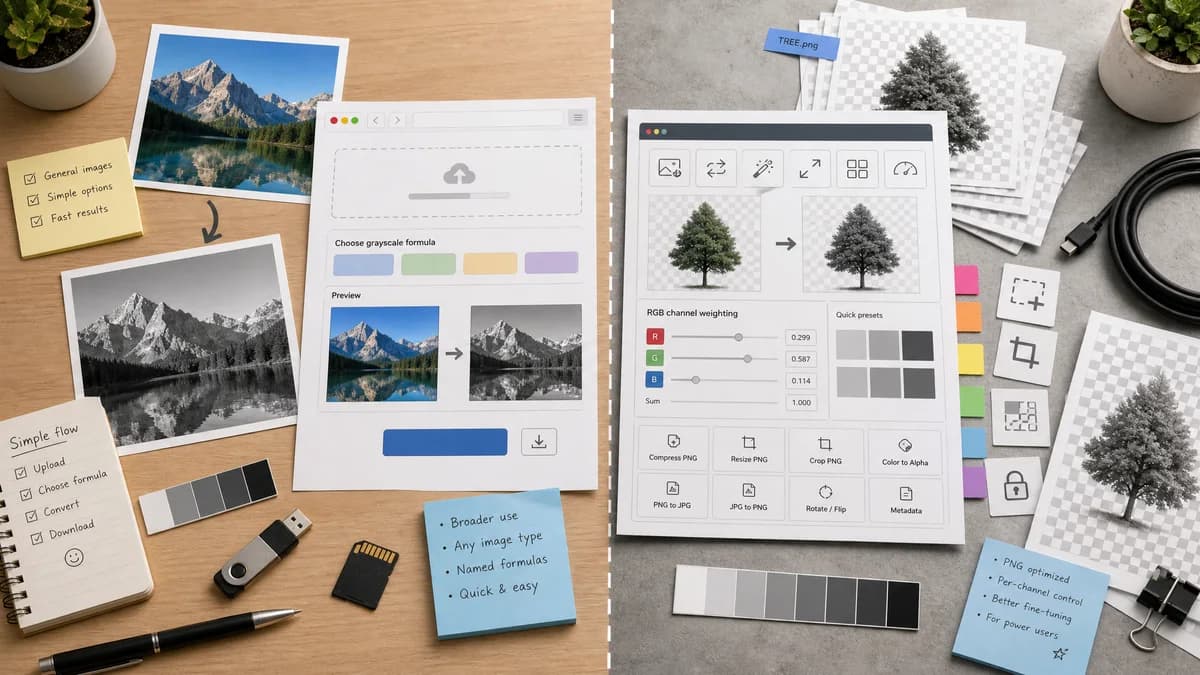
Grayscale Converter is the baseline in this comparison: Convert an uploaded image to grayscale in your browser, compare the original and converted result, then download the black-and-white output without sending the file to a server.
OnlinePNGTools is a PNG utility suite whose grayscale utility is referenced as supporting fine-tuned RGB channel weights.
Quick verdict
OnlinePNGTools is better for users who want PNG-specific channel weighting. TextFaker is designed to be better for general users who want named formulas and an approachable conversion flow.
How Grayscale Converter fits
TextFaker Grayscale Converter provides a broader general-image workflow while still offering clear grayscale formulas and simple method options for users who do not need detailed per-channel PNG weights.
How OnlinePNGTools fits
The official OnlinePNGTools PNG viewer page references a Convert PNG to Grayscale utility that can create grayscale PNGs with finely tuned RGB channel weights, within a wider Browserling online tools suite.
Side-by-side comparison
| Decision point | Grayscale Converter | OnlinePNGTools | Takeaway |
|---|---|---|---|
| Scope | Our workflowGeneral image grayscale converter | Competitor workflowPNG-focused tool suite | TextFaker is broader while OnlinePNGTools is more specialized. |
| Control style | Our workflowNamed method choices implemented | Competitor workflowReferenced utility supports fine-tuned RGB channel weights | OnlinePNGTools may offer deeper numeric control for PNG users. |
| Ease of use | Our workflowapproachable controls with before/after preview | Competitor workflowTool-suite style with many PNG utilities | TextFaker optimizes for a first-time user. |
| Format support | Our workflowsupport for multiple browser-decodable image formats | Competitor workflowPNG-oriented | TextFaker wins on input flexibility. |
| Privacy | Our workflowbrowser-local conversion | Competitor workflowOnline tool suite; local behavior needs confirmation per specific utility before claiming parity | TextFaker makes privacy behavior explicit. |
| Testing | Our workflowCan test formulas in project suite | Competitor workflowExternal utility behavior is not available to TextFaker tests | TextFaker can prove its conversion math in code. |
Use Grayscale Converter when
- General image grayscale conversion
- Named formulas such as luminance and average
- Shared TextFaker upload and access flow
- Users who prefer simpler controls
Use OnlinePNGTools when
- PNG-only workflows
- Fine-tuned RGB channel weighting
- Users already using OnlinePNGTools
- Technical PNG manipulation tasks
Detailed comparison
Specialized Control
OnlinePNGTools is important because fine-tuned RGB channel weights are a real grayscale control model. TextFaker uses simpler named modes unless the product decides advanced weights are needed.
- Consider an advanced custom weights option only if it fits the UI.
- Keep defaults understandable.
Format Strategy
A general TextFaker converter is designed to not be limited to PNG. However, PNG behavior is designed to be polished because PNG users often care about transparency and exact pixels.
- Support PNG preview and alpha preservation.
- Support other common raster formats when the browser can decode them.
Content Strategy
The comparison explains when custom channel weights matter, such as technical image processing or stylized contrast control.
- Describe named formulas in plain language.
- Avoid burying the user in equations on the main UI.
Implementation Notes
If custom weights are added, tests is designed to validate normalization, bounds, and expected output for known input pixels.
- Validate weight totals.
- Handle invalid user input.
- Keep presets stable.
Research notes
- The official PNG viewer page references the grayscale PNG utility and its finely tuned RGB channel weights.
- Use the PNG viewer source cautiously because the dedicated grayscale utility page was not directly captured in search results.
- This competitor supports the case for optional advanced channel weights, but they are not required for the initial TextFaker tool.
Official source
The only outbound competitor link on this page is placed here for source checking after the comparison.
Official OnlinePNGTools source