
Open Source Alternatives to BeFunky
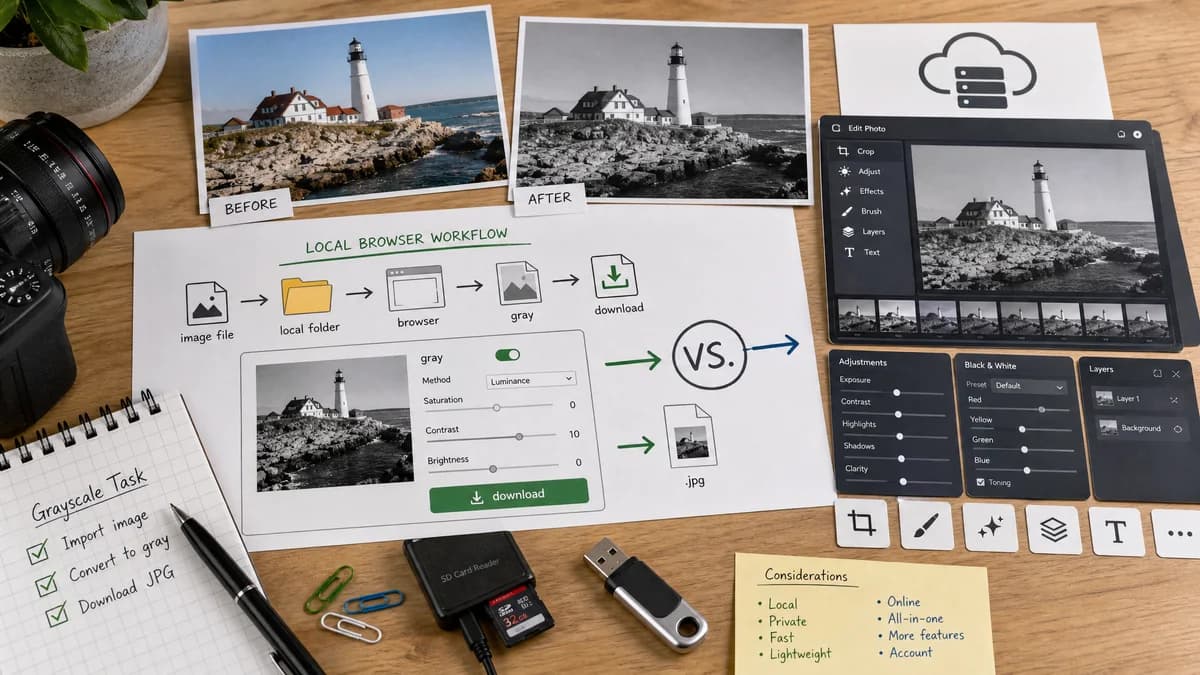
Grayscale Converter is a browser-based alternative for users who need this focused result without installing a proprietary desktop app or entering a larger hosted workflow.
This research compares that workflow with BeFunky while keeping the outbound source link at the bottom after the analysis.
Why Grayscale Converter fits
TextFaker focuses on converting image pixels to grayscale with predictable options and a direct download. It is designed to not attempt to replace BeFunky's broader creative editing stack.
What BeFunky offers
BeFunky offers black-and-white photo editing in its online photo editor feature set.
Open alternative signals
Source and openness
Grayscale ConverterBrowser-based and open-source-powered through standard Canvas, File, and image APIs; no full public source or self-hosted distribution is claimed here.
BeFunkyProprietary product or hosted editor workflow.
Deployment and setup
Grayscale ConverterRuns from the Grayscale Converter page in a web browser with no desktop editor install for the conversion step.
BeFunkyUses the proprietary product workspace, hosted editor, or installed application.
Pricing shape
Grayscale ConverterOne free anonymous successful use, one more after signup, then one lifetime unlock for all TextFaker tools.
BeFunkyUses the proprietary product pricing, subscription, account, or free-tier model.
Data control
Grayscale ConverterImage pixels are decoded and converted locally in the browser for the core grayscale workflow.
BeFunkyFile handling follows the proprietary product or hosted editor model.
Scope
Grayscale ConverterGrayscale conversion only.
BeFunkyOnline photo editing suite feature.
Method options
Grayscale ConverterLuminance and average-style choices implemented.
BeFunkyBlack-and-white editor controls and effects.
Decision guide
Users who need a fast grayscale file conversion with before/after inspection.
Users who want creative monochrome styling and broader photo-editing adjustments.
Side-by-side open source alternative comparison
| Decision point | Grayscale Converter | BeFunky | Takeaway |
|---|---|---|---|
| Workflow | Our workflowUpload image, choose grayscale mode, compare, download. | Proprietary workflowOpen an online photo editor and apply a black-and-white effect. | TextFaker optimizes for fewer steps. |
| Creative control | Our workflowLimited by design to grayscale conversion choices. | Proprietary workflowBroader creative editing controls. | BeFunky is better for stylized edits; TextFaker is better for utility conversion. |
| Transparency | Our workflowCan show exactly which grayscale approach is used. | Proprietary workflowEffect-based interface may not disclose formula details. | Formula visibility is a differentiator. |
| Integration | Our workflowFits TextFaker's shared image tool components and paywall flow. | Proprietary workflowPart of BeFunky's editor product. | Implementation stays consistent with existing TextFaker image tools. |
| Edge cases | Our workflowCan document alpha preservation and output format behavior. | Proprietary workflowHandled inside the proprietary editor workflow. | TextFaker is designed to be explicit about supported formats and limitations. |
| Testing | Our workflowFocused tests can verify pixel math and UI behavior. | Proprietary workflowExternal editor behavior cannot be unit tested by TextFaker. | Verification uses the alternative-page claims. |
Detailed research
Why compare BeFunky and TextFaker
BeFunky is a direct comparison target because it publishes a black-and-white photo editor feature page. TextFaker can address the utility segment of the same search intent.
What TextFaker emphasizes
The tool emphasizes local conversion, simple controls, and predictable output. For grayscale conversion, that is often more useful than a creative editor with many surrounding effects.
- Show before and after at similar dimensions.
- Offer method labels users can understand.
- Include download format and file-size feedback when feasible.
Limitations to state
A browser utility may not preserve every original metadata field after canvas export. That is designed to be documented plainly if the implementation exports a new image file.
Alternative-page copy guardrails
Avoid saying TextFaker is open source unless the repository and license are public. Use open-source-powered or open web standards language instead.
Research notes
- BeFunky's official feature page describes black-and-white photo editing.
- The TextFaker alternative page uses utility language and avoid claims that BeFunky uploads or processing details are known beyond the official product workflow.
- The phrase proprietary software can be used to identify BeFunky as the compared product type, not as a criticism.
Official source
The proprietary product link is included once here for source checking after the alternative analysis.
Official BeFunky source