
Image Aspect Ratio Calculator
Image Aspect Ratio Calculator reads one image or a width and height pair in your browser and reduces the dimensions to a clean ratio such as 16:9, 4:3, 3:2, or 1:1.
Use it to check social images, thumbnails, screenshots, print assets, video stills, and design exports before resizing or handing files to another tool.
Drop one image here
PNG, JPG, WebP, GIF, AVIF, BMP, or SVG up to 75 MB.
Supported image types
The calculator reads one browser-decodable still image and uses its intrinsic pixel dimensions. Animated formats are checked by decoded image dimensions only.
No ratio calculated
Choose one image or enter width and height to see the reduced aspect ratio, decimal ratio, orientation, and common-ratio match.
Calculate And Copy Image Ratios
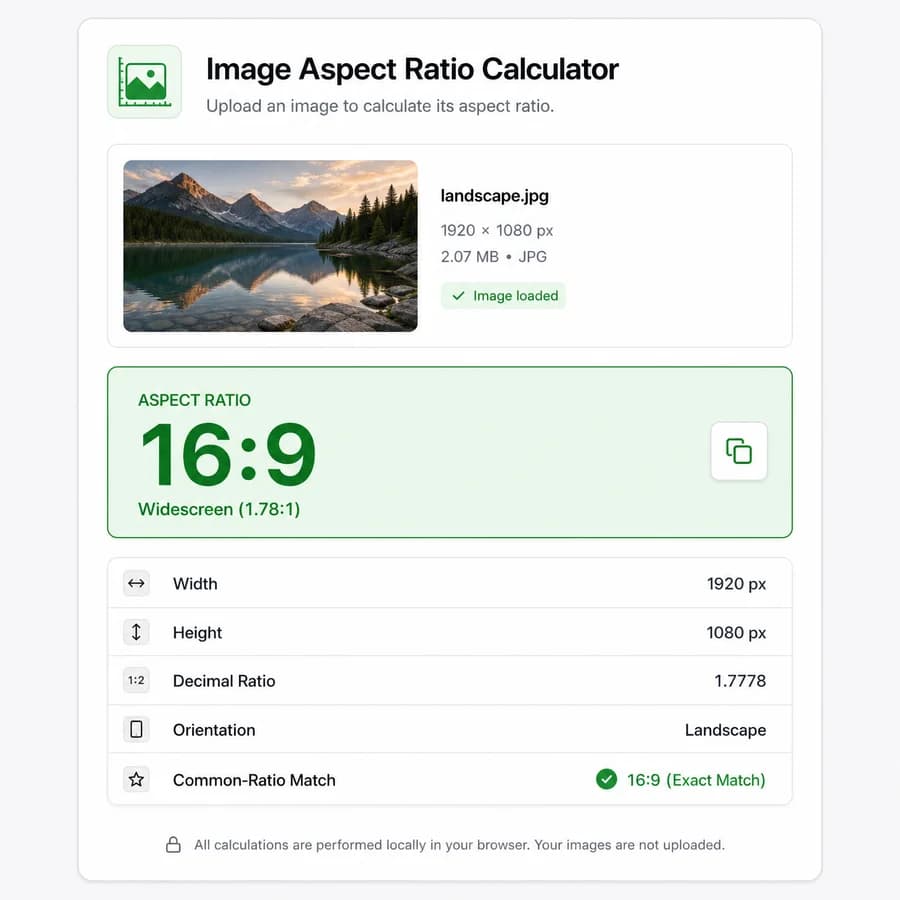
What The Result Should Show
The main result should be a compact success card that emphasizes the simplified ratio first, because that is the primary search intent for this tool. The detailed facts below should make the calculation auditable without turning the page into a general image-inspection tool.
- Show the reduced ratio as width:height using the greatest common divisor, for example 1920 x 1080 becomes 16:9.
- Include width, height, decimal width divided by height, orientation, and closest common-ratio match as separate facts below the main card.
- Use one copy-all icon button for a concise result string such as "16:9 | 1920 x 1080 | landscape | decimal 1.7778".
Inputs To Support
The page should support both uploaded images and manual dimensions so it can rank for image-ratio and width-height-ratio searches. Uploaded files should be decoded locally and should reuse the existing image dimensions checker helpers where they already provide reliable browser-readable dimensions.
- Accept one image at a time from file picker, drag-and-drop, and paste if the local image helper already supports paste.
- Provide manual width and height numeric inputs if implementation scope allows; calculate instantly once both values are positive integers.
- Treat zero, negative, decimal, missing, and nonnumeric dimensions as invalid and show a targeted validation message.
Common Ratio Matching
Common-ratio matching should identify exact matches and near matches without hiding the exact reduced ratio. This helps users distinguish a true 16:9 file from an almost-widescreen crop exported with a few extra pixels.
- Include exact or nearest labels for 1:1, 5:4, 4:3, 3:2, 16:10, 16:9, 1.91:1, 2:1, 21:9, 9:16, 4:5, and 2:3.
- Report exact matches when the reduced ratio equals a known preset after normalization.
- For near matches, compare decimal ratios and show the closest preset only when the difference is within a small documented tolerance.
Privacy And Browser Behavior
Aspect ratio calculation only needs intrinsic pixel dimensions, so the tool can stay browser-local and avoid file uploads. The implementation should prefer modern browser decoding APIs where possible and fall back to the existing project image helpers for broader format behavior.
- Use browser-decoded dimensions such as ImageBitmap width and height or HTML image natural dimensions rather than rendered CSS size.
- Keep file name, MIME type, extension, and file size secondary or omitted unless reused helpers surface them cheaply.
- Clearly distinguish unsupported image files from files that are valid but cannot be decoded by the current browser.
Testing Priorities
The tests should focus on deterministic math and user-visible output, because the result surface is small and errors would be obvious to users. File-detection tests should cover the same browser-readable formats supported by the shared image helper.
- Test ratio reduction with common and awkward dimensions such as 1920 x 1080, 4032 x 3024, 1200 x 630, 1080 x 1920, 1000 x 882, and 999 x 1000.
- Test decimal formatting with fixed precision and no noisy trailing output.
- Test orientation labels for landscape, portrait, and square.
- Test exact and nearest common-ratio matching.
- Test supported file detection, unsupported file messaging, manual dimension validation, and copy-all text.
References
- MDN createImageBitmap
- MDN HTMLImageElement Image constructor
- WHATWG HTML ImageBitmap
- Calculator Soup Aspect Ratio Calculator
- Aspect Ratio Dev
- Calculate Aspect Ratio
- Digital Rebellion Aspect Ratio Calculator
- Red Route Image Resizing Calculator
- Imagy Image Aspect Ratio Finder
- Imagy Image Aspect Ratio Changer
- Shutterstock Aspect Ratio Calculator
- Bellevue Fine Art Aspect Ratio Calculator
- Prints Giclee Shop Image Resize Calculator
- Have Camera Will Travel Aspect Ratio Calculator
- ryanhefner calculate-aspect-ratio
- calculate-aspect-ratio npm CDN
- envato aspect_ratio
- spencermountain fit-aspect-ratio
- Mikulew js-aspect-ratio-calculator
- malikmuhammadsaadshafiq-dev QuickRatio
- DazzleNodes ComfyUI Smart Resolution Calc
- altoiddealer sd-webui-ar-plusplus
- alemelis sd-webui-ar
- BaseMax Image DPI Print Calculator
Compare Image Aspect Ratio Calculator
Review this tool beside related online utilities, dedicated apps, and adjacent workflows.
Compare Image Aspect Ratio Calculator with other toolsOpen Source Alternatives
Compare this focused browser workflow with proprietary software and online tools that solve similar jobs.
View Image Aspect Ratio Calculator open source alternatives