
Image Dimensions Checker
Image Dimensions Checker shows the pixel width and height of a selected image without uploading the file.
Use it to confirm resolution, aspect ratio, megapixels, orientation, and basic file facts before publishing, resizing, printing, or sending an asset to someone else.
Drop one image here
PNG, JPG, WebP, GIF, AVIF, BMP, or SVG up to 75 MB.
Supported image types
The checker reads one browser-decodable still image and reports decoded display dimensions plus file facts. Animated formats are checked by their decoded image dimensions only.
No image selected
Choose one image to see pixel dimensions, aspect ratio, megapixels, orientation, MIME type, extension, and file size.
Check Image Dimensions Locally
What the checker reports
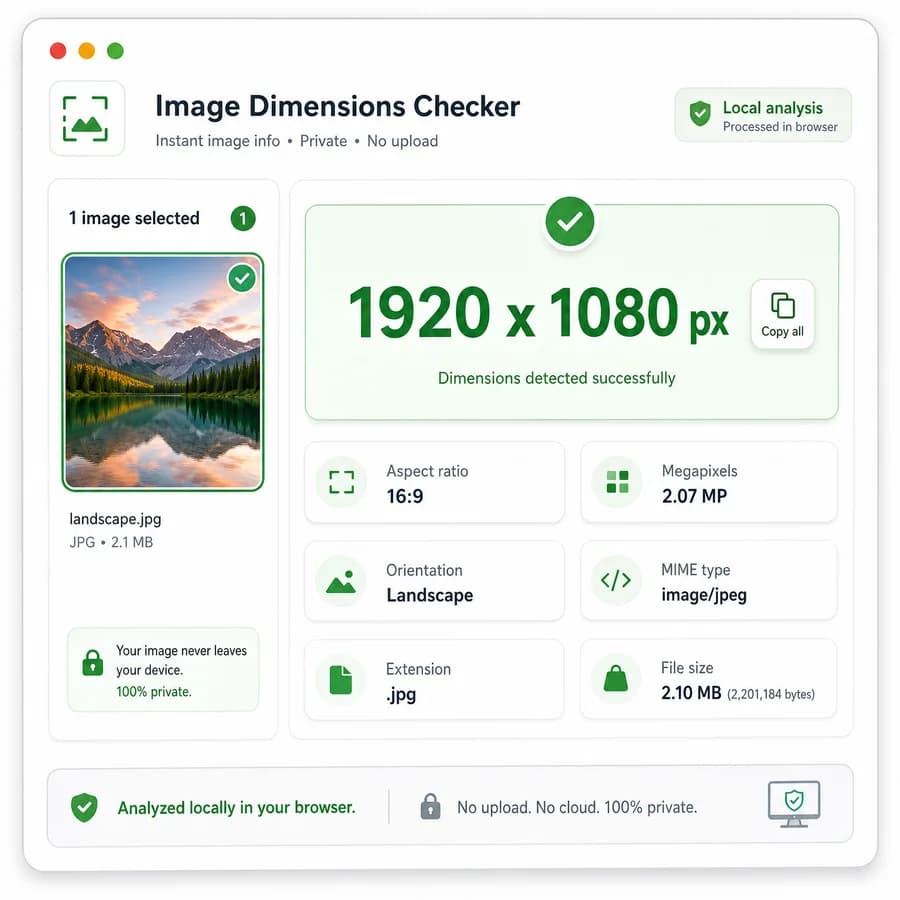
Select one image and the tool should decode it in the browser, then show the primary width x height result in a green success card. Below that, list the reduced aspect ratio, decimal ratio, megapixel count, orientation label, file name, extension, MIME type, and human-readable file size.
- Show dimensions as width x height pixels, such as 1920 x 1080 px.
- Reduce aspect ratios with a greatest-common-divisor helper, such as 1920:1080 to 16:9.
- Calculate megapixels from width multiplied by height divided by 1,000,000, rounded for display.
- Label orientation as landscape, portrait, square, or unknown when dimensions are unavailable.
Privacy and upload behavior
The page should be positioned as a browser-local reader. It should use the selected File object, object URLs, and browser image decoding APIs so users can inspect an image without sending the file to TextFaker servers.
- Do not upload, persist, or convert the selected image.
- Clear object URLs after decoding to avoid retaining unnecessary browser resources.
- Show an empty state before a valid file is selected.
- Show a no-success state for unsupported, empty, or undecodable files.
Copy-ready output
Because the result is small text, the success card should include one icon-only copy-all button that copies the complete fact summary. The detailed facts below can remain readable rows rather than separate copy controls.
- Copy text should include filename, dimensions, aspect ratio, megapixels, orientation, MIME type, extension, and file size.
- The copy button should not appear as a successful-result action until a valid image has decoded.
- Use existing TextFaker icon button and toast patterns if available.
- Keep comparison and alternative page body copy free of outbound URLs; store URLs only in dedicated URL fields.
Supported input scope
Support should be based on browser-decodable still image formats and the existing TextFaker image decode pattern. MIME and extension detection should be explicit so tests can verify expected accepts and rejection behavior.
- Prioritize PNG, JPEG/JPG, WebP, GIF, AVIF, BMP, and SVG when the browser can decode them.
- Treat the file MIME type and extension as separate facts because user agents may provide an empty or generic MIME type.
- Do not promise EXIF orientation correction; this page reports decoded display dimensions and a simple width-versus-height orientation label.
- For animated formats, report the decoded image dimensions, not frame counts or animation timing.
Compare Image Dimensions Checker
Review this tool beside related online utilities, dedicated apps, and adjacent workflows.
Compare Image Dimensions Checker with other toolsOpen Source Alternatives
Compare this focused browser workflow with proprietary software and online tools that solve similar jobs.
View Image Dimensions Checker open source alternatives