
Image Transparency Checker vs Adobe Photoshop
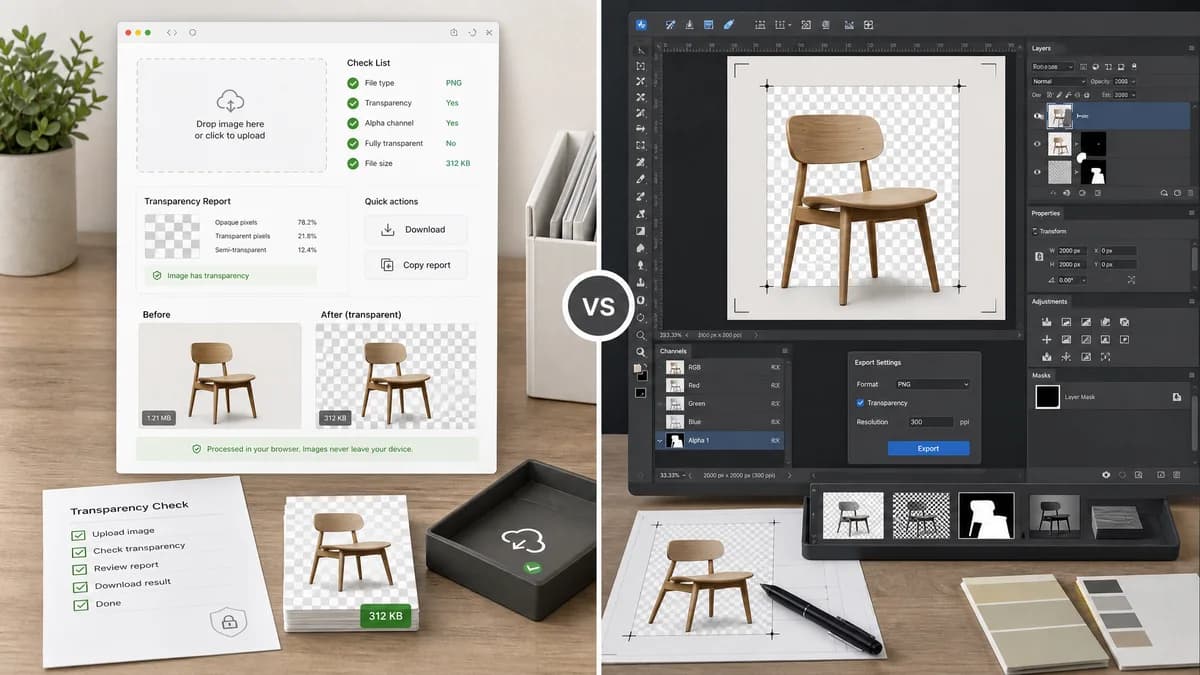
Image Transparency Checker is the baseline in this comparison: Check whether an uploaded image has transparent or semi-transparent pixels, with local alpha counts, percentages, and a checkerboard preview.
Adobe Photoshop is a professional editor whose channel workflows include color channels and alpha channels for selections, masks, and editing.
Quick verdict
Photoshop is the right tool for professional editing and repair. TextFaker should be the right tool for a quick, copyable transparency check.
How Image Transparency Checker fits
TextFaker should provide a lightweight browser-local transparency report for users who do not need Photoshop's editing workspace or subscription-grade feature set.
How Adobe Photoshop fits
Photoshop is a comprehensive commercial editor for creating, editing, viewing, and exporting images with alpha channels, masks, and layered transparency.
Side-by-side comparison
| Decision point | Image Transparency Checker | Adobe Photoshop | Takeaway |
|---|---|---|---|
| Cost and access | Our workflowOnline TextFaker tool with shared access flow after value-producing checks. | Competitor workflowCommercial professional software ecosystem. | TextFaker should be easier to access for a simple check. |
| Workflow | Our workflowUpload, decode, summarize, copy. | Competitor workflowOpen file in editor, inspect channels or layers, and optionally edit/export. | TextFaker is faster for verification. |
| Alpha model | Our workflowCounts decoded alpha values at the pixel level. | Competitor workflowOfficial help covers channels, including alpha-channel concepts for masks and selections. | Photoshop is conceptual and editable; TextFaker should be numeric and diagnostic. |
| Editing power | Our workflowNo editing scope in the checker. | Competitor workflowExtensive editing, masking, selections, and export controls. | Photoshop remains stronger for correction. |
| Result communication | Our workflowOne copy-all result suitable for tickets, audits, and handoff. | Competitor workflowNo simple transparency-count report is the primary workflow. | TextFaker can serve a reporting niche. |
| SEO audience | Our workflowTargets transparency checker for images and transparent image checker. | Competitor workflowTargets professional editing and channel documentation more broadly. | The search intent is more aligned with TextFaker. |
Use Image Transparency Checker when
- Checking exported assets without opening Photoshop
- Support and QA workflows needing a copied result
- Users without access to commercial editing software
- Fast browser-local alpha diagnostics
Use Adobe Photoshop when
- Professional transparency editing
- Layer masks and alpha-channel work
- Retouching and compositing
- Production image export workflows
Detailed comparison
Professional Contrast
Photoshop has deep channel capabilities, but a transparency checker searcher often needs confirmation, not editing. TextFaker should not try to imitate the editor.
Diagnostic Advantage
A numeric report is useful after Photoshop export because users may still need to confirm whether transparency was preserved in the final file.
Content Guidance
Comparison copy should say that Photoshop can create and edit alpha channels, while TextFaker checks the final image file locally.
Risk
Do not overstate support for Photoshop-specific formats unless the browser decoder or implementation explicitly supports them.
Research notes
- Adobe help documents channel basics and alpha-channel concepts.
- Photoshop is an adjacent commercial editor, not a direct one-click checker.
- The TextFaker page can use exported-asset verification as a use case.
Official source
The only outbound competitor link on this page is placed here for source checking after the comparison.
Official Adobe Photoshop source