
Image Transparency Checker vs GIMP
Image Transparency Checker is the baseline in this comparison: Check whether an uploaded image has transparent or semi-transparent pixels, with local alpha counts, percentages, and a checkerboard preview.
GIMP is a full desktop editor with alpha-channel controls, including layer alpha channel behavior and transparency editing.
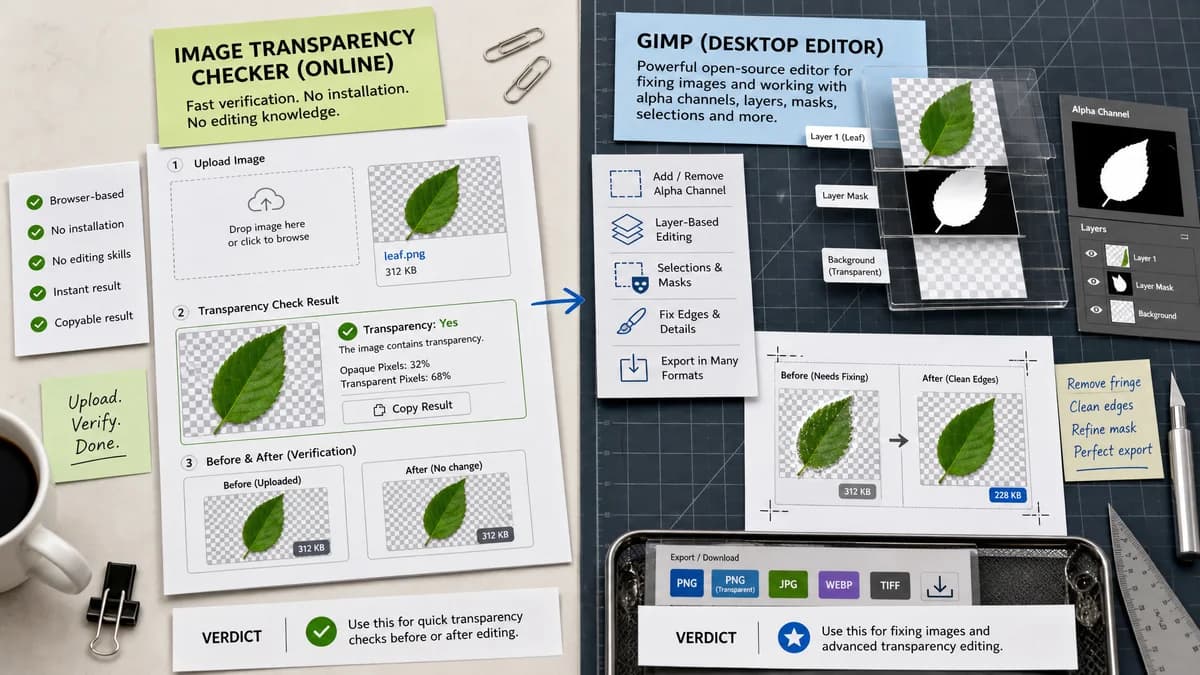
Quick verdict
GIMP is better for fixing images. TextFaker is better for quick online transparency verification before or after editing.
How Image Transparency Checker fits
TextFaker should be a browser-local check that requires no installation and no editing knowledge. It should diagnose transparency and provide a copyable result.
How GIMP fits
GIMP is a strong open-source option when users need to add, remove, or edit alpha channels and work with layers, selections, and masks.
Side-by-side comparison
| Decision point | Image Transparency Checker | GIMP | Takeaway |
|---|---|---|---|
| Installation | Our workflowRuns in the browser as a local checker. | Competitor workflowDesktop application that must be installed. | TextFaker has lower friction for a quick check. |
| Primary job | Our workflowDiagnose transparency and report exact values. | Competitor workflowEdit images, layers, selections, masks, and alpha channels. | The tools are complementary. |
| Alpha controls | Our workflowRead decoded pixel alpha values only. | Competitor workflowDocumentation covers adding alpha channels to layers and file-format-related alpha behavior. | GIMP is more capable for modification. |
| Result clarity | Our workflowPlain yes-or-no summary plus counts and percentages. | Competitor workflowUsers infer transparency through editor state, layers, and visual appearance. | TextFaker should be clearer for non-experts. |
| Batch or automation | Our workflowSingle browser check unless future scope adds batch mode. | Competitor workflowCan be scripted or extended, but with more setup. | TextFaker should stay focused on one-file diagnostics. |
| Copy output | Our workflowOne copy-all result button. | Competitor workflowNo built-in single diagnostic report is the central workflow. | Copyable reporting is a TextFaker differentiator. |
Use Image Transparency Checker when
- No-install browser checks
- Fast asset QA
- Copying transparency counts and percentages
- Checking whether an exported image actually contains non-opaque pixels
Use GIMP when
- Open-source image editing
- Adding or editing alpha channels
- Layer and mask workflows
- Users who need desktop control over image files
Detailed comparison
Open Source Role
GIMP is a major open-source alternative, but it solves a larger editing problem. It belongs in open-source alternatives and comparison content, not as a feature model for the checker UI.
MVP Boundary
The TextFaker MVP should not include editing controls such as erase, add alpha, or export fixed PNG. Those would change the tool category.
User Education
Explain that adding an alpha channel is different from having transparent pixels. A fully opaque image can be alpha-capable while still having no see-through pixels.
Testing
Tests should include an opaque PNG, a PNG with one fully transparent pixel, and a PNG with one semi-transparent pixel to cover the distinction.
Research notes
- GIMP documentation discusses adding alpha channels and notes that imported files may or may not define alpha.
- GIMP is useful as an open-source alternative page candidate.
- TextFaker should not promise editing or alpha-channel creation.
Official source
The only outbound competitor link on this page is placed here for source checking after the comparison.
Official GIMP source