
Image Transparency Checker vs ImageMagick
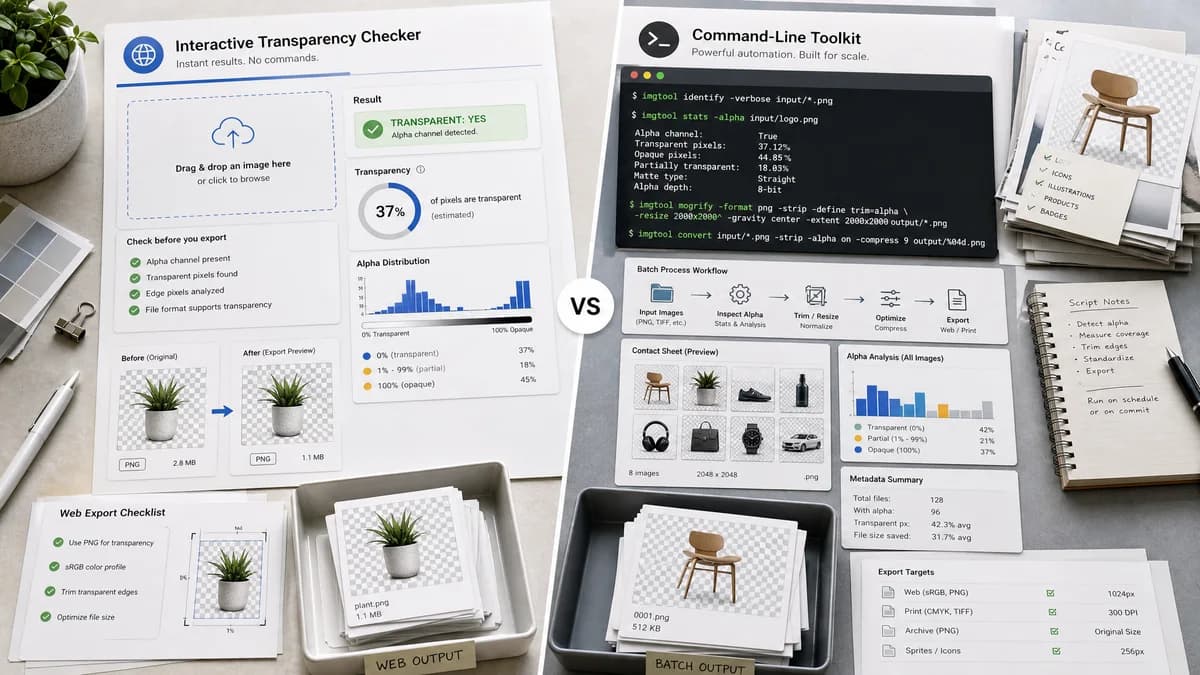
Image Transparency Checker is the baseline in this comparison: Check whether an uploaded image has transparent or semi-transparent pixels, with local alpha counts, percentages, and a checkerboard preview.
ImageMagick is an open-source command-line image toolkit whose identify command can inspect image characteristics and whose alpha options support alpha-channel operations.
Quick verdict
ImageMagick is better for automation and batch processing. TextFaker is better for interactive, no-command transparency checking with readable results.
How Image Transparency Checker fits
TextFaker should bring the most common alpha-checking answer into the browser: whether the image is transparent, how much of it is transparent, and what the alpha distribution means.
How ImageMagick fits
ImageMagick is powerful for scripted inspection and transformations, but users must know command-line options and format expressions to distinguish alpha presence from actual non-opaque pixels.
Side-by-side comparison
| Decision point | Image Transparency Checker | ImageMagick | Takeaway |
|---|---|---|---|
| Interface | Our workflowBrowser upload and visual result. | Competitor workflowCommand-line identify workflow. | TextFaker is more accessible for one-off checks. |
| Alpha presence | Our workflowExpose alpha-capable status and actual transparent pixel status separately. | Competitor workflowImageMagick documentation includes alpha-channel controls and identify options; format expressions can reveal channel state or opacity. | TextFaker should hide command complexity. |
| Pixel counts | Our workflowReturn exact transparent and semi-transparent pixel counts and percentages. | Competitor workflowCan be scripted to derive facts, but not a single default web report. | TextFaker should offer the report out of the box. |
| Automation | Our workflowManual browser-local checker for individual uploads. | Competitor workflowExcellent for batch scripts and CI workflows. | ImageMagick wins for automation. |
| Preview | Our workflowCheckerboard preview for user trust. | Competitor workflowCommand-line output is not preview-first, though generated images can be produced. | TextFaker is stronger for visual confirmation. |
| Testing implications | Our workflowImplement deterministic fixture tests around alpha values. | Competitor workflowImageMagick can be used as a reference tool in development, if installed. | Use command-line tools as research references, not as browser dependencies. |
Use Image Transparency Checker when
- Non-technical users checking one image
- Designers validating logo exports
- Copy-ready browser reports
- Visual checkerboard confirmation
Use ImageMagick when
- Batch transparency checks
- Automated pipelines
- Scripted image transformations
- Developers comfortable with command-line tools
Detailed comparison
Developer Benchmark
ImageMagick is a key technical benchmark because developers already use it to inspect alpha and opacity. TextFaker should translate that capability into a browser-local UI.
Distinction To Preserve
The implementation should distinguish an alpha channel or decoded alpha plane from an image that actually contains transparent or translucent pixels.
Automation Gap
TextFaker will not replace ImageMagick for batch or CI. The page should acknowledge that command-line tools are better for scripted workflows.
Output Design
A good TextFaker result is a compact human-readable equivalent of what users try to extract with command-line probes.
- File name and dimensions.
- Alpha status.
- Fully transparent count.
- Semi-transparent count.
- Transparency percentage.
Research notes
- ImageMagick identify documentation is an official source for image inspection capabilities.
- ImageMagick command-line options document alpha operations and TrueColorAlpha behavior.
- This competitor is especially relevant for open-source alternatives and developer-facing comparison copy.
Official source
The only outbound competitor link on this page is placed here for source checking after the comparison.
Official ImageMagick source