
Image Transparency Checker vs imageonline.io Alpha Channel Extractor
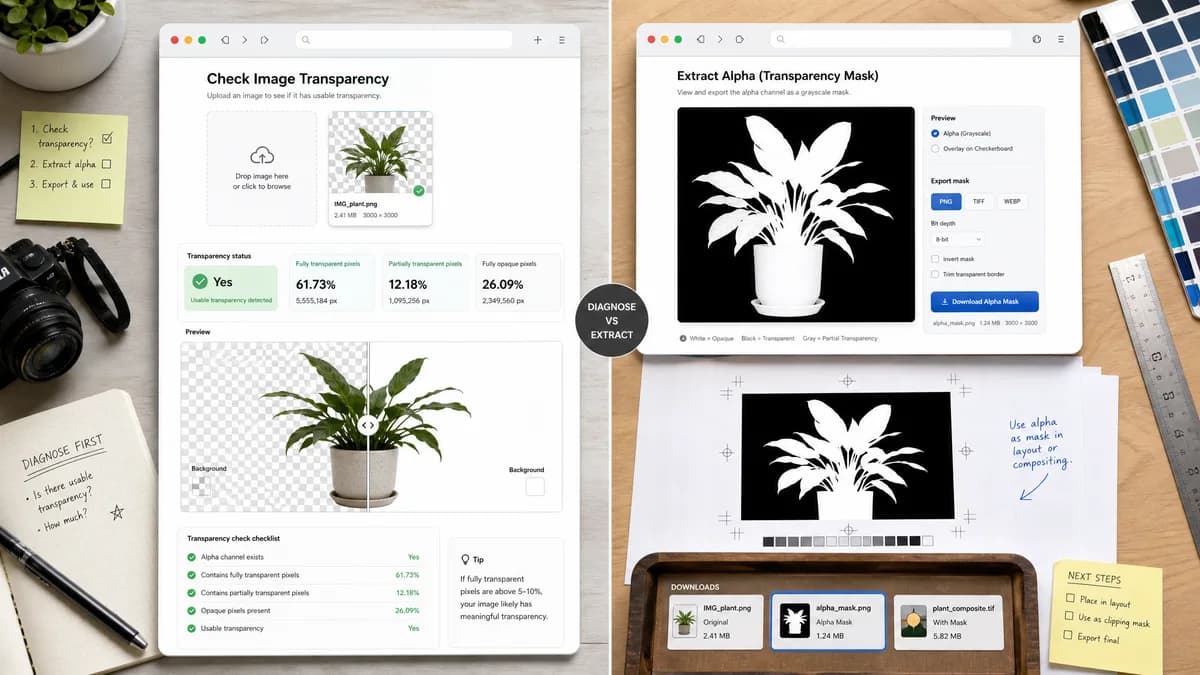
Image Transparency Checker is the baseline in this comparison: Check whether an uploaded image has transparent or semi-transparent pixels, with local alpha counts, percentages, and a checkerboard preview.
imageonline.io Alpha Channel Extractor displays an image alpha channel as a grayscale mask and lets users export it for editing or compositing workflows.
Quick verdict
TextFaker should position itself as the simpler first diagnostic step. If the user needs a mask file, the extractor-style workflow is better; if they need to know whether transparency exists and how much, TextFaker is better.
How Image Transparency Checker fits
TextFaker should not primarily extract masks. It should answer whether the image has usable transparency and quantify full and partial transparent pixels, with preview as supporting evidence.
How imageonline.io Alpha Channel Extractor fits
The extractor is adjacent rather than identical: it is best for users who already know they need to inspect or download the alpha mask itself.
Side-by-side comparison
| Decision point | Image Transparency Checker | imageonline.io Alpha Channel Extractor | Takeaway |
|---|---|---|---|
| Primary output | Our workflowTransparency verdict, counts, percentages, and preview. | Competitor workflowGrayscale alpha-channel image and alpha mask extraction. | Different outputs serve different points in the workflow. |
| User expertise | Our workflowPlain-language summary for designers, developers, and non-experts. | Competitor workflowBetter for users who understand alpha masks and compositing. | TextFaker should keep terminology clear. |
| Copy workflow | Our workflowCopy-all text report. | Competitor workflowDownloadable extracted alpha channel is the key action. | TextFaker is better for documentation and QA notes. |
| Transparency status | Our workflowExplicit yes-or-no status for transparent pixels and alpha-like decoded data. | Competitor workflowDisplays alpha visually but may require user interpretation. | A direct verdict reduces ambiguity. |
| Preview | Our workflowCheckerboard preview of the original image when useful. | Competitor workflowAlpha channel map as a grayscale preview. | TextFaker should prioritize real-world compositing preview. |
| Scope | Our workflowSingle diagnostic utility in TextFaker's shared tool registry. | Competitor workflowSpecialized extraction utility within imageonline.io's image tool collection. | Keep TextFaker narrow and faster to understand. |
Use Image Transparency Checker when
- Checking if a file truly has transparency
- Counting transparent and semi-transparent pixels
- Preparing a copy-ready QA report
- Detecting opaque images that only look transparent
Use imageonline.io Alpha Channel Extractor when
- Extracting an alpha mask image
- Viewing alpha as a grayscale map
- Compositing and editing workflows
- Users who need a downloadable mask asset
Detailed comparison
Adjacent Use
Alpha extraction is a natural next step after a transparency check, but it is not the same user intent. Many users simply want to know whether their logo or cutout is transparent.
Differentiation
TextFaker should answer the yes-or-no question first, then quantify the result. It can mention alpha masks in SEO content without making mask export part of the MVP.
Technical Fit
A future alpha-map preview could be generated from the same pixel pass used for counting, but export is optional and should not distract from the checker.
Research Signal
The extractor page reinforces that alpha values are often represented visually as black-to-white masks, which may help users understand semi-transparent edges.
Research notes
- imageonline.io's extractor page describes a grayscale alpha-channel display.
- It is positioned for alpha mask viewing and exporting.
- TextFaker should avoid claiming mask extraction unless implemented.
Official source
The only outbound competitor link on this page is placed here for source checking after the comparison.
Official imageonline.io Alpha Channel Extractor source