
Image Transparency Checker vs Photopea
Image Transparency Checker is the baseline in this comparison: Check whether an uploaded image has transparent or semi-transparent pixels, with local alpha counts, percentages, and a checkerboard preview.
Photopea is a browser-based editor with channel tools for RGB, transparency values, masks, and independent channels.
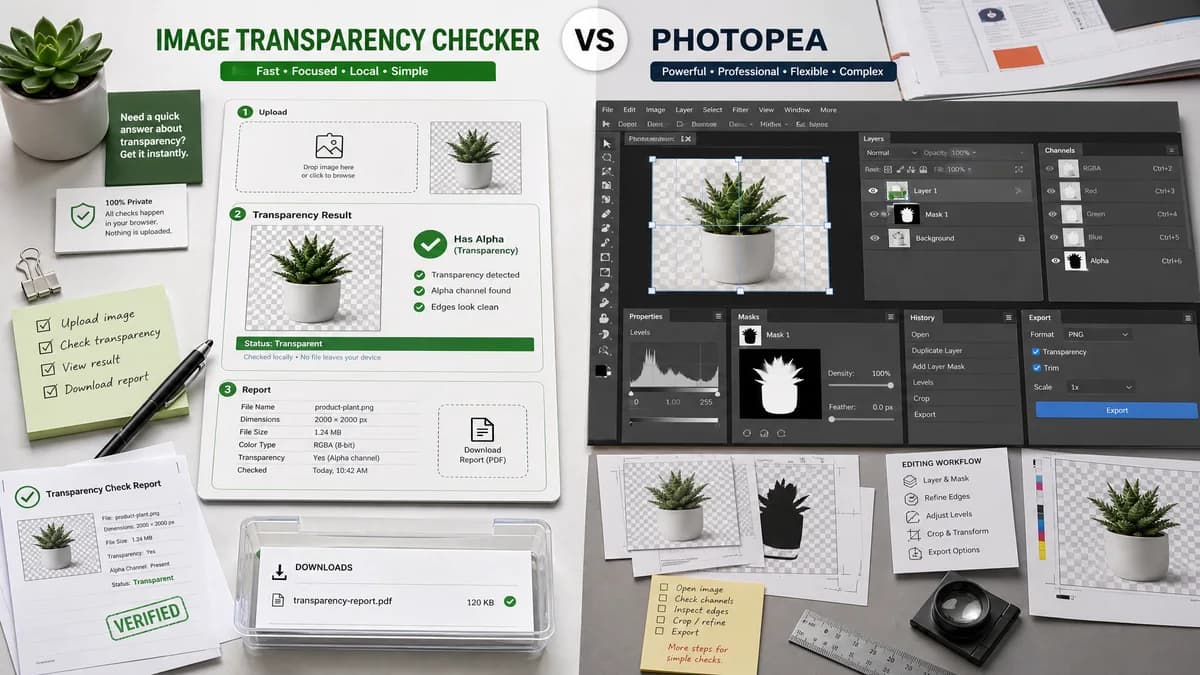
Quick verdict
Photopea is best when users need to edit or manipulate transparency. TextFaker is best when they only need a trusted local answer and a report.
How Image Transparency Checker fits
TextFaker should be a fast checker, not a full editor. It should give immediate transparency diagnostics without requiring users to open panels, inspect channels, or understand editing workflows.
How Photopea fits
Photopea is powerful for editing and viewing channels, but it is broader than the transparent image checker intent and may be more complex for a simple verification task.
Side-by-side comparison
| Decision point | Image Transparency Checker | Photopea | Takeaway |
|---|---|---|---|
| Tool scope | Our workflowSingle-purpose transparency diagnostic. | Competitor workflowFull browser image editor with channels, layers, masks, and filters. | TextFaker should be faster for simple checks. |
| Learning curve | Our workflowUpload image, read summary, copy results. | Competitor workflowRequires navigating editor concepts such as channels and masks. | TextFaker can serve users who do not want an editor. |
| Alpha visibility | Our workflowReport pixel alpha categories directly. | Competitor workflowDocumentation explains that transparency values are part of color image channels and can be viewed in channels workflows. | Photopea is powerful, but not optimized for numeric transparency reporting. |
| Editing | Our workflowNo editing required or expected. | Competitor workflowStrong editing capabilities for transparency changes. | Use Photopea for fixing; use TextFaker for checking. |
| Result export | Our workflowCopy-all diagnostic text. | Competitor workflowExports edited image files from an editor workflow. | Different output modes reflect different jobs. |
| Privacy and local flow | Our workflowShould run the check locally from upload to pixel analysis. | Competitor workflowPhotopea is browser-based and handles files in an editor environment. | Both can be browser-friendly, but TextFaker should communicate local analysis simply. |
Use Image Transparency Checker when
- Quick transparency verification
- Non-editor users who need a clear verdict
- Copying results for QA or client communication
- Checking assets without opening a full editing workspace
Use Photopea when
- Editing transparent images
- Viewing and manipulating channels and masks
- PSD-like workflows in a browser
- Users who need selections, layers, filters, and export controls
Detailed comparison
Editor Contrast
Photopea validates that transparency is a channel-level concept, but its workflow is meant for editing. The proposed TextFaker tool should remove that complexity for users who only need verification.
User Intent
Searches like transparent image checker usually imply a quick test, not a full design application. The upload-to-verdict loop should be short.
Feature Boundary
Do not add layer editing, mask creation, or channel painting. Those features belong in Photopea-like editors and would make TextFaker harder to use.
Content Opportunity
Comparison content can explain that a checker tells you what exists, while an editor helps change the asset after the check.
Research notes
- Photopea documentation defines channels as per-pixel raster values and includes transparency values in color images.
- Photopea supports channel viewing and editing workflows.
- TextFaker's advantage is a direct numeric verdict instead of editor navigation.
Official source
The only outbound competitor link on this page is placed here for source checking after the comparison.
Official Photopea source