
Open Source Alternatives to Adobe Photoshop
Image Transparency Checker is a browser-based alternative for users who need this focused result without installing a proprietary desktop app or entering a larger hosted workflow.
This research compares that workflow with Adobe Photoshop while keeping the outbound source link at the bottom after the analysis.
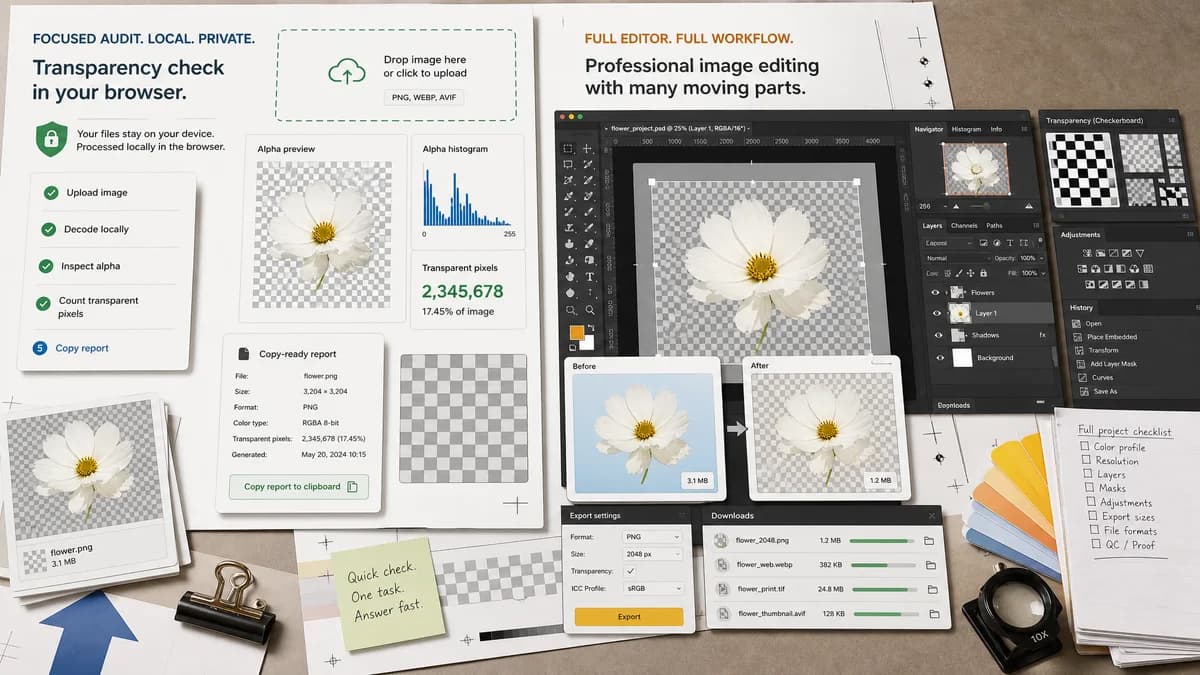
Why Image Transparency Checker fits
TextFaker Image Transparency Checker should focus on a narrow audit task: decode the uploaded image locally, inspect alpha values, count transparent pixels, and show a copy-ready report.
What Adobe Photoshop offers
Adobe Photoshop is a full professional image editor with layer workflows and transparency display preferences, including checkerboard settings for transparent areas.
Open alternative signals
Workflow
Image Transparency CheckerSingle-purpose transparency audit in the browser
Adobe PhotoshopFull image editing workspace
Pixel counts
Image Transparency CheckerDesigned to report fully transparent and semi-transparent pixel totals
Adobe PhotoshopPrimarily visual inspection and editing tools
Install/account
Image Transparency CheckerNo desktop app required for the checker flow
Adobe PhotoshopCreative Cloud product ecosystem
Privacy posture
Image Transparency CheckerImage can be decoded locally for the check
Adobe PhotoshopProject workflow depends on Adobe app and cloud/account choices
Decision guide
Quickly proving whether a PNG, WebP, AVIF, GIF, or other browser-decodable image has fully transparent or semi-transparent pixels without opening a full editor.
Editing, compositing, masking, retouching, preparing layered source files, and changing the image after transparency problems are found.
Side-by-side open source alternative comparison
| Decision point | Image Transparency Checker | Adobe Photoshop | Takeaway |
|---|---|---|---|
| Transparency detection | Our workflowCounts alpha values and summarizes whether transparency exists | Proprietary workflowShows transparent regions visually and supports manual editing | Use TextFaker when the question is whether transparency exists; use Photoshop when the file needs repair. |
| Scope | Our workflowFocused checker with one copy-all result | Proprietary workflowBroad professional editor | The narrower tool should be faster for asset QA. |
| Output | Our workflowReport with alpha-channel status, pixel counts, percentages, and preview | Proprietary workflowEdited image or layered document workflow | TextFaker should produce evidence, not a new design file. |
| Best user intent | Our workflowTransparent image checker, fake checkerboard detection, asset handoff QA | Proprietary workflowPhoto editing, masking, retouching, compositing | The SEO page should target checker intent, not Photoshop replacement intent. |
| Local processing | Our workflowThe checker should keep image analysis browser-local | Proprietary workflowProfessional app workflow may include cloud-connected features | Local alpha inspection is a useful privacy differentiator. |
| Transparency display | Our workflowCheckerboard preview plus numeric alpha analysis | Proprietary workflowCheckerboard display preferences for editing canvas | Numeric counts make TextFaker stronger for audit and handoff proof. |
Detailed research
Why Choose TextFaker
Choose TextFaker when a designer, developer, marketplace operator, or client only needs proof that an image contains real alpha transparency. The page should make clear that it checks pixels locally and reports exact transparent and semi-transparent counts.
- Useful for verifying exported logos, stickers, product cutouts, and UI assets.
- Helpful when an image shows a checkerboard pattern that may be baked into the pixels rather than true transparency.
- Better suited to quick QA than editing or retouching.
When Photoshop Fits Better
Photoshop remains the better choice when the next step is editing: removing backgrounds, refining masks, changing layers, or fixing edge artifacts after a failed export.
- Use it for layered PSD workflows.
- Use it for manual mask cleanup.
- Use it when transparency is only one part of a larger design job.
Page Positioning
The alternative page should avoid implying that TextFaker replaces Photoshop. It should position TextFaker as a lightweight transparency checker that complements full editors by confirming whether the exported file is actually transparent.
Implementation Notes
The tool should use the shared upload drop zone, decode into canvas or ImageBitmap, inspect alpha values, and unlock the access/paywall flow only after a successful value-producing result.
- Report alpha channel evidence separately from transparent pixel presence.
- Count alpha 0 as fully transparent and alpha 1 through 254 as semi-transparent.
- Show one copy-all button for the full result summary.
Research notes
- Official Photoshop help documents transparency checkerboard preferences, which supports comparison around visual transparency inspection.
- Photoshop is proprietary software and should be contrasted with TextFaker as a browser-based checker, not as an open-source clone.
- The TextFaker page should emphasize measurement and verification rather than full editing parity.
Official source
The proprietary product link is included once here for source checking after the alternative analysis.
Official Adobe Photoshop source