
Instagram Carousel Panorama Splitter vs PanoraSplit
Instagram Carousel Panorama Splitter is the baseline in this comparison: Split a wide photo or design into numbered Instagram carousel slides with browser-local crop math, dimensions, and downloads.
Compare TextFaker with PanoraSplit, an iOS app that splits photos into 2 to 9 images for swipeable Instagram panoramas.
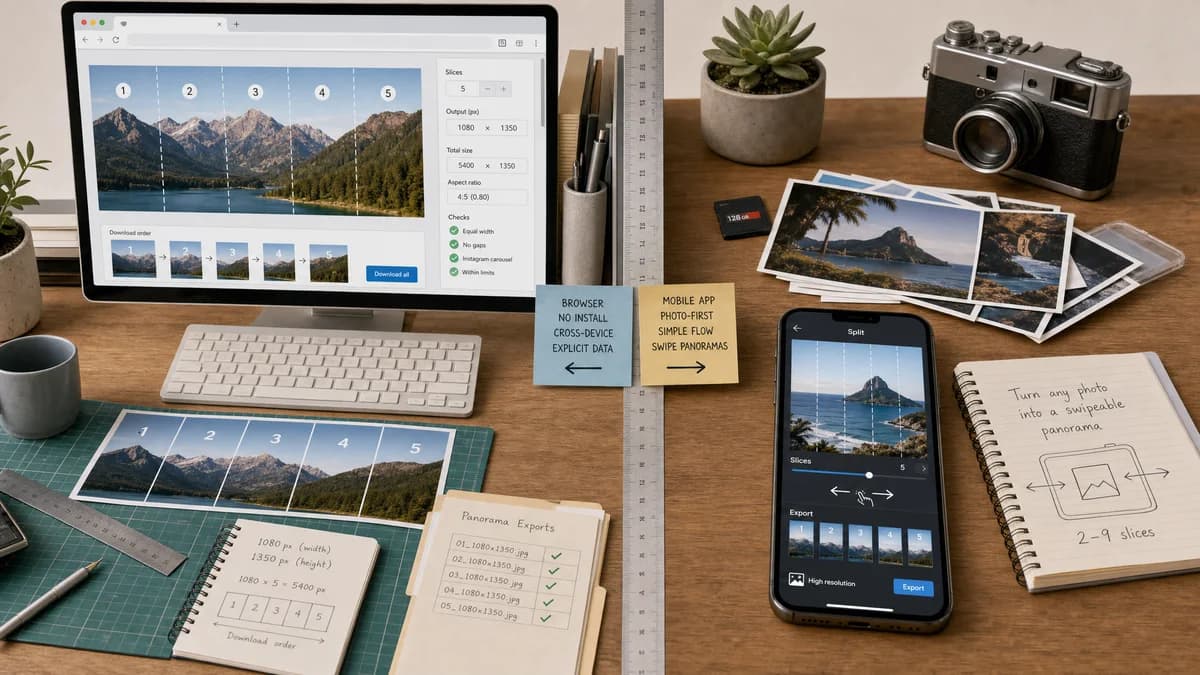
Quick verdict
PanoraSplit is a direct mobile-app competitor; TextFaker can differentiate through no-install access, broader device support, and transparent deterministic crop data.
How Instagram Carousel Panorama Splitter fits
TextFaker provides a browser-local splitter with explicit output math, ordered downloads, and validation for Instagram carousel presets.
How PanoraSplit fits
PanoraSplit focuses on making swipeable panoramas from photos on iPhone, splitting any photo into multiple high-resolution pieces for Instagram posting.
Side-by-side comparison
| Decision point | Instagram Carousel Panorama Splitter | PanoraSplit | Takeaway |
|---|---|---|---|
| Slice range | Our workflowCan support configurable slice counts up to Instagram carousel limits with validation. | Competitor workflowApp listing says it splits photos into 2 to 9 photos. | TextFaker can cover longer carousel designs and warn about platform constraints. |
| Platform | Our workflowBrowser-based and cross-platform. | Competitor workflowiOS app listing. | TextFaker can serve users outside the Apple app ecosystem. |
| Output transparency | Our workflowDisplays slice count, crop boxes, dimensions, and downloadable file metadata. | Competitor workflowFocuses on high-resolution split output and posting instructions. | TextFaker is better suited for deterministic QA and repeatable workflows. |
| Privacy | Our workflowLocal browser processing can be explicit on the page. | Competitor workflowNative app flow uses local device images but app permissions are separate from web transparency. | TextFaker can make privacy a first-class feature. |
| Posting workflow | Our workflowExports files for manual upload or scheduling tools. | Competitor workflowGuides users to post split photos with Instagram's multiple selection flow. | Both require Instagram upload, but TextFaker can better support desktop preparation. |
| Advanced validation | Our workflowCan warn when an image is too narrow, too low-resolution, or will require scaling. | Competitor workflowListing emphasizes ease rather than detailed validation messages. | TextFaker can win for users who want predictable output before export. |
Use Instagram Carousel Panorama Splitter when
- Desktop and Android users who do not want an iOS-only workflow
- Users who need exact crop-box and dimension reporting
- Creators exporting ZIP files for scheduling or later posting
- People comparing square, 4:5, and 3:4 slice choices
Use PanoraSplit when
- iPhone users who want a dedicated panorama split app
- Users who prefer saving directly into the iOS photo workflow
- Simple 2 to 9 piece swipeable panoramas
- Quick app-based preview before posting
Detailed comparison
User Need
Public discussions ask for ways to split one panorama into multiple Instagram carousel images while keeping the full scene visible. Users mention needing a set aspect ratio and a chosen number of slices.
- The core job is slicing and ordering, not image enhancement.
- A validation-first UI reduces failed Instagram uploads and visible seams.
Feature Scope
The page can stay focused on panorama splitting. Add controls only when they affect measurable output, such as aspect ratio, slice count, fit mode, output format, and quality.
- Include per-slide previews but make numeric outputs primary.
- Offer a copyable manifest for all slices.
- Support PNG and JPEG export with deterministic MIME labels.
Local Processing
Image decoding, scaling, crop calculation, and encoding can all happen in the browser. No server upload is necessary for normal JPG, PNG, WebP, AVIF, or BMP inputs that the browser can decode.
- Use object URLs for preview and revoke them after replacement.
- Keep maximum megapixel limits to protect mobile memory.
- Show a clear message when the browser cannot decode a file.
Test Strategy
Automated tests can use generated images and deterministic dimensions, then inspect output blobs rather than subjective appearance.
- Assert slice count and dimensions match the selected preset.
- Assert crop boxes cover the chosen panorama region exactly once.
- Assert filenames preserve left-to-right order.
- Assert invalid slice counts produce stable warning text.
Positioning
TextFaker can position this as a practical utility for photographers, designers, and social media managers who already made the artwork and want reliable slices.
- Do not claim automatic engagement improvement.
- Do highlight no account, no install, and local processing.
Research notes
- PanoraSplit's App Store copy validates the exact use case: split wide photos into swipeable Instagram panoramas without losing important details.
- A TextFaker version can include more explicit numeric outputs than typical mobile apps expose.
- The comparison can avoid saying TextFaker posts directly; it exports files for the user to upload.
Official source
The only outbound competitor link on this page is placed here for source checking after the comparison.
Official PanoraSplit source