
Instagram Carousel Panorama Splitter vs Panoslice
Instagram Carousel Panorama Splitter is the baseline in this comparison: Split a wide photo or design into numbered Instagram carousel slides with browser-local crop math, dimensions, and downloads.
Compare a browser-local TextFaker panorama splitter with Panoslice, an iOS carousel maker with templates, collage tools, and slide design features.
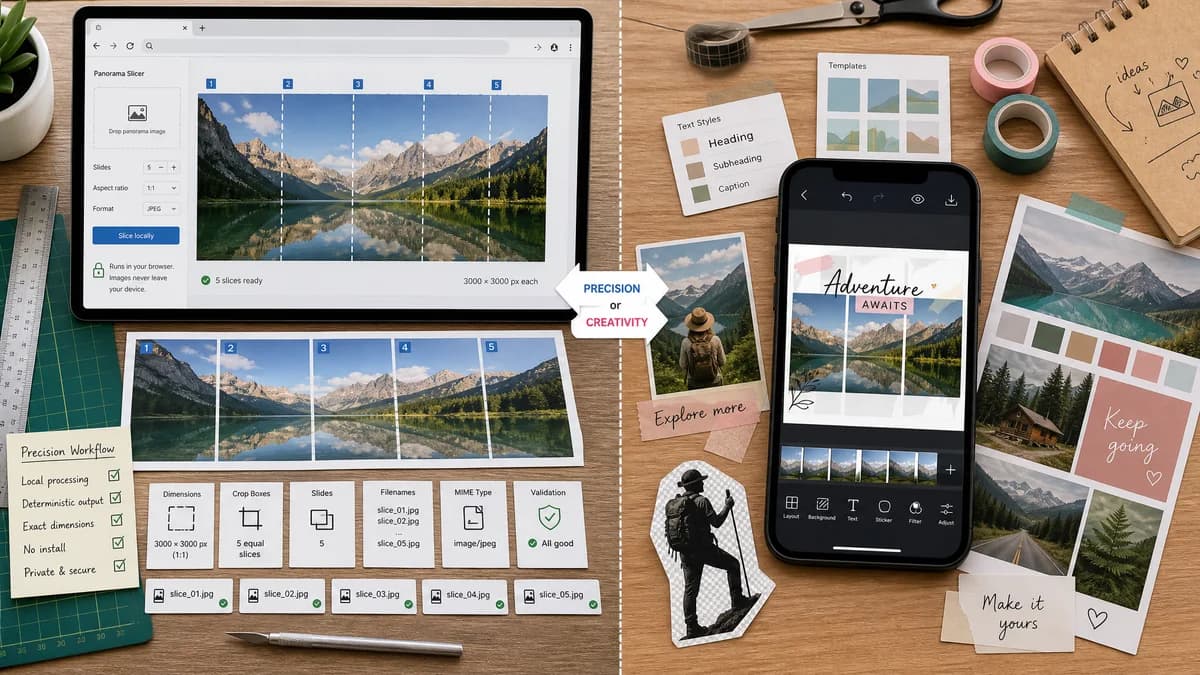
Quick verdict
Choose TextFaker for quick, private, deterministic panorama slicing in any modern browser; choose Panoslice when the job is more about creative layout templates and mobile editing than verifiable crop output.
How Instagram Carousel Panorama Splitter fits
TextFaker is a focused, no-install browser tool for splitting one wide image into deterministic Instagram carousel slices. It can expose exact dimensions, crop boxes, slide count, output filenames, MIME types, and validation messages so users and tests can confirm the output without visual judgment.
How Panoslice fits
Panoslice is a mobile-first creative app for Instagram carousels, photo dumps, scrapbook styles, text overlays, background removal, and templates. It is stronger for designed carousel compositions than for transparent browser-local slice math.
Side-by-side comparison
| Decision point | Instagram Carousel Panorama Splitter | Panoslice | Takeaway |
|---|---|---|---|
| Primary workflow | Our workflowUpload one wide image, choose an Instagram slide preset and slice count, then export ordered slices. | Competitor workflowBuild carousel layouts using templates, collage, photo dump styles, text, and editing tools. | TextFaker can be simpler for users who already have the panorama and only need reliable slices. |
| Install requirement | Our workflowRuns in the browser with no app-store install. | Competitor workflowRequires an iOS app install. | TextFaker is more accessible on desktop, Android, school, and shared machines. |
| Deterministic outputs | Our workflowCan show crop boxes, per-slice pixel dimensions, output count, filenames, and ZIP manifest. | Competitor workflowApp listing emphasizes creative carousel creation rather than machine-readable crop details. | TextFaker has a stronger testing and QA story. |
| Privacy posture | Our workflowDesigned to process the image locally in the browser. | Competitor workflowMobile app behavior depends on app permissions and platform storage flow. | TextFaker can make privacy explicit and easy to verify. |
| Instagram presets | Our workflowCan include square, 4:5 portrait, 3:4 portrait, and custom slide width presets with validation. | Competitor workflowTargets Instagram carousel design but does not expose detailed preset math in the listing. | TextFaker can lead with exact dimensions and warnings. |
| Mobile usability | Our workflowCan support touch upload, preview, slice-count stepper, and one-tap ZIP or individual downloads. | Competitor workflowNative mobile app likely provides strong phone ergonomics. | Panoslice may feel richer on iPhone, while TextFaker can stay lightweight and cross-platform. |
Use Instagram Carousel Panorama Splitter when
- Splitting a finished panorama or long carousel design without installing an app
- Checking exact 1080 x 1350, 1080 x 1080, or 3:4 slide math before posting
- Downloading ordered image files or a ZIP with testable filenames and dimensions
- Privacy-sensitive users who prefer local browser processing
Use Panoslice when
- iPhone users who want carousel templates and scrapbook-style layouts
- Creators who want text, collage, and visual effects in the same app
- Users comfortable working inside a mobile app workflow
- Posts that require design composition rather than only slicing
Detailed comparison
Demand Evidence
Public user discussions show that people want to split panoramas for Instagram swipe posts without learning manual slicing tools. One shortcut creator said they built their own workflow after failing to find an app that matched their desired output shape. Adobe Community users also report visible seams after manual slicing.
- The user problem is not just cropping; it is preserving continuity across adjacent carousel slides.
- A deterministic splitter can address common complaints by showing the exact boundary positions before export.
Product Angle
The TextFaker page can avoid becoming a full carousel design suite. Its advantage is a narrow workflow: take a finished panorama, compute exact Instagram-ready slices, and export them with transparent numbers.
- Use presets for square, 4:5, and 3:4 slide targets.
- Allow 2 to 20 slices, with warnings when output exceeds common posting workflows.
- Show source-to-output scaling and crop decisions explicitly.
Implementation Guidance
Use browser image decoding and canvas or OffscreenCanvas to crop and encode each slide locally. The core function can be pure enough to unit test with synthetic dimensions before UI tests exercise file upload and downloads.
- Return an array of crop boxes with x, y, width, and height in source pixels.
- Return output dimensions for every slide.
- Return validation messages for too-small images, unsupported files, invalid slice counts, and non-wide inputs.
- Generate stable filenames such as panorama-slide-01.png.
Automated Testing
Tests can avoid visual judgment by uploading a generated test image with known dimensions and asserting the computed crop boxes and exported image dimensions.
- Assert a 5400 x 1350 input at 4:5 and 5 slices exports five 1080 x 1350 files.
- Assert crop boxes are contiguous with no gap or overlap after rounding.
- Assert ZIP contains the expected filenames in order.
- Assert mobile viewport controls remain reachable and do not require drag precision.
SEO Fit
This tool fits TextFaker's existing browser-local image utility cluster and complements the Instagram Image Size Checker. It can target queries around Instagram panorama splitter, carousel image splitter, swipeable panorama, and split long image for Instagram.
- The page can explain that it does not post to Instagram directly.
- Comparison content can stress local processing and exact output reporting.
Research notes
- Panoslice is a strong creative competitor but less direct for users who only need a transparent slicing calculator.
- Public Reddit and Adobe Community sources reveal repeated pain around exact slices, seams, crop math, and tool reliability after Instagram layout changes.
- The implementation can avoid aesthetic promises and instead verify dimensions, slice count, and boundaries.
Official source
The only outbound competitor link on this page is placed here for source checking after the comparison.
Official Panoslice source