
Open Source Alternatives to Canva
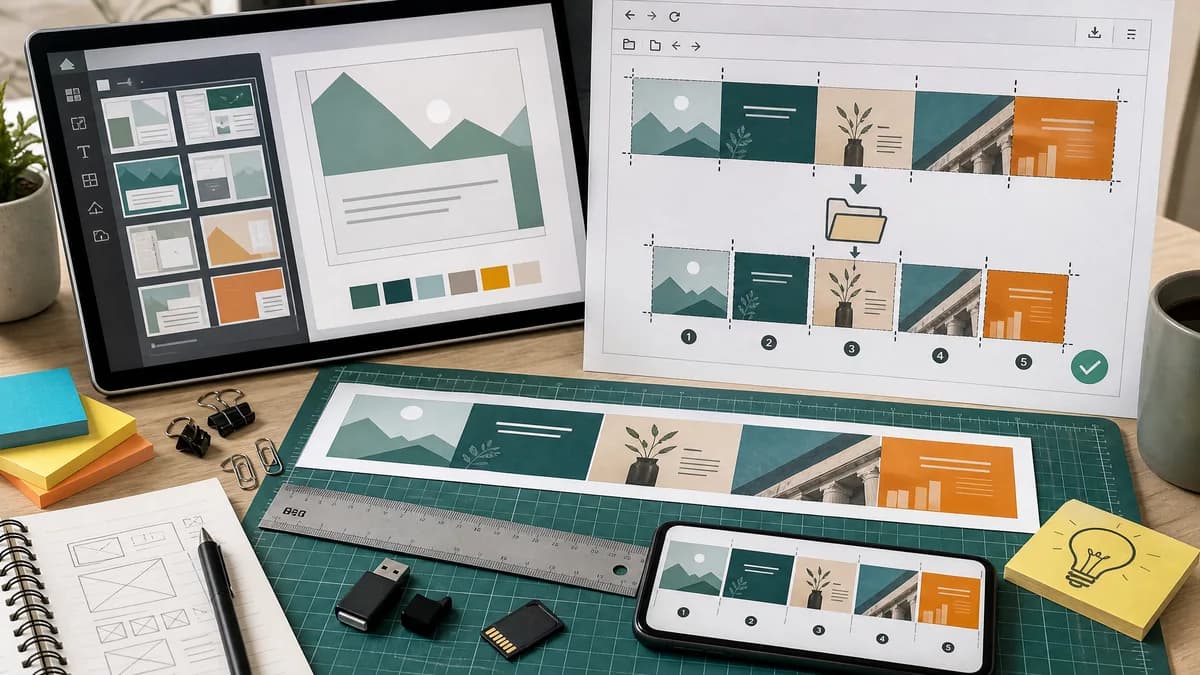
Instagram Carousel Panorama Splitter is a browser-based alternative for users who need this focused result without installing a proprietary desktop app or entering a larger hosted workflow.
This research compares that workflow with Canva while keeping the outbound source link at the bottom after the analysis.
Why Instagram Carousel Panorama Splitter fits
TextFaker can not compete with Canva as a design editor. It can serve the post-design step: users export one long image from any editor, then split it locally into exact carousel files.
What Canva offers
Canva provides customizable Instagram carousel templates and a broad visual design platform for creating social content.
Open alternative signals
Product scope
Instagram Carousel Panorama SplitterImage splitting utility
CanvaFull design platform
Best input
Instagram Carousel Panorama SplitterFinished wide export from any editor
CanvaDesign starts inside Canva templates
Output validation
Instagram Carousel Panorama SplitterExact slide dimensions and crop boxes
CanvaTemplate and design export workflow
Privacy
Instagram Carousel Panorama SplitterLocal browser file processing
CanvaCloud design platform
Decision guide
Users who already designed a panorama or carousel strip and need exact, local slicing and validation.
Users who need templates, brand kits, stock assets, collaborative editing, and social design workflows.
Side-by-side open source alternative comparison
| Decision point | Instagram Carousel Panorama Splitter | Canva | Takeaway |
|---|---|---|---|
| Design creation | Our workflowDoes not create layouts from templates; it splits existing images. | Proprietary workflowProvides thousands of templates and design assets. | TextFaker is a utility companion, not a Canva clone. |
| Carousel math | Our workflowCalculates slide count, target canvas, and crop boxes explicitly. | Proprietary workflowUsers often manually create wide designs and use external splitters. | TextFaker can solve the error-prone export step. |
| Local workflow | Our workflowUploaded file remains in the browser during splitting. | Proprietary workflowDesign assets live in Canva's cloud workflow. | Local splitting is useful after export. |
| Automated tests | Our workflowTest with a fixed 3240 by 1080 export and assert three 1080 by 1080 outputs. | Proprietary workflowTemplate rendering and visual quality are not deterministic in the same way. | TextFaker has a clean deterministic test path. |
| Mobile use | Our workflowMobile-friendly upload, settings, and share/download controls. | Proprietary workflowCanva has mature mobile and web apps. | TextFaker can keep the mobile flow very short. |
| Pricing and accounts | Our workflowCan work without design accounts or cloud assets. | Proprietary workflowAdvanced platform features may depend on account or plan. | The utility can appeal to users who only need splitting. |
Detailed research
Why Users Compare It
Many tutorials teach users to design a seamless carousel in Canva, then split the long image elsewhere. That makes Canva an important comparison even though it is a design platform rather than a pure splitter.
- Position TextFaker as the export-finishing step.
- Include a preset for Canva-style long canvases.
- Warn when total width is not evenly divisible by slide count.
Implementation Notes
A useful Canva-adjacent workflow can accept a long PNG or JPEG, infer likely slide count when width is a multiple of 1080, and let users confirm or override the count.
- Auto-detect 2160, 3240, 4320, 5400, and similar widths.
- Show inferred slide dimensions before export.
- Flag fractional slice widths as a validation warning.
Demand Evidence
The Reddit Canva tutorial shows a clear workflow: create a wide canvas, align content across split boundaries, then use an image splitter. This is a public general-user creator source, not a developer-only need.
- The pain point is post-design slicing.
- The user wants seamless alignment without manual cropping.
Open-Source-Powered Angle
TextFaker can fairly describe itself as a browser-based, open-source-powered alternative to the splitter step in Canva workflows. It can not imply it replaces Canva's design suite.
- Use local Canvas rendering.
- Keep export math visible.
- Support direct downloads without account setup.
Research notes
- Canva's official page offers Instagram carousel post templates to personalize and share.
- A Reddit Canva tutorial explains designing one long canvas by multiplying 1080px by the number of slides, then using a splitter afterward.
- This supports a complementary open-source-powered TextFaker utility for the split/export step.
Official source
The proprietary product link is included once here for source checking after the alternative analysis.
Official Canva source