
Open Source Alternatives to SwipeMix
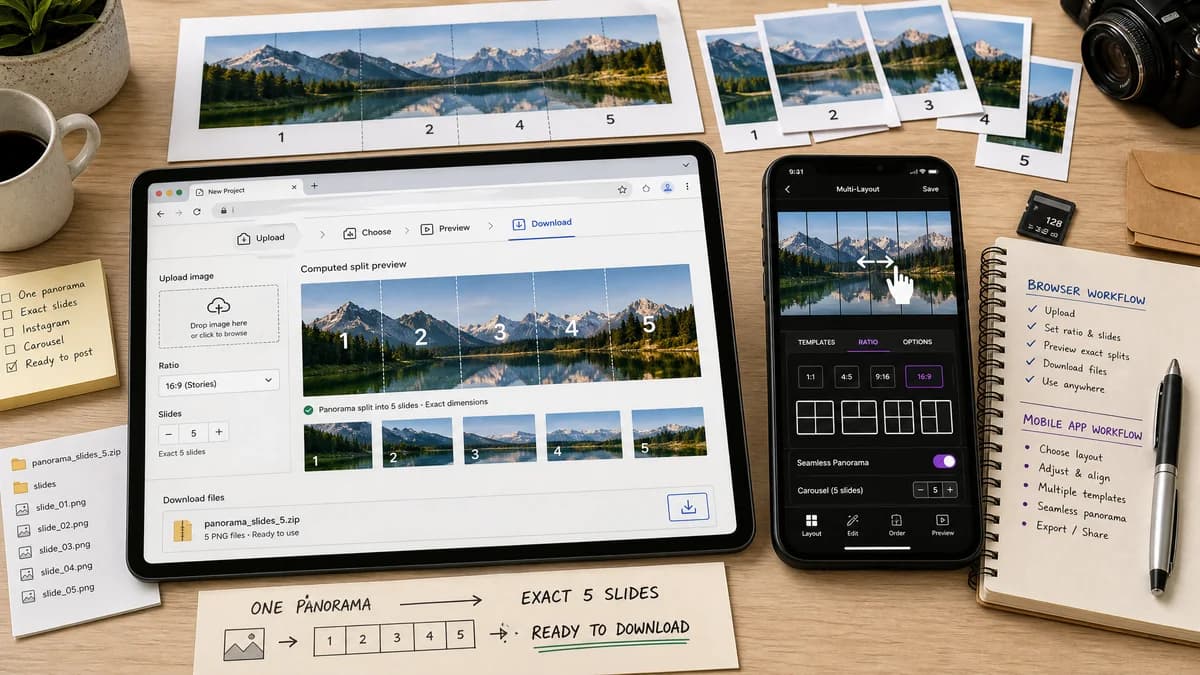
Instagram Carousel Panorama Splitter is a browser-based alternative for users who need this focused result without installing a proprietary desktop app or entering a larger hosted workflow.
This research compares that workflow with SwipeMix while keeping the outbound source link at the bottom after the analysis.
Why Instagram Carousel Panorama Splitter fits
TextFaker can offer a lower-friction workflow for users who do not need collage templates: upload one image, pick slide count and ratio, review computed output, and download files.
What SwipeMix offers
SwipeMix is an all-in-one mobile tool for carousel posts, seamless panoramas, layouts, and collages for Instagram-style content.
Open alternative signals
Feature focus
Instagram Carousel Panorama SplitterPrecise panorama splitting
SwipeMixCarousel, panorama, layout, and collage creation
Install
Instagram Carousel Panorama SplitterNo app install
SwipeMixiOS app install
Output metadata
Instagram Carousel Panorama SplitterVisible dimensions, count, crop boxes, and file names
SwipeMixCreator-facing export flow
Privacy posture
Instagram Carousel Panorama SplitterLocal browser processing
SwipeMixMobile app processing and sharing
Decision guide
Creators who want precise split output, no installation, no account dependency, and local file handling.
Creators who want a native app with collage and layout design features in addition to splitting.
Side-by-side open source alternative comparison
| Decision point | Instagram Carousel Panorama Splitter | SwipeMix | Takeaway |
|---|---|---|---|
| Input stage | Our workflowDesigned for a finished wide image or design export. | Proprietary workflowSupports making carousel and collage content inside the app. | TextFaker can integrate well with Canva, Figma, Photoshop, or camera exports. |
| Output checks | Our workflowReports exact slide count and per-slide dimensions before download. | Proprietary workflowFocuses on a visual carousel result. | TextFaker can reduce upload mistakes through validation. |
| Format handling | Our workflowCan export PNG, JPEG, or WebP when the browser supports encoding. | Proprietary workflowApp output format depends on native implementation. | Explicit MIME and extension checks are useful for tests and users. |
| Accessibility | Our workflowWorks from desktop browser, mobile browser, and keyboard-accessible controls. | Proprietary workflowNative mobile app workflow. | A responsive web tool expands where the job can be done. |
| Batch clarity | Our workflowOutputs slide-01 through slide-N in upload order. | Proprietary workflowMay save or share images through the mobile photo library. | Predictable filenames help avoid posting in the wrong order. |
| Validation path | Our workflowTest fixture can assert crop rectangles and output size without visual inspection. | Proprietary workflowManual preview confirms visual continuity. | TextFaker can make the non-visual QA path explicit. |
Detailed research
Why Users Compare It
SwipeMix overlaps with the panorama and carousel maker category, but it is broader than the requested utility. TextFaker can win on transparency and speed for people who simply need to cut an image correctly.
- Avoid a template-heavy product promise.
- Make settings compact for mobile use.
- Provide an export summary that can be copied.
Implementation Notes
The core algorithm can create a virtual output canvas for the entire carousel, fit the source image into that canvas, and then slice equal-width slide canvases. The UI can show whether pixels were cropped, padded, or scaled.
- Support matte color for contain mode padding.
- Support PNG for lossless output and JPEG/WebP with quality controls.
- Show warnings for non-integer scaling or heavy upscaling.
Demand Evidence
Public discussions describe users designing a long carousel image and then needing a splitter to cut it into columns. That is a utility task, not necessarily a full app subscription task.
- Users care about alignment across swipe boundaries.
- Users also care about the correct number of columns and upload order.
Open-Source-Powered Angle
The page can present TextFaker as an open-source-powered alternative workflow because the transformation can be implemented with standard browser APIs and auditable crop math.
- Keep all work local to the device.
- Expose enough output data for deterministic tests.
Research notes
- The official App Store listing presents SwipeMix as a carousel, panorama, and collage maker.
- Community carousel tutorials and Reddit posts show users want simple splitting after creating a full-width design elsewhere.
- TextFaker can provide deterministic download names and crop metadata so the result can be tested.
Official source
The proprietary product link is included once here for source checking after the alternative analysis.
Official SwipeMix source