
Open Graph Image Checker
Open Graph Image Checker checks your og:image asset against the 1200 x 630 link preview size, 1.91:1 ratio, platform variants, file-size risk, and image format compatibility.
OG image checker results show whether a preview image is ready for Facebook, LinkedIn, X, Slack, Discord, and mobile message unfurls or needs a crop, resize, compression, or safer export format.
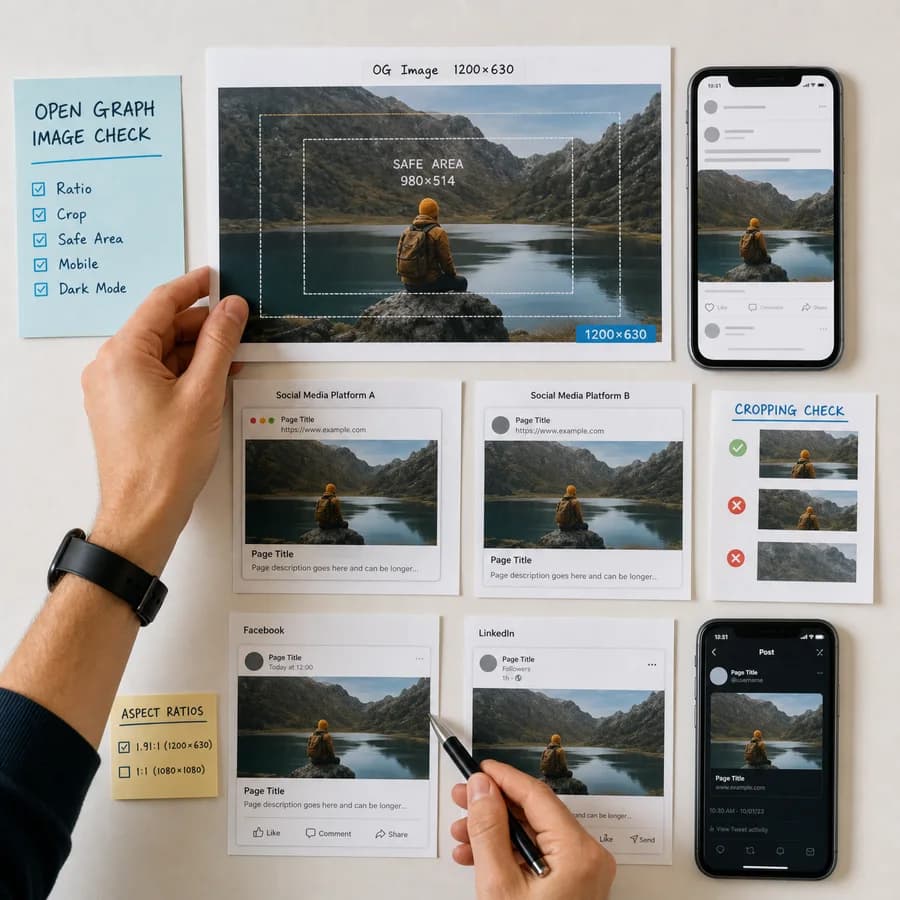
Open Graph sizes checked
The main target is a 1200 x 630 px image, with related checks for Facebook, LinkedIn, X large cards, and chat unfurls that read Open Graph metadata.
Minimum: 600 x 315 px.
Minimum: 600 x 315 px.
Minimum: 200 x 105 px.
Minimum: 300 x 157 px.
Minimum: 600 x 315 px.
Minimum: 300 x 200 px.
Choose an Open Graph image
JPG, PNG, WebP, GIF, AVIF, and BMP images up to 50 MB.
Open Graph result
Dimensions, file size, format risk, and meta tag guidance.
Select an image to compare it with Open Graph and common link-preview targets.
Open Graph Image Size Guide
What this Open Graph image checker validates
An Open Graph image is the preview image referenced by the og:image meta tag when a page is shared in social feeds, messaging apps, and workplace chat tools. The tool reads the selected image locally, checks pixel dimensions and aspect ratio, then compares the file with common link-preview targets such as 1200 x 630 for universal Open Graph cards, 1200 x 627 for LinkedIn URL posts, and a wide card target for X summary_large_image.
The check also flags file-size risk and format compatibility because a technically correct 1.91:1 image can still fail if it is too large, uses a less reliable format, or lacks explicit width, height, and alt metadata in the page markup.
- Use 1200 x 630 px as the safest all-purpose Open Graph image export.
- Keep the aspect ratio close to 1.91:1 for most large social and chat previews.
- Use JPG or PNG when broad scraper compatibility matters.
- Add og:image:width, og:image:height, and og:image:alt next to the og:image tag.
How to interpret the fit report
Exact means the uploaded image matches one of the configured preview targets. Ready means the aspect ratio fits and the image is at least as large as the target, so you can export a final target-size copy for predictable results. Minimum size means the image can work for a large preview but may look soft on dense screens. Crop risk means the image is close but not close enough to trust automatic cropping.
The best-fit row is only the starting point. Check the full table if one image must serve several destinations, because a 1200 x 630 Open Graph card, a 1200 x 627 LinkedIn URL image, and an X large card are close but not identical.
- If the report says too small, export from the source design instead of upscaling a small raster.
- If the report says crop risk, crop to the listed ratio before publishing.
- If file size is large, compress the final JPG or PNG before adding it to the page.
- If the format is not recommended, export a JPG or PNG version for the og:image URL.
Practical og:image markup
Open Graph itself defines the og:image field and optional structured properties such as image type, width, height, and alt text. In practice, adding explicit width and height helps crawlers understand the preview image faster, and alt text gives assistive technologies and downstream systems a useful description of the visual.
Use an absolute HTTPS image URL that can be fetched without cookies, login, robots blocks, or temporary signed URLs. After changing the image, refresh platform caches with the relevant sharing debugger or card validator because many services cache link preview metadata aggressively.
- Use a stable image URL, for example /og/product-name.jpg, instead of a short-lived blob or signed URL.
- Keep important text, logos, faces, and product details away from the edges.
- Avoid tiny screenshots with dense text; previews are often scaled down on mobile.
- Set twitter:card to summary_large_image when X is an important destination.
Limits and publishing checks
This tool checks the image file you select. It does not crawl a live page, verify that the og:image URL is public, or confirm that a platform has refreshed its cached preview. A browser-only checker is useful before upload, but the final page still needs a live URL test after deployment.
Different apps can crop, pad, compress, cache, or ignore preview images differently. The safest workflow is to create a clear 1200 x 630 JPG or PNG, keep the file reasonably small, publish explicit Open Graph metadata, then test the finished URL in the platform preview/debug tool.
- Facebook, LinkedIn, Slack, Discord, and mobile apps can cache old preview images.
- Some platforms fall back to page screenshots or other images if og:image cannot be fetched.
- Animated GIF previews are not predictable; use a static first-frame export when the card matters.
- WebP, AVIF, and BMP are not as universally safe as JPG or PNG for Open Graph tags.