
Perceptual Hash Generator vs ImageMagixOnline Image Hash Generator
Perceptual Hash Generator is the baseline in this comparison: Generate pHash-style, average hash, and difference hash fingerprints from an uploaded image locally in your browser.
ImageMagixOnline offers a free image hash generator focused on dHash and aHash, with configurable bit sizes and copyable hexadecimal results.
Quick verdict
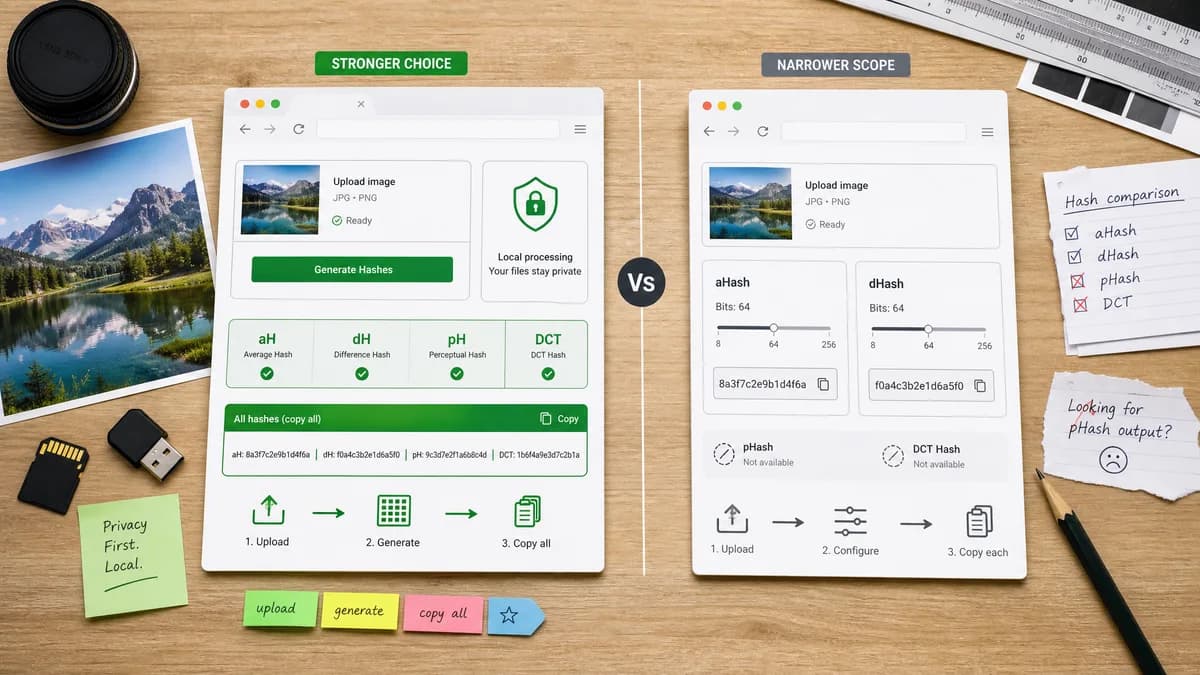
TextFaker exceeds this competitor on algorithm breadth and result interpretation while preserving the simplicity of upload, generate, copy.
How Perceptual Hash Generator fits
TextFaker supports dHash and aHash while adding pHash/DCT-style output where practical, privacy-first local decoding, and a unified copy-all result.
How ImageMagixOnline Image Hash Generator fits
ImageMagixOnline is strong for configurable aHash and dHash generation but is less complete for users specifically searching for pHash output.
Side-by-side comparison
| Decision point | Perceptual Hash Generator | ImageMagixOnline Image Hash Generator | Takeaway |
|---|---|---|---|
| pHash support | Our workflowIncludes pHash/DCT-style hash where practical. | Competitor workflowThe researched page focuses on dHash and aHash and notes other hash types separately. | pHash support is a key TextFaker differentiator. |
| Configurable bit size | Our workflowUses clear 64-bit defaults for pHash-style, average hash, and difference hash output. | Competitor workflowProvides bit-size options such as common 8x8 and larger variants. | ImageMagixOnline is stronger for bit-size configuration; TextFaker is clearer for quick standard outputs. |
| Output format | Our workflowProvides copy-ready hex, binary length notes, and a copy-all button. | Competitor workflowDisplays hexadecimal dHash and aHash values with copy controls. | TextFaker matches hex readability and improves consolidated copying. |
| User guidance | Our workflowIncludes Hamming-distance guidance and limitations. | Competitor workflowIncludes a compare-hashes workflow section in its page copy. | This competitor sets a useful baseline for comparison education. |
| Algorithm balance | Our workflowExplains when pHash, aHash, and dHash differ without implying one is always correct. | Competitor workflowOptimized around two simpler perceptual hash families. | TextFaker serves broader search intent with nuanced algorithm descriptions. |
| Upload workflow | Our workflowBrowser-local canvas decoding matches TextFaker's image-tool pattern. | Competitor workflowOnline generator with drag-and-drop and preview workflow. | Both tools fit quick upload workflows; TextFaker emphasizes local decoding and result explanation. |
Use Perceptual Hash Generator when
- Users who need pHash-style output in addition to aHash and dHash
- Users who want a single consolidated output block
- Privacy-focused image workflows
- People who need threshold guidance for comparing hashes
Use ImageMagixOnline Image Hash Generator when
- Users who only need aHash and dHash
- Users who want selectable hash sizes
- Users who prefer a focused hash generator without additional interpretation
Detailed comparison
Search Intent
ImageMagixOnline covers average hash generator and difference hash generator searches well, but users explicitly searching for image pHash generator need more than dHash and aHash.
- TextFaker title and description mention pHash, aHash, dHash, and Hamming distance.
Feature Scope
Configurable hash sizes are useful for advanced users, but TextFaker prioritizes clear 64-bit outputs that are easier to compare and document.
- The copy-all result keeps every visible hash in one stable text block.
Result UX
The result surface includes the uploaded image name, dimensions, each hash, bit length, and a compact comparison note.
Testing Focus
Focused tests cover deterministic outputs on generated fixtures and verify that unsupported files do not trigger metered usage.
- Include browser workflow readiness in the implementation checklist.
Research notes
- Adjacent direct competitor for aHash and dHash.
- Useful reference for bit-size option expectations.
- TextFaker's pHash-style output would address a broader query set.
- The comparison uses neutral SEO content and source-based positioning.
Official source
The only outbound competitor link on this page is placed here for source checking after the comparison.
Official ImageMagixOnline Image Hash Generator source