
Perceptual Hash Generator vs Oyyi Perceptual Hash Tool
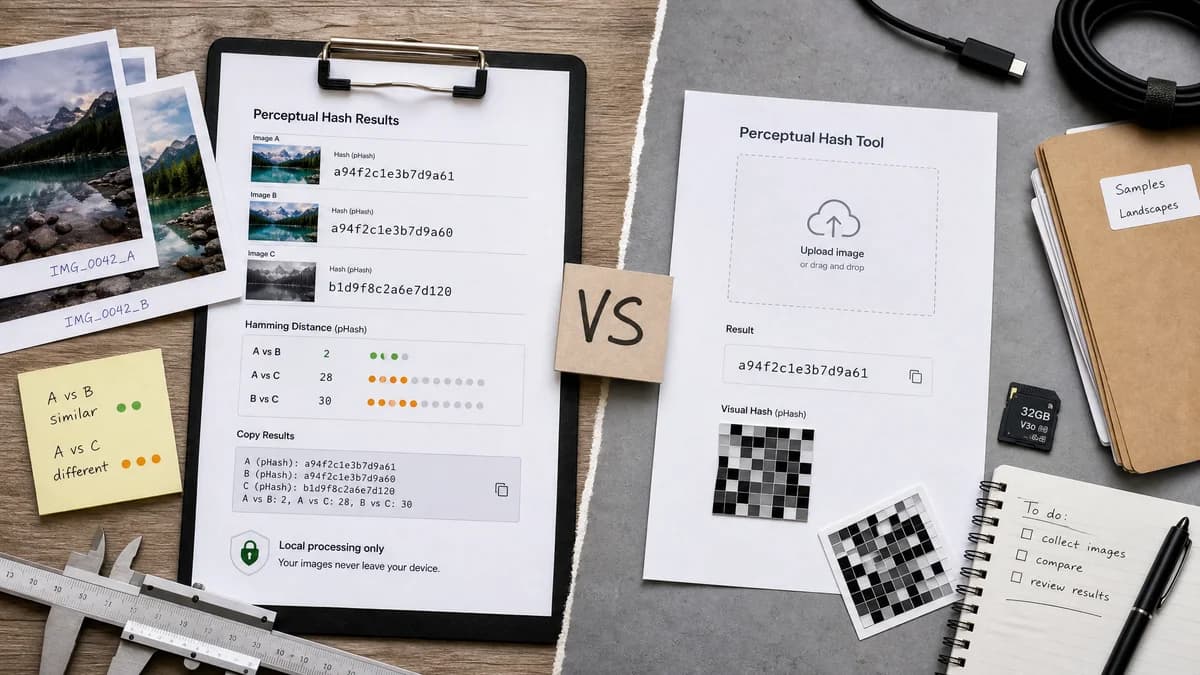
Perceptual Hash Generator is the baseline in this comparison: Generate pHash-style, average hash, and difference hash fingerprints from an uploaded image locally in your browser.
Oyyi offers an online tool for generating an image perceptual hash and includes a visual representation of the hash.
Quick verdict
TextFaker differentiates through practical comparison outputs and local processing rather than decorative hash visualization.
How Perceptual Hash Generator fits
TextFaker prioritizes multiple hash outputs, Hamming-distance guidance, and copy-ready text results over a primarily visual hash representation.
How Oyyi Perceptual Hash Tool fits
Oyyi is an online perceptual hash generator with a simple media-tool orientation and an emphasis on generating the hash result.
Side-by-side comparison
| Decision point | Perceptual Hash Generator | Oyyi Perceptual Hash Tool | Takeaway |
|---|---|---|---|
| Hash breadth | Our workflowpHash-style, aHash, and dHash outputs. | Competitor workflowPresents a perceptual hash generation workflow. | TextFaker is more explicit about algorithm variants. |
| Output style | Our workflowCopy-ready text values with one copy-all button. | Competitor workflowIncludes a visual representation of the hash. | TextFaker favors practical handoff over visualization. |
| Privacy model | Our workflowDecodes images locally in the browser. | Competitor workflowOnline tool positioning; local processing was not the core researched claim. | State local behavior clearly. |
| Comparison support | Our workflowExplains Hamming distance and how to compare two hashes. | Competitor workflowFocused on generating a perceptual hash. | Comparison education can make TextFaker more useful. |
| Related tools | Our workflowSeparate from TextFaker's image diff and color tools. | Competitor workflowPart of a broader online media-tool set. | Registry copy prevents confusion with pixel comparisons. |
| Testing needs | Our workflowRequires deterministic fixtures and decode-error cases. | Competitor workflowPublic page does not affect TextFaker test coverage. | TextFaker's implementation includes focused and full verification. |
Use Perceptual Hash Generator when
- Users who need multiple image-similarity fingerprints
- Users copying hash values into scripts or dedup databases
- Privacy-sensitive upload workflows
- Users who need explanation of Hamming distance
Use Oyyi Perceptual Hash Tool when
- Users who want a quick perceptual hash result
- Users who like visual representation of generated hashes
- Casual online media-tool users
Detailed comparison
Differentiator
A visual hash representation may be interesting, but the main user intent is usually to generate, compare, and copy fingerprints. TextFaker optimizes for that workflow.
Algorithm Naming
Search demand includes pHash generator, average hash generator, and difference hash generator. Naming each output is more valuable than a single generic perceptual-hash label.
Result Design
The result area is compact and scannable: file name, dimensions, pHash-style, aHash, dHash, binary or hex notes, and copy-all.
- Avoid card nesting; keep the upload and result workflow direct.
Limits
The tool clarifies that perceptual hashes can miss transformed images and can collide; they are not proof of identity or integrity.
Research notes
- Online direct competitor but less detailed in available source summary.
- Good reminder that visual hash representation is optional, not core.
- TextFaker emphasizes utility for duplicate detection and comparison.
- Keep implementation local and deterministic.
Official source
The only outbound competitor link on this page is placed here for source checking after the comparison.
Official Oyyi Perceptual Hash Tool source