
Open Source Alternatives to PhotoDNA
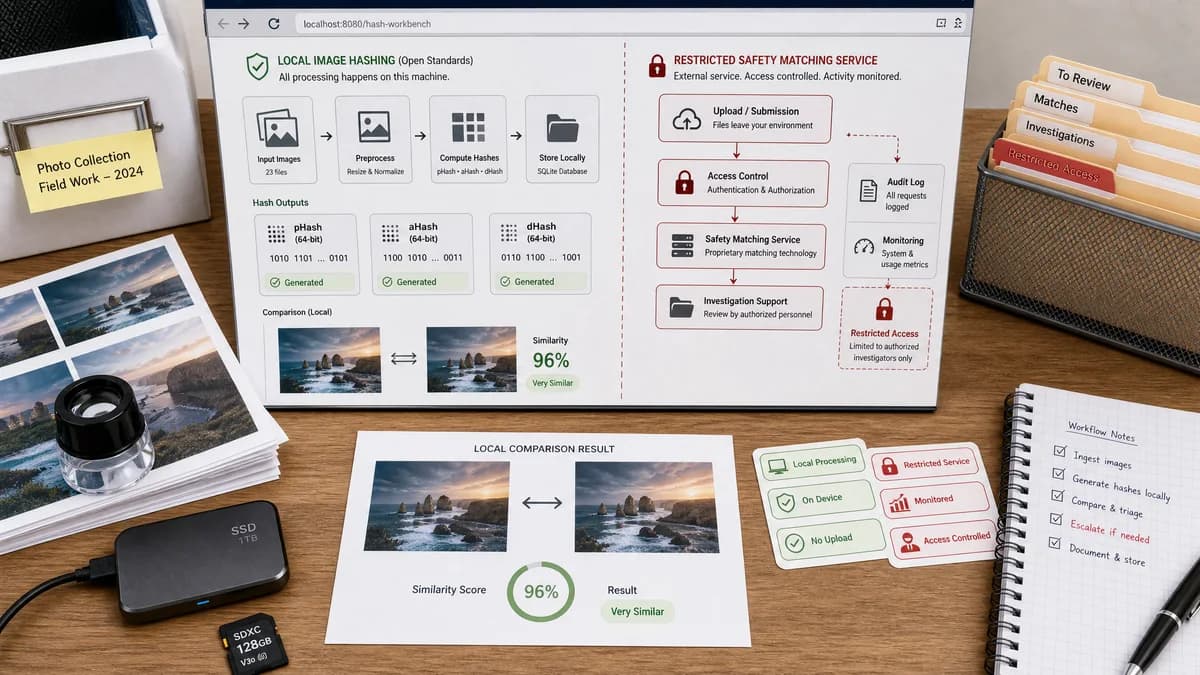
Perceptual Hash Generator is a browser-based alternative for users who need this focused result without installing a proprietary desktop app or entering a larger hosted workflow.
This research compares that workflow with PhotoDNA while keeping the outbound source link at the bottom after the analysis.
Why Perceptual Hash Generator fits
TextFaker can help users understand perceptual hashing concepts with local pHash-style, aHash, and dHash outputs, but it does not present itself as a PhotoDNA-compatible or safety-enforcement system.
What PhotoDNA offers
PhotoDNA is a Microsoft technology and cloud service used for specific child safety and investigation support contexts, with access controls and monitoring described by Microsoft.
Open alternative signals
Access model
Perceptual Hash GeneratorPublic browser tool for ordinary uploaded images
PhotoDNARestricted Microsoft service with controlled usage
Algorithm compatibility
Perceptual Hash GeneratorCommon perceptual hashing concepts such as pHash-style, aHash, and dHash
PhotoDNAMicrosoft PhotoDNA technology, not exposed as a general hash format
Intended use
Perceptual Hash GeneratorBenign duplicate checks, testing, and image-fingerprint learning
PhotoDNASpecific content safety and investigation support workflows
Output visibility
Perceptual Hash GeneratorDisplays copy-ready hash strings
PhotoDNAOperates within service-specific matching systems
Decision guide
Educational, developer, QA, and duplicate-image fingerprint generation on ordinary images.
Approved content-safety workflows that require Microsoft's PhotoDNA ecosystem and eligibility controls.
Side-by-side open source alternative comparison
| Decision point | Perceptual Hash Generator | PhotoDNA | Takeaway |
|---|---|---|---|
| Appropriate scope | Our workflowGenerate hashes for user-controlled, benign images. | Proprietary workflowSupport approved content safety matching workflows. | The alternative page needs a prominent scope distinction. |
| Hash compatibility | Our workflowProduces common perceptual hash formats. | Proprietary workflowUses Microsoft technology that is not a public pHash/aHash/dHash calculator. | TextFaker clearly separates ordinary perceptual hashing from PhotoDNA-compatible safety systems. |
| Privacy | Our workflowHashing happens in the browser after local decode. | Proprietary workflowCloud Service use is governed by Microsoft access and monitoring policies. | TextFaker's privacy advantage applies only to the local hash generator use case. |
| User control | Our workflowUsers can copy every visible result. | Proprietary workflowThe service is designed around matching workflows, not copy-ready educational output. | TextFaker focuses on transparency and learning. |
| Error counting | Our workflowOnly successful hash results count toward shared access. | Proprietary workflowService usage follows Microsoft terms and controls. | The local tool is explicit about fair usage behavior. |
| SEO framing | Our workflowOpen-source-powered perceptual hash generator for ordinary images. | Proprietary workflowRestricted content safety technology. | Keep the comparison factual and avoid sensitive-use overreach. |
Detailed research
Why Users Compare Them
PhotoDNA is frequently discussed in the broader perceptual hashing ecosystem, but its purpose and access model are different from a public image hash generator. The comparison helps users choose the right category of tool.
- TextFaker does not generate PhotoDNA hashes.
- Explain common pHash, aHash, and dHash at a high level.
Safety Boundary
The tool is framed for normal image similarity, QA, and duplicate detection workflows. It does not invite users to test, evade, or emulate restricted safety systems.
- Avoid PhotoDNA compatibility claims.
- Avoid sensitive operational guidance.
Workflow Fit
A browser-local implementation can make perceptual hashing understandable by showing image dimensions, hash strings, and Hamming-distance notes immediately after a successful decode.
- Use a single copy-all result button.
- Do not count unsupported files or decode errors.
Verification Needs
Because the comparison involves a sensitive proprietary system, tests and copy prove the TextFaker tool only performs ordinary local hashing.
- Fixture image hash tests.
- Error path tests.
- SEO copy review for non-equivalence language.
Research notes
- Microsoft's official FAQ describes PhotoDNA Cloud Service usage restrictions and auditing for child sexual abuse content prevention and related investigations.
- PhotoDNA is not a general public hash calculator, and its algorithm is not treated as interchangeable with pHash, aHash, or dHash.
- Use careful wording: TextFaker is an open-source-powered browser workflow, not a replacement for restricted proprietary software content-safety infrastructure.
Official source
The proprietary product link is included once here for source checking after the alternative analysis.
Official PhotoDNA source