
Open Source Alternatives to TinEye
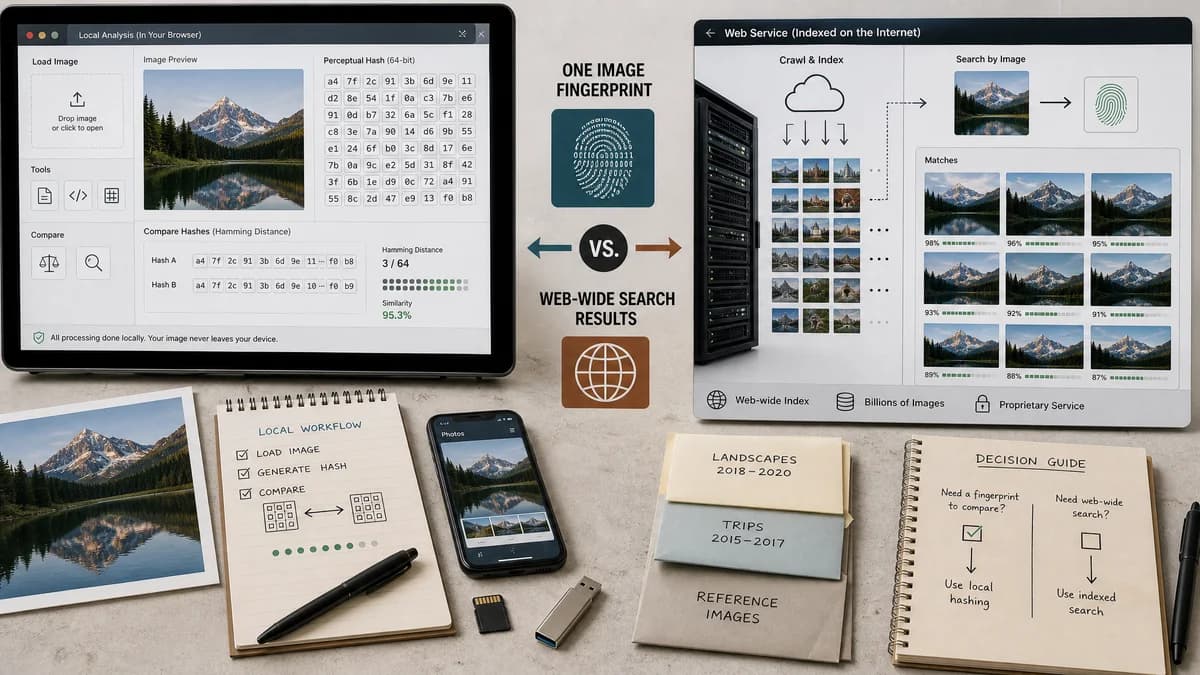
Perceptual Hash Generator is a browser-based alternative for users who need this focused result without installing a proprietary desktop app or entering a larger hosted workflow.
This research compares that workflow with TinEye while keeping the outbound source link at the bottom after the analysis.
Why Perceptual Hash Generator fits
TextFaker provides local, inspectable hash values from one uploaded image and guidance for comparing two hashes by Hamming distance.
What TinEye offers
TinEye is a reverse image search service that uses image recognition and compact fingerprints to find matches in its index.
Open alternative signals
Search index
Perceptual Hash GeneratorNo index; user receives hash values to compare themselves
TinEyeSearches TinEye's existing image index
Transparency
Perceptual Hash GeneratorShows algorithm-specific hash strings and comparison guidance
TinEyeReturns search matches from a proprietary recognition system
Best user intent
Perceptual Hash GeneratorPerceptual hash generator and compare image hashes
TinEyeReverse image search and source discovery
Locality
Perceptual Hash GeneratorBrowser-local image decoding and hashing
TinEyeSubmitted image or URL is processed by TinEye
Decision guide
Generating transparent image fingerprints for duplicate checks, tutorials, QA notes, or small local workflows.
Finding where an image or modified image appears across TinEye's search index.
Side-by-side open source alternative comparison
| Decision point | Perceptual Hash Generator | TinEye | Takeaway |
|---|---|---|---|
| Result format | Our workflowCopy-ready pHash-style, aHash, and dHash values. | Proprietary workflowRanked reverse image search results. | TextFaker makes hash output the hero result. |
| Similarity meaning | Our workflowHash distance between two known fingerprints. | Proprietary workflowImage recognition match against indexed content. | The page explains that hash distance is not the same as web search relevance. |
| Use case | Our workflowLocal duplicate triage and developer experimentation. | Proprietary workflowFinding online copies, edits, and sources. | Users with web discovery needs still need a reverse search service. |
| Setup | Our workflowUpload an image in the browser and copy results. | Proprietary workflowUse TinEye web search or related APIs. | TextFaker can win on immediacy for hash-generation tasks. |
| Privacy expectation | Our workflowNo image leaves the browser for hashing. | Proprietary workflowSearch requires submitting an image or image URL. | Local hashing is important for unreleased designs or internal screenshots. |
| Verification | Our workflowCan be tested with deterministic fixture images. | Proprietary workflowSearch results depend on a live external index. | TextFaker tests lock down hash determinism and UI copy behavior. |
Detailed research
Why Users Compare Them
TinEye popularized the idea that an image can be represented by a compact fingerprint. Some users searching for alternatives only need to generate and compare those fingerprints rather than search the public web.
- Explain the distinction between fingerprint generation and reverse image search.
- Include examples for comparing two hash strings with Hamming distance.
Product Positioning
The TextFaker page presents a practical local utility for image pHash, aHash, and dHash generation. It does not suggest that a local hash generator can find online copies without an external index.
- Use plain language around near-duplicate detection.
- Provide copy-all output for developer handoff.
Content Risks
Reverse image search algorithms are often proprietary and not identical to common perceptual hash algorithms. The page says open-source-powered where appropriate and avoid overclaiming algorithm equivalence.
Testing Notes
Use fixture images with predictable dimensions and verify that unsupported file types or broken image decodes do not count shared access usage.
- Test pHash-style, aHash, dHash presence.
- Test Hamming-distance guidance text.
- Test copy-all result payload.
Research notes
- TinEye's official help says it creates a unique compact digital signature or fingerprint for submitted images.
- TinEye states it finds image matches, including cropped, edited, or resized versions, rather than generally similar images with the same subject.
- The TextFaker comparison avoids claiming equivalent web-scale search coverage.
Official source
The proprietary product link is included once here for source checking after the alternative analysis.
Official TinEye source