
Photo Border Maker
Photo Border Maker creates exact borders around an uploaded image locally in your browser, so the source photo does not need to be uploaded to a server.
Choose equal or custom side borders, print-friendly units, colors, output format, and fit rules, then verify the final canvas size before downloading.
Choose a photo
JPG, PNG, WebP, AVIF, GIF, or BMP up to 50 MB.
Drop a photo here or click to choose
The image stays local while the bordered file is rendered.
Border result
Output dimensions, image rectangle, file type, size, and download.
No photo selected
Choose a photo to calculate border dimensions and render a new file.
Local photo border rendering
The selected image is decoded, bordered, previewed, and downloaded in this browser. Unsupported files, missing input, and failed renders do not consume a free use.
Make Exact Photo Borders
Border Controls
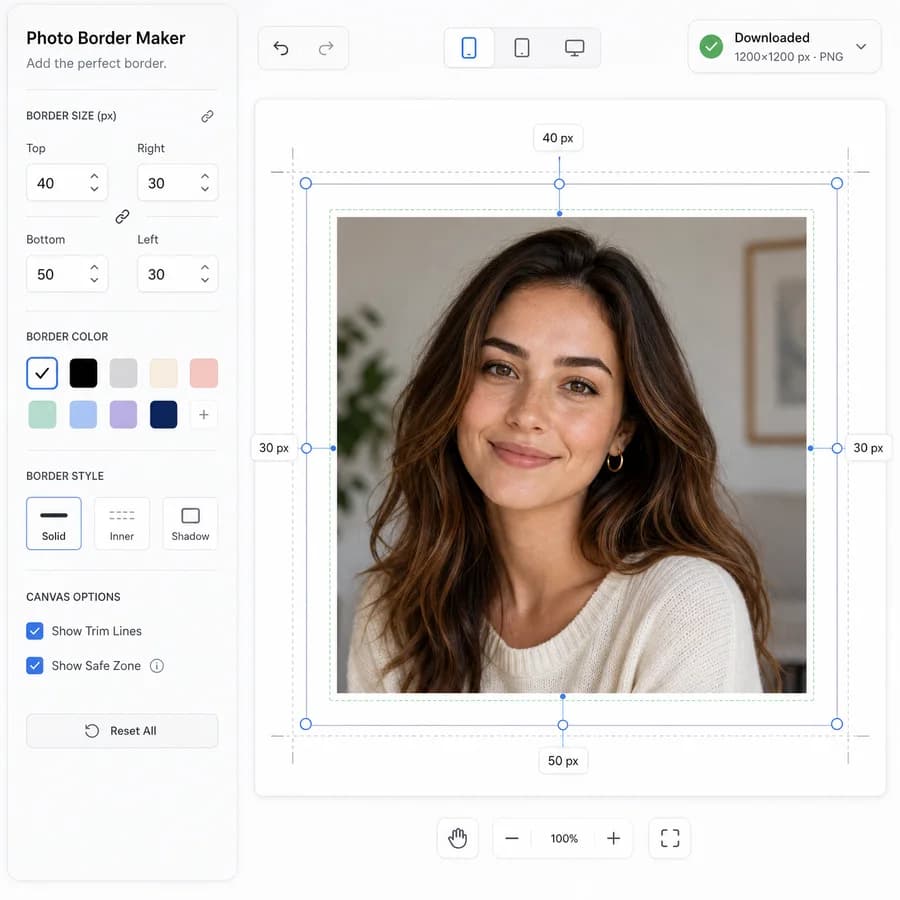
The controls support both quick presets and precise inputs so casual users can make a clean white frame while print users can target exact margins.
- Equal border mode with one value applied to all sides.
- Custom top, right, bottom, and left border inputs in pixels, percent of image width, inches, millimeters, or centimeters.
- Common print presets such as 1/8 inch, 1/4 inch, 1/2 inch, 3/4 inch, and 1 inch at a selected DPI.
- Border color picker with white, black, sampled-image color, transparent PNG, and custom HEX options.
Print Output
The tool makes the sizing math explicit because many user questions are about whether the print size grows or the photo shrinks inside the chosen paper size.
- Canvas expand mode keeps the original image pixels unchanged and add new border pixels around it.
- Fit inside paper mode chooses a target paper size and DPI, shrink or fit the photo, then calculate the border area.
- Show original dimensions, output dimensions, inner image rectangle, border thickness per side, aspect ratio, and estimated print size.
- Warn when a requested paper/DPI combination would require upscaling, cropping, or borders smaller than the selected minimum.
Download and Batch Flow
The primary workflow remains simple on phones: upload, choose a border preset, check dimensions, download. Batch mode can reuse the same settings across multiple images while still reporting each output separately.
- Export PNG for transparency or lossless borders, JPG for photo prints, and WebP for smaller social copies when supported.
- Preserve the original image by creating a new rendered file with a clear suffix such as -border.
- For multiple photos, display a result table with filename, input size, output size, border values, MIME type, and generated file size.
- Provide copy buttons for a compact dimension report and a JSON-like settings summary for repeat jobs.
Validation Messages
Automated and user-facing validation focus on measurable outputs, not whether a border looks good.
- Report exact output width and height after every setting change.
- Report the crop or fit rectangle as x, y, width, and height when target-paper mode is enabled.
- Report bleed and safe-zone status when a paper preset includes minimum border or trim assumptions.
- Block downloads with deterministic errors for unsupported MIME types, zero-size canvases, impossible negative borders, or browser canvas size limits.
Compare Photo Border Maker
Review this tool beside related online utilities, dedicated apps, and adjacent workflows.
Compare Photo Border Maker with other toolsOpen Source Alternatives
Compare this focused browser workflow with proprietary software and online tools that solve similar jobs.
View Photo Border Maker open source alternatives