
Photo Contact Sheet Maker vs XnView MP
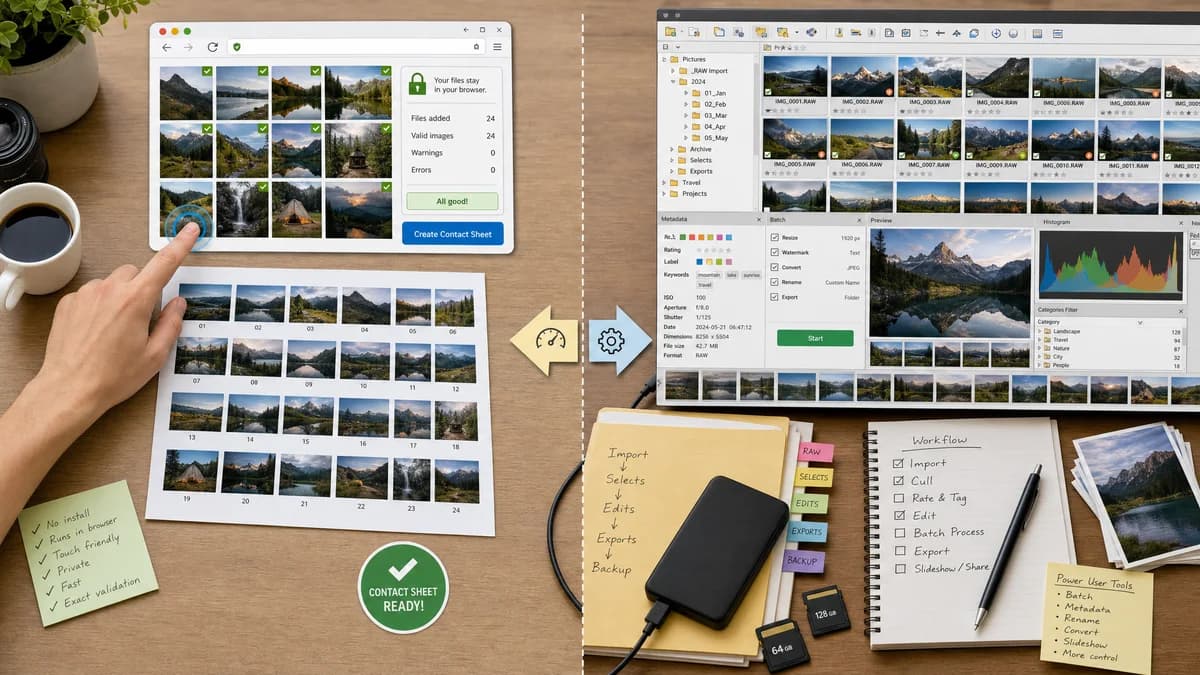
Photo Contact Sheet Maker is the baseline in this comparison: Create a printable grid of photos with filenames, spacing, page size, and PNG export without uploading images.
XnView MP includes contact sheet creation alongside image browsing, batch processing, metadata tools, slideshows, and file listings.
Quick verdict
XnView MP is better for power users managing folders on desktop; TextFaker is better for quick, no-install, privacy-explicit contact sheets and simpler automated QA.
How Photo Contact Sheet Maker fits
Photo Contact Sheet Maker provides a browser-local contact sheet workflow with touch-friendly controls and exact validation summaries for generated sheets.
How XnView MP fits
XnView MP is a capable desktop image browser and organizer with contact sheet features, broad format support, and many batch utilities.
Side-by-side comparison
| Decision point | Photo Contact Sheet Maker | XnView MP | Takeaway |
|---|---|---|---|
| Platform | Our workflowBrowser-based and responsive. | Competitor workflowDesktop application for major operating systems. | TextFaker can run where installation is inconvenient. |
| Feature breadth | Our workflowFocused on contact sheet generation. | Competitor workflowImage organizer, viewer, batch processor, metadata tool, and contact sheet creator. | XnView MP is broader; TextFaker can be simpler. |
| Captions | Our workflowShould offer fixed filename, date, dimensions, index, and custom captions with predictable wrapping. | Competitor workflowOfficial FAQ references captions including filename, EXIF, and custom text. | Both can serve labeled sheets; TextFaker should make label behavior testable. |
| Multi-page output | Our workflowShould make page count explicit and export PNG pages plus a PDF bundle. | Competitor workflowOfficial FAQ references printable sheets and multi-page PDFs. | XnView MP is strong here; TextFaker needs comparable multi-page clarity. |
| Settings persistence | Our workflowCan persist settings in browser local storage and show a reset option. | Competitor workflowCommunity threads report user concern around some contact sheet settings not persisting. | TextFaker can compete by making presets and persistence transparent. |
| Automated verification | Our workflowBuilt into web tests through generated fixtures and layout summaries. | Competitor workflowDesktop app output is less suited to the site's automated test model. | TextFaker fits TextFaker's deterministic tool requirements better. |
Use Photo Contact Sheet Maker when
- No-install contact sheets on desktop or mobile browsers
- Users who want one task without a full image manager
- Repeatable outputs with exact layout JSON
- Privacy-sensitive uploads that never leave the browser
Use XnView MP when
- Desktop users browsing large local folders
- Power users needing image management plus batch tools
- Users who need many formats and broader file operations
- People comfortable with desktop settings dialogs
Detailed comparison
Demand Signal
XnView's own FAQ documents contact sheet creation with rows, columns, captions, page size, and output formats. Its forum has multiple contact sheet questions around multi-page PDFs, ordering, caption length, and sticky settings.
- Users ask how to create one multi-page contact sheet rather than separate sheets.
- Users want order control and settings persistence.
- Users need captions long enough for real filenames.
Competitive Lesson
XnView MP proves the market wants contact sheets inside a practical image utility. It also shows where a web tool can win: fewer dialogs, clearer defaults, and persistent presets designed around the single task.
- Make page presets visible.
- Show all computed dimensions before export.
- Keep previous settings but make them editable and resettable.
Implementation Guidance
Treat layout as structured data first and rendering second. The UI should be able to display a table of pages and items before export, which improves both accessibility and tests.
- Manual drag order plus sort order controls.
- Multi-line caption wrapping with deterministic max lines.
- Overflow handling when captions exceed available height.
- Per-page preview thumbnails that do not require full-resolution rendering until export.
Validation Plan
Use fixtures with long filenames, mixed dimensions, and known last-modified dates to verify sorting and caption wrapping. Export should be considered valid when counts, dimensions, coordinates, and Blob type match expectations.
- Assert long captions wrap or truncate according to selected mode.
- Assert filename sort places numbered fixtures correctly.
- Assert PDF page count equals computed page count.
- Assert settings persistence restores the last selected page preset.
Research notes
- Official XnView pages identify contact sheets as a supported creation feature.
- XnView forums provide strong public demand evidence for ordering, multi-page output, caption control, and settings persistence.
- A TextFaker implementation should borrow the practical controls but reduce desktop-app complexity.
Official source
The only outbound competitor link on this page is placed here for source checking after the comparison.
Official XnView MP source