
Open Source Alternatives to Adobe Bridge
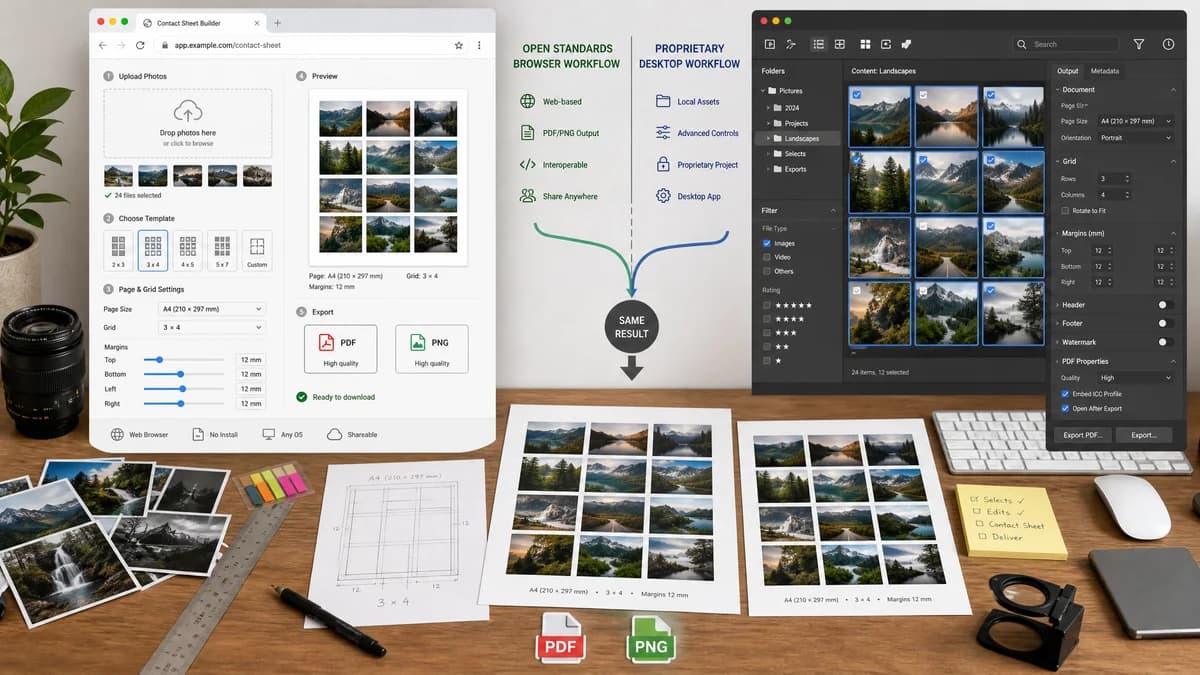
Photo Contact Sheet Maker is a browser-based alternative for users who need this focused result without installing a proprietary desktop app or entering a larger hosted workflow.
This research compares that workflow with Adobe Bridge while keeping the outbound source link at the bottom after the analysis.
Why Photo Contact Sheet Maker fits
TextFaker can let users drop photos, pick a template, and generate a contact sheet with explicit page and grid metrics directly in the browser.
What Adobe Bridge offers
Adobe Bridge's Output workspace creates PDF contact sheets from selected images using templates and output settings for document, grid, margin, header, footer, watermark, and PDF properties.
Open alternative signals
Contact sheet focus
Photo Contact Sheet MakerDesigned only for photo grid proof sheets and contact sheet downloads.
Adobe BridgePart of a broad asset browsing and Adobe workflow app.
Setup
Photo Contact Sheet MakerRuns from a web page with local files.
Adobe BridgeRequires Bridge and Creative Cloud installation.
Deterministic outputs
Photo Contact Sheet MakerCan display a manifest and test fixture results.
Adobe BridgeOutput settings are visual and app-driven.
Mobile access
Photo Contact Sheet MakerCan support phone uploads and responsive controls.
Adobe BridgeDesktop-oriented.
Decision guide
People who want a quick contact sheet from a folder of exported images and a direct download without Creative Cloud workflow concepts.
Creative Cloud users who already use Bridge to browse assets and need Adobe PDF output settings integrated with desktop folders.
Side-by-side open source alternative comparison
| Decision point | Photo Contact Sheet Maker | Adobe Bridge | Takeaway |
|---|---|---|---|
| Template control | Our workflowSimple page presets, grid dimensions, gap, label, background, and fit mode. | Proprietary workflowBridge offers templates plus document, grid, margin, header, footer, watermark, and PDF properties. | TextFaker can be easier for casual proof-sheet tasks. |
| File handling | Our workflowBrowser File API with no server upload. | Proprietary workflowDesktop folder and content panel workflow. | Both can work locally, but TextFaker avoids installing a desktop asset manager. |
| Output formats | Our workflowPNG for image sheets and PDF for print/share sheets. | Proprietary workflowPDF contact sheets through the Output workspace. | PNG output is useful for social, email, and web previews. |
| Testability | Our workflowGrid math can be asserted from JSON and rendered output metadata. | Proprietary workflowPrimarily verified through the app preview and generated PDF. | A deterministic manifest is a major implementation advantage. |
| Audience | Our workflowGeneral users, teachers, creators, photographers, and support teams. | Proprietary workflowCreative Cloud users and asset managers. | The browser tool should avoid Adobe-specific terminology. |
| Privacy copy | Our workflowClear local-only browser processing message. | Proprietary workflowDesktop local browsing, with Adobe account/app context. | Privacy can be a conversion point for one-off image sheets. |
Detailed research
Demand Fit
Bridge appears in many contact sheet tutorials because it can create PDF proof sheets, but users still ask basic workflow questions in public support channels.
- Pain points include finding the Output workspace, dragging selected images, and generating the PDF.
- A simple one-screen web workflow can capture users who only need a sheet once.
Product Shape
The tool should present a preview but make the numeric output state first-class.
- Show selected image count, pages required, grid capacity per page, and output size before export.
- Allow filename labels, index labels, and no-label modes.
- Include resettable presets for A4, Letter, and custom pixel pages.
Validation Plan
The layout engine can be tested with synthetic images in CI.
- Assert that eight images with a 3x2 grid produces two pages.
- Assert labels match sanitized filenames in selection or sorted order.
- Assert generated PDF has the expected number of pages and media box dimensions.
Comparison Message
Position the page as a browser-based contact sheet alternative for users who do not need a full digital asset manager.
Research notes
- Official Adobe Bridge documentation says the Output workspace can create PDF contact sheets from one or more images.
- A public Adobe Community thread about Bridge 2023 includes a user saying the contact sheet PDF workflow is unintuitive, showing demand for a simpler interface.
- Implementation should include a PDF generation mode that reports page count, paper preset, margins, grid geometry, and embedded image count.
Official source
The proprietary product link is included once here for source checking after the alternative analysis.
Official Adobe Bridge source