
Pixel-by-Pixel Image Diff vs ChangeChecks Image Compare
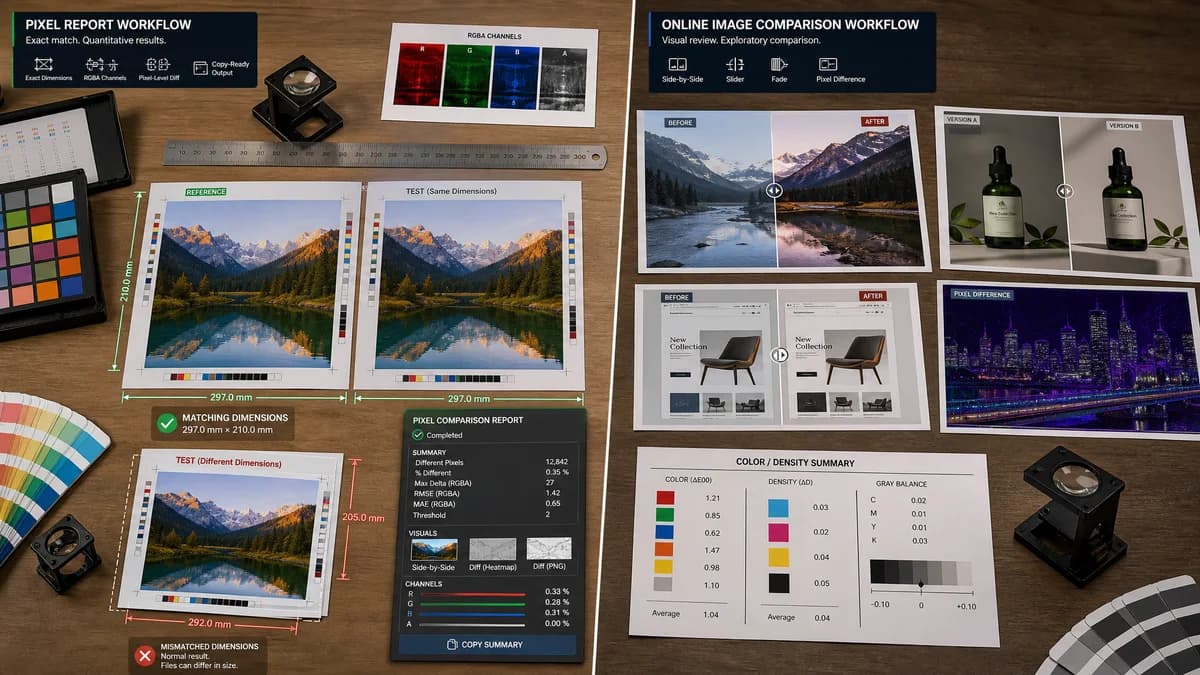
Pixel-by-Pixel Image Diff is the baseline in this comparison: Compare two same-size images in your browser, measure exact RGBA pixel differences, adjust tolerance, and download a diff heatmap PNG.
Compare TextFaker's browser-local pixel report against ChangeChecks' online image comparison workflow.
Quick verdict
TextFaker competes by making the quantitative pixel report more explicit and copy-ready, while still offering enough visual review to satisfy users who searched for an image diff checker.
How Pixel-by-Pixel Image Diff fits
Pixel-by-Pixel Image Diff focuses on exact two-image RGBA comparison in the browser, requiring matching dimensions for pixel-level results and treating mismatched dimensions as a clear normal result. It provide counts, percentages, channel delta metrics, RMSE or mean absolute error, threshold tolerance, heatmap preview, side-by-side review, diff PNG download, and copy-all output.
How ChangeChecks Image Compare fits
ChangeChecks offers an online image comparison page with slider, fade, and pixel-difference modes for photos, screenshots, design comps, and product renders. Its public positioning emphasizes free use, no account, and no server upload, making it adjacent to a browser-local TextFaker implementation.
Side-by-side comparison
| Decision point | Pixel-by-Pixel Image Diff | ChangeChecks Image Compare | Takeaway |
|---|---|---|---|
| Primary workflow | Our workflowTwo dedicated upload zones for baseline/reference and changed/test images, followed by local pixel decoding and comparison. | Competitor workflowDrop two image versions and review them with slider, fade, or pixel-difference modes. | TextFaker makes the baseline-versus-test relationship explicit for QA and regression review. |
| Dimension handling | Our workflowRequires matching dimensions for exact pixel comparison and reports mismatches as a normal, non-error result. | Competitor workflowPublic copy emphasizes visual comparison modes rather than an exact same-size requirement. | Dimension mismatch messaging is a differentiator for users who need defensible pixel math. |
| Metrics | Our workflowTotal pixels, differing pixels, identical pixels, difference percentage, average and maximum channel deltas, and RMSE or MAE. | Competitor workflowFocused more on visible comparison modes than a copy-ready statistical report in the researched page copy. | TextFaker can serve developers and QA reviewers who need numbers, not only visual inspection. |
| Privacy model | Our workflowBrowser-local decoding and diff generation avoid uploading images. | Competitor workflowThe official page presents no-upload processing as part of the service positioning. | Both fit privacy-sensitive image comparison; TextFaker state local processing clearly in SEO and UI copy. |
| Tolerance control | Our workflowThreshold slider let users ignore minor anti-aliasing or compression noise. | Competitor workflowThe researched page highlights modes but does not foreground a numeric tolerance workflow. | A visible threshold control helps TextFaker targets visual regression and screenshot comparison intent. |
| Exports and copying | Our workflowDownload generated diff PNG and provide one copy-all result button. | Competitor workflowThe researched page is oriented around interactive comparison modes. | TextFaker can win when users need to paste results into bug reports or attach a diff artifact. |
Use Pixel-by-Pixel Image Diff when
- Exact same-dimension pixel audits
- Copy-ready QA metrics
- Alpha-aware RGBA comparisons
- Diff PNG export from a local browser workflow
Use ChangeChecks Image Compare when
- Fast visual review with slider and fade modes
- Users who want a broad online image compare experience
- Reviewing design or product-render changes without reading metrics
Detailed comparison
Positioning
ChangeChecks already covers the common need to compare two images visually online. TextFaker avoids becoming only another slider tool and instead emphasizes exact browser-local pixel accounting.
- Use language such as pixel-by-pixel image diff, visual regression image comparison, and pixel difference checker.
- Keep this separate from color, transparency, alpha, and histogram tools by centering the two-image comparison workflow.
Implementation Notes
The future TextFaker tool use the shared upload component twice and only count shared access or paywall usage after a successful two-image comparison result exists.
- Do not count unsupported file uploads, decode failures, one-image states, or missing second image states.
- Generate the heatmap from decoded RGBA buffers after validating dimensions.
SEO Angle
The page target users who want both quick visual confirmation and exact metrics for a visual regression or screenshot change.
- Include explanatory content about why same dimensions matter for pixel-level comparison.
- Explain threshold tolerance as a way to handle anti-aliasing and compression noise.
Verification Readiness
Focused tests cover successful identical images, one-pixel differences, alpha-only differences, threshold behavior, dimension mismatch, decode failures, and copy/download actions.
- Run the focused tool tests and full project verification defined by the repository tooling when implemented.
- Prepare a browser smoke test with two generated same-size images and one mismatch pair.
Research notes
- Official page reviewed for ChangeChecks positioning and modes.
- Treat ChangeChecks as an adjacent online visual comparison tool, not as proof of all metric capabilities.
- TextFaker includes open-source alternative entries separately when implemented, with pixelmatch, Resemble.js, ImageMagick, looks-same, and BackstopJS as likely candidates.
- Generated test images includes identical RGBA PNGs, a single changed red pixel, alpha-only changes, and mismatched canvas sizes.
Official source
The only outbound competitor link on this page is placed here for source checking after the comparison.
Official ChangeChecks Image Compare source