
Pixel-by-Pixel Image Diff vs Image-Comparison.com
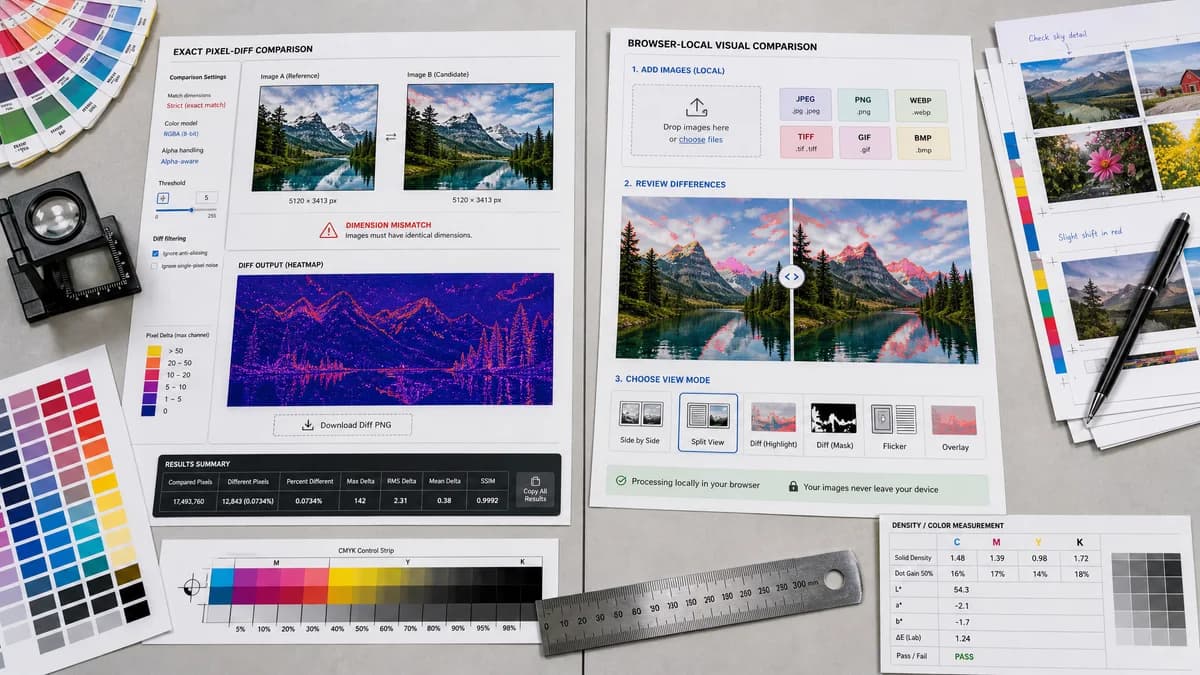
Pixel-by-Pixel Image Diff is the baseline in this comparison: Compare two same-size images in your browser, measure exact RGBA pixel differences, adjust tolerance, and download a diff heatmap PNG.
Compare TextFaker's future exact pixel diff tool with Image-Comparison.com's browser-local visual comparison experience.
Quick verdict
Image-Comparison.com is one of the closest UX competitors; TextFaker differentiate through a developer-friendly metric panel, dimension mismatch clarity, and a single copy-all result format.
How Pixel-by-Pixel Image Diff fits
Pixel-by-Pixel Image Diff is a focused two-image pixel comparator with exact dimensions required, alpha-aware RGBA math, threshold filtering, heatmap output, diff PNG download, and copy-ready numeric results.
How Image-Comparison.com fits
Image-Comparison.com presents an online picture comparison tool with local pixel metrics after highlighted diff review, support for several common image formats, multiple review modes, and browser-local processing.
Side-by-side comparison
| Decision point | Pixel-by-Pixel Image Diff | Image-Comparison.com | Takeaway |
|---|---|---|---|
| Visual modes | Our workflowDiff heatmap and side-by-side where practical, with the heatmap tied directly to thresholded pixel results. | Competitor workflowMultiple visual review modes are part of the researched page positioning. | TextFaker provide fewer modes but make the diff mode more measurable. |
| Metric output | Our workflowCopy-ready total, identical, differing, percentage, average delta, maximum delta, and RMSE or MAE. | Competitor workflowThe page mentions local pixel metrics after highlighted diff review. | TextFaker is explicit about every metric to build trust. |
| Dimension policy | Our workflowExact comparison requires identical width and height; mismatch is reported clearly. | Competitor workflowThe researched summary does not foreground a strict dimension policy. | Clear dimension handling is important for pixel-level accuracy and user education. |
| File support | Our workflowShould support browser-decodable image formats through local decode paths and report unsupported files without counting usage. | Competitor workflowThe page describes common image formats such as PNG, JPG, JPEG, and WebP. | TextFaker align with browser-supported formats and fail cleanly. |
| Privacy | Our workflowLocal decoding and diff PNG generation in the browser. | Competitor workflowBrowser-local processing is part of the official page's positioning. | Privacy is table stakes in this category. |
| Result actions | Our workflowDownload diff PNG and copy all metrics in one action. | Competitor workflowCompetitor is framed around visual comparison modes and local metrics. | Copy and export actions is first-class controls in TextFaker. |
Use Pixel-by-Pixel Image Diff when
- Exact pixel-diff summaries
- Regression artifact downloads
- Transparent image comparison
- Users who want output they can paste into tickets
Use Image-Comparison.com when
- Interactive picture comparison
- Users who want several visual review modes
- Browser-local review of common image formats
Detailed comparison
Differentiation
This competitor is close because it combines visual review with local metrics. TextFaker differentiate by making the exact pixel math more transparent and by integrating with the existing TextFaker tool registry and access controls.
- Show threshold value in copied results.
- Include alpha-aware wording in the result explanation.
User Intent
Searchers for image diff checker and compare images pixel by pixel often want a quick answer: are these files identical, and if not, how different are they.
- Put identical versus differing pixels near the top of the result.
- Use plain labels rather than visual-testing jargon only.
SEO Content
The content explain the difference between side-by-side review, slider comparison, and true pixel-by-pixel diff. That helps separate this page from general image compare tools.
- Explain why resized or padded comparisons are not exact pixel comparisons.
- Mention visual regression screenshots, UI QA, design handoff, and PNG alpha checks.
Verification
Browser smoke tests verify both the heatmap canvas and copy/download buttons after two valid uploads.
- Use generated images so tests do not rely on external assets.
- Verify that missing second image and decode errors do not count usage.
Research notes
- Image-Comparison.com appears close to this TextFaker tool and is included in comparison pages.
- Its official page supports browser-local processing and multiple review modes, so TextFaker does not overclaim uniqueness on privacy or visual review alone.
- TextFaker's stronger implementation target is exact metric reporting and usage-count semantics.
- Open-source alternatives still be separate from proprietary online competitor comparisons.
Official source
The only outbound competitor link on this page is placed here for source checking after the comparison.
Official Image-Comparison.com source