
Pixel-by-Pixel Image Diff vs ImageMagick Compare
Pixel-by-Pixel Image Diff is the baseline in this comparison: Compare two same-size images in your browser, measure exact RGBA pixel differences, adjust tolerance, and download a diff heatmap PNG.
Compare TextFaker's browser-local pixel diff with ImageMagick's command-line compare utility.
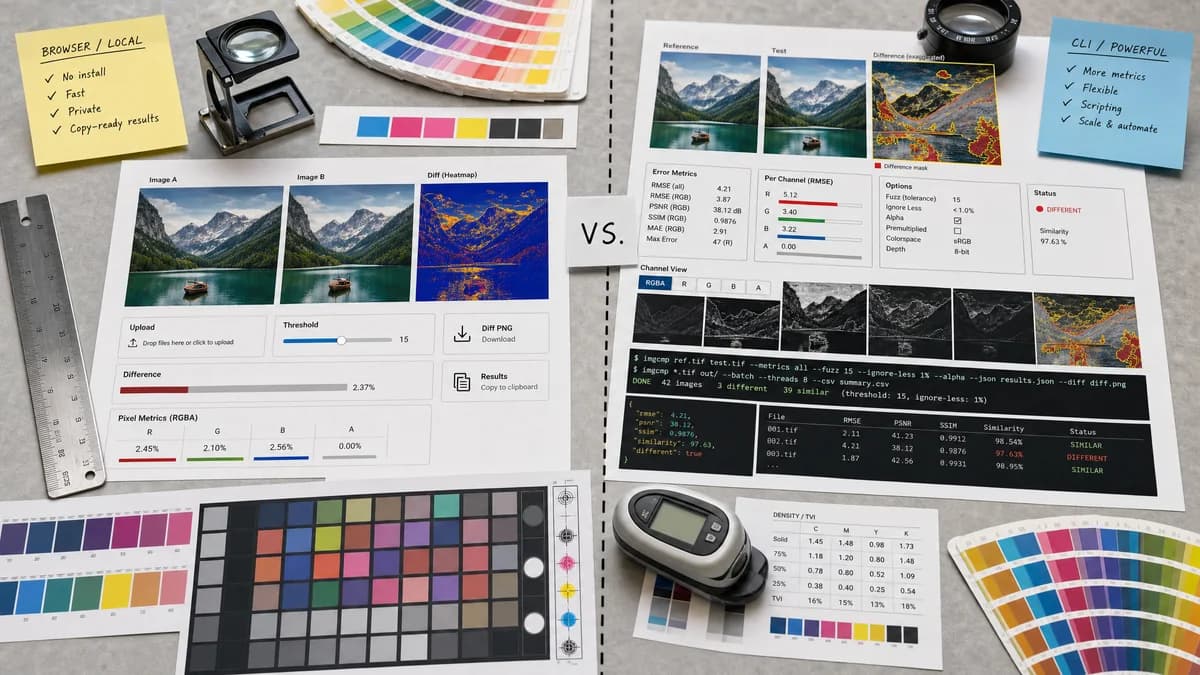
Quick verdict
ImageMagick Compare is more powerful for scripted and command-line workflows, while TextFaker is better for users who need a local no-install web UI and copy-ready results.
How Pixel-by-Pixel Image Diff fits
Pixel-by-Pixel Image Diff makes exact two-image comparison accessible in the browser with uploads, threshold control, visual heatmap output, detailed RGBA metrics, diff PNG download, and copyable results.
How ImageMagick Compare fits
ImageMagick's compare command mathematically and visually annotates differences between images. Official documentation shows highlighted difference images, RMSE and PSNR examples, channel options, fuzz tolerance, alpha options, and return values for similar or different images.
Side-by-side comparison
| Decision point | Pixel-by-Pixel Image Diff | ImageMagick Compare | Takeaway |
|---|---|---|---|
| Interface | Our workflowBrowser UI with two uploads, sliders, previews, buttons, and result cards. | Competitor workflowCommand-line utility invoked with ImageMagick commands. | TextFaker is more approachable for non-CLI users. |
| Metrics | Our workflowFixed user-facing metrics: pixel counts, percent difference, deltas, and RMSE or MAE. | Competitor workflowOfficial docs show RMSE, PSNR, channel distortion, fuzz, and other metric options. | ImageMagick is more configurable; TextFaker is clearer and simpler. |
| Visual diff | Our workflowGenerated heatmap preview and downloadable diff PNG from the browser. | Competitor workflowcompare can produce an output image that visually annotates differences. | Both can create diff images, but TextFaker removes command syntax friction. |
| Tolerance | Our workflowThreshold slider for minor channel differences. | Competitor workflowImageMagick supports fuzz and metric options. | TextFaker translate tolerance into plain-language UI controls. |
| Alpha and channels | Our workflowAlpha-aware RGBA comparison is part of the default result. | Competitor workflowImageMagick supports channel and alpha options through command flags. | TextFaker default to the common RGBA case rather than requiring flags. |
| Automation | Our workflowOne-off browser-local utility, with focused tests and smoke-test readiness when implemented. | Competitor workflowStrong automation fit through shell scripts and CI commands. | Developers who need batch automation may prefer ImageMagick; TextFaker serves immediate manual checks. |
Use Pixel-by-Pixel Image Diff when
- Users avoiding command-line setup
- Manual image QA
- Browser-local diff previews
- Copyable summary metrics
Use ImageMagick Compare when
- Scripted image comparison
- Batch processing
- Advanced image metrics and channel options
- Command-line automation in CI or local workflows
Detailed comparison
Reference Metrics
ImageMagick is an important reference because it exposes established image comparison metrics such as RMSE and visual difference output. TextFaker use familiar metric names where appropriate.
- Include RMSE or mean absolute error in the result.
- Define the chosen metric briefly in SEO content.
UI Advantage
The opportunity for TextFaker is not to out-feature ImageMagick, but to make a precise comparison easy without installation, terminal commands, or file-system output paths.
- Keep controls minimal: upload zones, threshold slider, view mode, copy, download.
- Use result labels that match bug-report language.
Command Line Alternative
ImageMagick appear in open-source alternatives as the command-line option for users who need automation, batch processing, or advanced metrics.
- Describe it as powerful and scriptable.
- Do not present it as a browser-local web page.
Verification
TextFaker tests can use known generated fixtures and compare expected metric values. A separate manual QA note can mention checking that the heatmap visually marks changed pixels.
- Test maximum channel delta with a known RGBA change.
- Test RMSE or MAE calculation using tiny images where expected values are easy to verify.
Research notes
- ImageMagick Compare is a mature official reference for visual and mathematical image difference workflows.
- Its docs support RMSE, PSNR, channel, alpha, and fuzz concepts relevant to TextFaker's metric choices.
- TextFaker does not replicate the full option set; it expose a constrained browser UX.
- Include ImageMagick in open-source alternatives and comparison pages.
Official source
The only outbound competitor link on this page is placed here for source checking after the comparison.
Official ImageMagick Compare source