
Pixel-by-Pixel Image Diff vs pixelmatch
Pixel-by-Pixel Image Diff is the baseline in this comparison: Compare two same-size images in your browser, measure exact RGBA pixel differences, adjust tolerance, and download a diff heatmap PNG.
Compare TextFaker's no-code browser tool with pixelmatch, a JavaScript pixel-level comparison library.
Quick verdict
pixelmatch is a strong implementation reference and open-source alternative, but TextFaker serves users who want a direct browser-local tool rather than a library they must wire into tests or scripts.
How Pixel-by-Pixel Image Diff fits
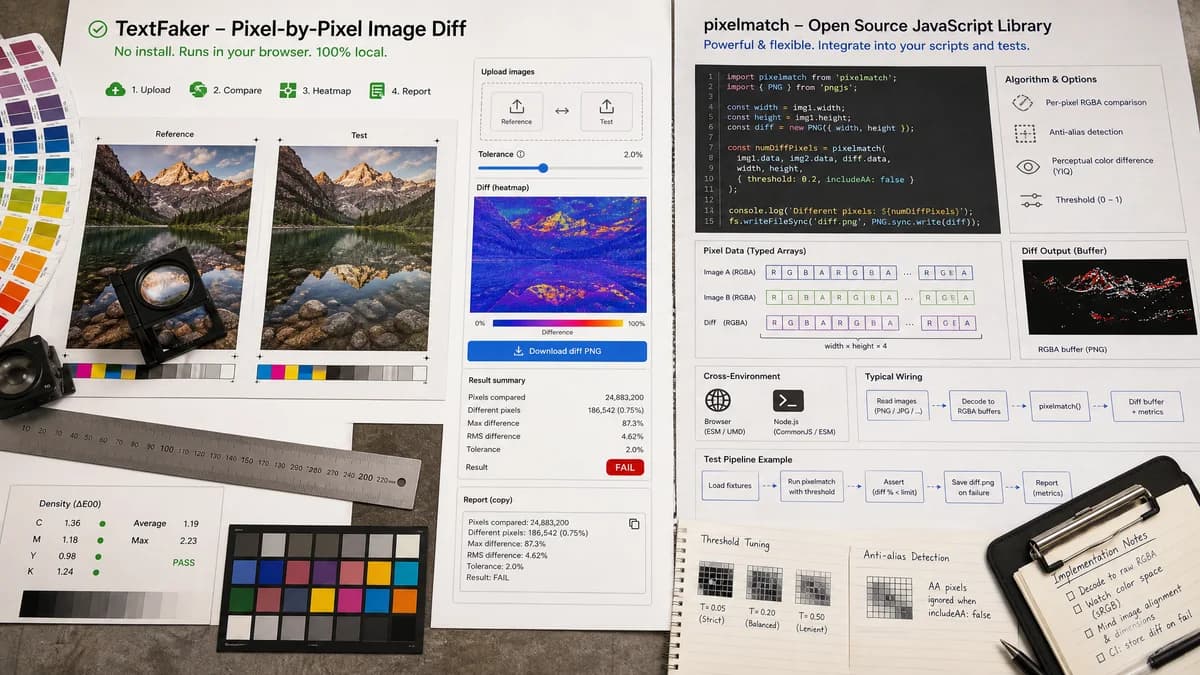
Pixel-by-Pixel Image Diff exposes a no-install browser UI for uploading two images, decoding pixels locally, adjusting tolerance, viewing a heatmap, downloading a diff PNG, and copying a readable metrics report.
How pixelmatch fits
pixelmatch is an open-source JavaScript pixel-level image comparison library originally created for screenshot tests. Its repository describes threshold support, anti-aliased pixel detection, perceptual color difference metrics, typed-array inputs, browser and Node compatibility, and a diff output buffer.
Side-by-side comparison
| Decision point | Pixel-by-Pixel Image Diff | pixelmatch | Takeaway |
|---|---|---|---|
| Audience | Our workflowEnd users who want to upload two images and get a result. | Competitor workflowDevelopers integrating a JavaScript library into browser or Node workflows. | TextFaker abstract away image decoding and diff buffer management. |
| Inputs | Our workflowFile uploads through two shared drop zones, decoded locally into image data. | Competitor workflowRaw typed arrays of image data plus width and height are passed to the library. | pixelmatch is lower-level; TextFaker owns the full UI pipeline. |
| Tolerance | Our workflowUser-facing threshold slider with explained effect on differing-pixel counts. | Competitor workflowLibrary option supports threshold values for pixel comparison. | pixelmatch can inform TextFaker's tolerance model, but UI explanation is still needed. |
| Anti-aliasing | Our workflowThreshold helps users ignore minor anti-aliasing and compression noise; implementation may also account for anti-aliased pixels if compatible with the chosen algorithm. | Competitor workflowRepository describes accurate anti-aliased pixel detection and perceptual color difference metrics. | pixelmatch is a credible technical reference for visual regression behavior. |
| Output | Our workflowPreview heatmap, downloadable PNG, and copy-all metrics. | Competitor workflowReturns a diff output buffer and number of different pixels when used programmatically. | TextFaker converts low-level output into a polished user result. |
| Dimension handling | Our workflowUI validates dimensions before comparison and explains mismatches. | Competitor workflowLibrary usage requires width and height values for the image data arrays. | TextFaker handles user-facing validation that libraries leave to integrators. |
Use Pixel-by-Pixel Image Diff when
- No-code local image comparisons
- Manual QA and design review
- Copy-ready result summaries
- Non-developers comparing screenshots or transparent PNGs
Use pixelmatch when
- Developers building visual regression tooling
- Automated screenshot tests
- Projects needing a small JavaScript diff library
- Custom Node or browser integrations
Detailed comparison
Implementation Reference
pixelmatch is one of the best technical references for a browser-local pixel-diff implementation because it is small, JavaScript-based, and designed for pixel-level screenshot comparison.
- Evaluate whether to use pixelmatch directly or implement a local RGBA comparison wrapper that matches TextFaker's metric requirements.
- If using pixelmatch, still compute additional metrics such as average channel delta and RMSE or MAE.
Open Source Alternative
The future TextFaker page includes pixelmatch in open-source alternatives because it directly targets pixel-level image comparison and screenshot testing.
- Describe it as a library, not an online tool.
- Make clear that users need code to use it.
Metric Gaps
pixelmatch returns a different-pixel count and can create diff output, but TextFaker's user experience needs a broader report for non-code users.
- Compute total and identical pixels from dimensions and different-pixel count.
- Compute channel deltas from original image buffers independently.
Verification
Focused tests can mirror pixelmatch-style inputs with generated typed arrays or decoded PNG fixtures.
- Test threshold effects against known RGBA values.
- Test alpha-only differences because the TextFaker requirement explicitly calls for alpha-aware comparison.
Research notes
- pixelmatch is a high-priority open-source alternative and possible implementation dependency.
- Official repository states it was originally created for screenshot tests and works with raw typed arrays in browser or Node environments.
- Do not present pixelmatch as an end-user web app; it is a developer library.
- If the implementation uses pixelmatch, document any extra TextFaker metrics layered on top.
Official source
The only outbound competitor link on this page is placed here for source checking after the comparison.
Official pixelmatch source