
Pixel-by-Pixel Image Diff vs Playwright Visual Comparisons
Pixel-by-Pixel Image Diff is the baseline in this comparison: Compare two same-size images in your browser, measure exact RGBA pixel differences, adjust tolerance, and download a diff heatmap PNG.
Compare TextFaker's manual browser-local image diff with Playwright's automated screenshot visual comparisons.
Quick verdict
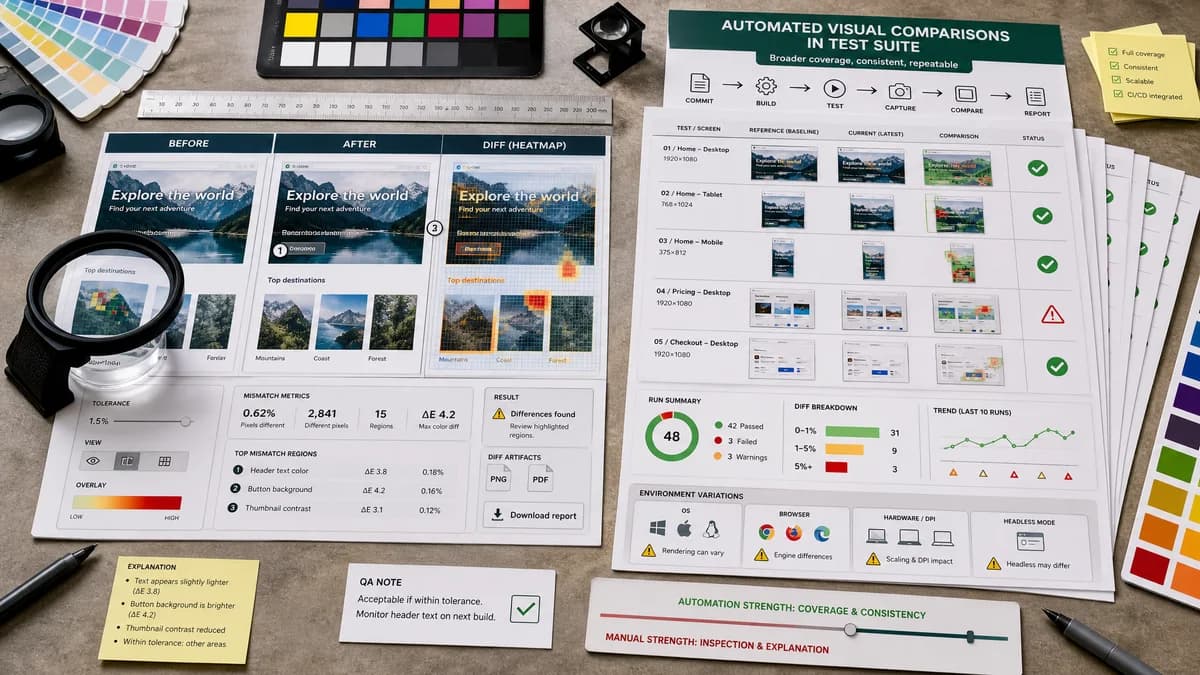
Playwright is better for automated regression tests inside a test suite, while TextFaker is better for inspecting two files immediately, explaining a mismatch, and producing a shareable manual QA report.
How Pixel-by-Pixel Image Diff fits
Pixel-by-Pixel Image Diff help users manually compare two existing images or screenshots locally, producing a heatmap, metrics, tolerance-adjusted results, and a downloadable diff artifact.
How Playwright Visual Comparisons fits
Playwright Test includes visual comparison support through screenshot assertions. Official documentation describes generating reference screenshots on first run, comparing subsequent screenshots to references, and warning that rendering can vary by operating system, browser, hardware, headless mode, and related environment factors.
Side-by-side comparison
| Decision point | Pixel-by-Pixel Image Diff | Playwright Visual Comparisons | Takeaway |
|---|---|---|---|
| Workflow | Our workflowUpload two existing images and compare locally in the browser. | Competitor workflowWrite Playwright tests that capture screenshots and compare them against stored references. | TextFaker is immediate and file-based; Playwright is automated and code-based. |
| Baseline management | Our workflowUser supplies both baseline/reference and changed/test image each time. | Competitor workflowPlaywright creates and stores reference screenshots, then compares future test runs against them. | TextFaker avoids test setup but does not manage baselines over time. |
| Environment control | Our workflowCompares decoded image files as provided, independent of browser automation rendering steps. | Competitor workflowOfficial docs warn screenshot rendering can vary across OS, browser, hardware, power source, headless mode, and settings. | TextFaker is useful after screenshots already exist, especially when investigating flaky visual test output. |
| Metrics and UI | Our workflowUser-facing pixel counts, channel deltas, threshold slider, heatmap, side-by-side, copy, and download. | Competitor workflowPlaywright focuses on assertions, generated references, and test runner output. | TextFaker is a triage companion for visual test artifacts. |
| Audience | Our workflowDevelopers, designers, QA reviewers, and support users who have two image files. | Competitor workflowDevelopers writing Playwright Test suites. | TextFaker reaches a broader non-code audience. |
| Dimension mismatch | Our workflowReports mismatched dimensions as a normal result with exact sizes. | Competitor workflowScreenshot comparison in test tooling typically expects comparable snapshots within the test framework's configured behavior. | TextFaker help users diagnose why a test artifact cannot be compared pixel for pixel. |
Use Pixel-by-Pixel Image Diff when
- One-off comparison of uploaded screenshots
- Manual review of visual regression artifacts
- Non-code image difference checks
- Copying metrics into bug reports
Use Playwright Visual Comparisons when
- Automated screenshot regression tests
- CI-integrated browser testing
- Developers maintaining baselines in a code repository
- Repeatable page or component visual checks
Detailed comparison
Triage Companion
Playwright can create visual regression artifacts, but users may still need a standalone tool to inspect two screenshots and understand the difference in human-readable terms.
- Use baseline/reference and changed/test terminology familiar to test users.
- Mention visual regression screenshots in SEO copy.
Tolerance Copy
Playwright documentation highlights environment variability. TextFaker's threshold slider is explained as a review aid for small rendering, anti-aliasing, or compression differences, not as proof that images are truly identical.
- Show both raw and thresholded meaning if implementation supports it.
- Include threshold in copied results.
Automation Boundary
TextFaker does not pretend to replace automated test suites. It serve ad hoc comparison, investigation, and reporting.
- Comparison pages can recommend Playwright for continuous automated testing.
- Recommend TextFaker for quick local inspection of two files.
Focused Tests
Future tests simulate the kinds of artifacts Playwright users inspect: same-size screenshots, small anti-aliased differences, and full-width layout shifts that create many changed pixels.
- Use generated PNG fixtures for deterministic assertions.
- Include browser smoke-test readiness for upload, compare, threshold update, copy, and download.
Research notes
- Playwright is an adjacent competitor because it handles automated visual comparisons rather than manual web image diffing.
- Official docs support the baseline screenshot workflow and environment-variability caveat.
- TextFaker is positioned as a manual artifact inspection tool, not a CI visual testing replacement.
- Comparison content avoid outbound URLs in body copy.
Official source
The only outbound competitor link on this page is placed here for source checking after the comparison.
Official Playwright Visual Comparisons source