
Pixel-by-Pixel Image Diff vs TwinLens
Pixel-by-Pixel Image Diff is the baseline in this comparison: Compare two same-size images in your browser, measure exact RGBA pixel differences, adjust tolerance, and download a diff heatmap PNG.
Compare TextFaker's focused pixel-by-pixel image diff against TwinLens' broader browser-based image and video comparison app.
Quick verdict
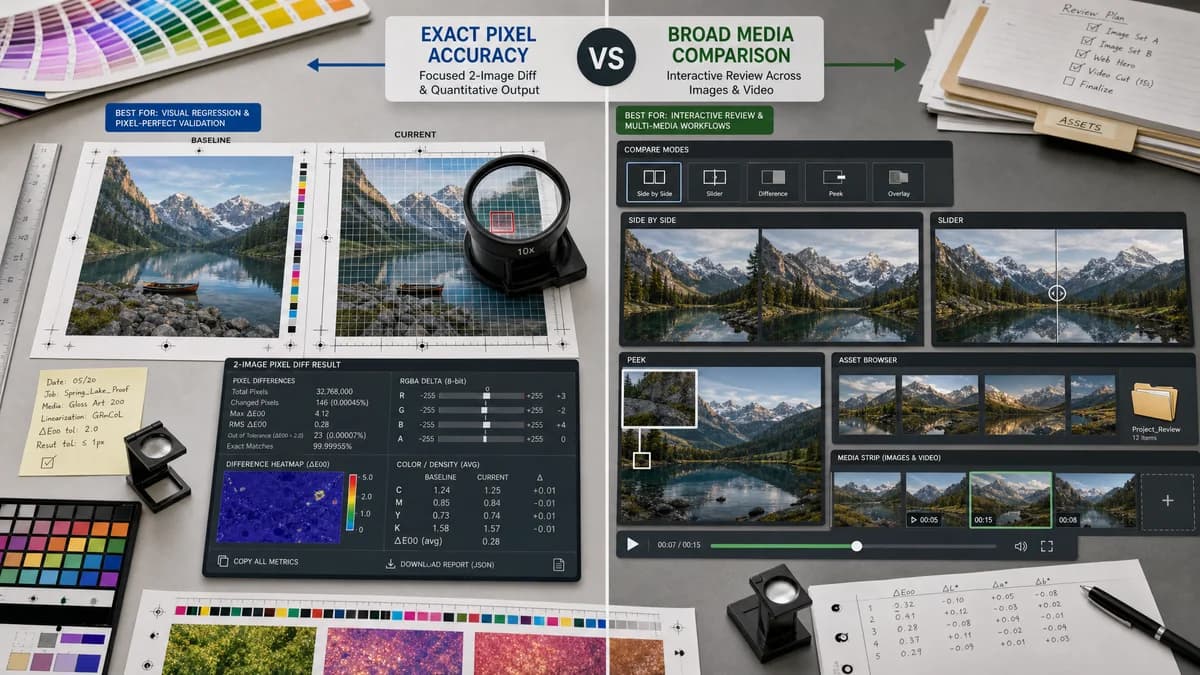
TwinLens is stronger for interactive multi-media review, while TextFaker is stronger for exact two-image pixel metrics and visual regression report output.
How Pixel-by-Pixel Image Diff fits
Pixel-by-Pixel Image Diff is a focused two-image tool for exact local pixel comparison, reporting quantitative RGBA differences and producing a diff heatmap that can be downloaded or summarized with a copy-all button.
How TwinLens fits
TwinLens presents a browser-based image and video comparer with side-by-side, image slider, peek, folder comparison, offline operation, no uploads, and support for many image formats including PNG, JPG, WebP, AVIF, GIF, BMP, SVG, HEIC/HEIF, and TIFF.
Side-by-side comparison
| Decision point | Pixel-by-Pixel Image Diff | TwinLens | Takeaway |
|---|---|---|---|
| Scope | Our workflowOne focused tool for comparing two images at the pixel level. | Competitor workflowBroader image and video comparison app with multiple comparison modes and folder support. | TextFaker is simpler and more metrics-driven. |
| Media support | Our workflowImage-only workflow based on browser-local decoding for pixel buffers. | Competitor workflowImage and video comparison, including synced playback and broad image format support according to official page copy. | TwinLens is broader; TextFaker does not compete on video comparison. |
| Metrics | Our workflowDetailed pixel counts and channel-delta metrics. | Competitor workflowOfficial page emphasizes interactive comparison and 1:1 pixel accuracy, not a full metric report in the researched summary. | TextFaker can serve report-oriented QA use cases. |
| Result artifact | Our workflowGenerated heatmap diff PNG download. | Competitor workflowInteractive comparison modes such as slider, peek, and side-by-side are core to the page positioning. | TextFaker makes exportable diff artifacts central. |
| Privacy | Our workflowBrowser-local processing is explicit. | Competitor workflowTwinLens states no uploads and offline operation in its official copy. | Privacy is not enough as a differentiator; metrics and exact result semantics matter. |
| Usage policy | Our workflowOnly count shared access or paywall usage after successful two-image comparison. | Competitor workflowNot applicable from the researched public page. | TextFaker implements fair usage gating because upload experimentation is common. |
Use Pixel-by-Pixel Image Diff when
- Two-image pixel reports
- Exact same-size screenshot comparisons
- Diff PNG artifacts
- Alpha-aware RGBA metric output
Use TwinLens when
- Side-by-side image and video review
- Comparing up to several media items
- Folder comparison workflows
- Users who need broad format support and interactive sliders
Detailed comparison
Product Boundary
TwinLens shows that users value rich visual comparison, but TextFaker remains a tool-page utility rather than a broad media comparison app.
- Do not add video diff to this tool.
- Do not add folder comparison unless a future separate tool is built.
User Jobs
TextFaker's likely users will include developers validating screenshots, designers checking exported assets, and support teams producing a concise difference report.
- Use baseline/reference and changed/test labels.
- Offer side-by-side as a supporting view, not the primary deliverable.
SEO Content
The SEO section acknowledges that sliders are useful for human review, then explains when a true pixel-by-pixel diff is needed.
- Target visual regression image comparison and pixel difference checker terms.
- Explain RGBA and alpha-aware comparisons in plain English.
Testing
Browser smoke tests check that the primary diff workflow is usable without relying on broad media features.
- Upload two generated PNGs through both drop zones.
- Validate that the result panel, heatmap canvas, download button, and copy-all button appear.
Research notes
- TwinLens is adjacent rather than a pure pixel-diff competitor because it includes image, video, and folder comparison workflows.
- Its no-upload and offline positioning means TextFaker emphasizes metric depth, not just privacy.
- Avoid claiming support for image formats in TextFaker until actual browser decode behavior and tests confirm them.
- TextFaker smoke-test images use simple deterministic fixtures to support smoke tests and docs screenshots.
Official source
The only outbound competitor link on this page is placed here for source checking after the comparison.
Official TwinLens source