
Pixel-by-Pixel Image Diff vs WebUtility Image Diff
Pixel-by-Pixel Image Diff is the baseline in this comparison: Compare two same-size images in your browser, measure exact RGBA pixel differences, adjust tolerance, and download a diff heatmap PNG.
Compare TextFaker's exact same-dimension pixel diff with WebUtility's visual regression image diff tool.
Quick verdict
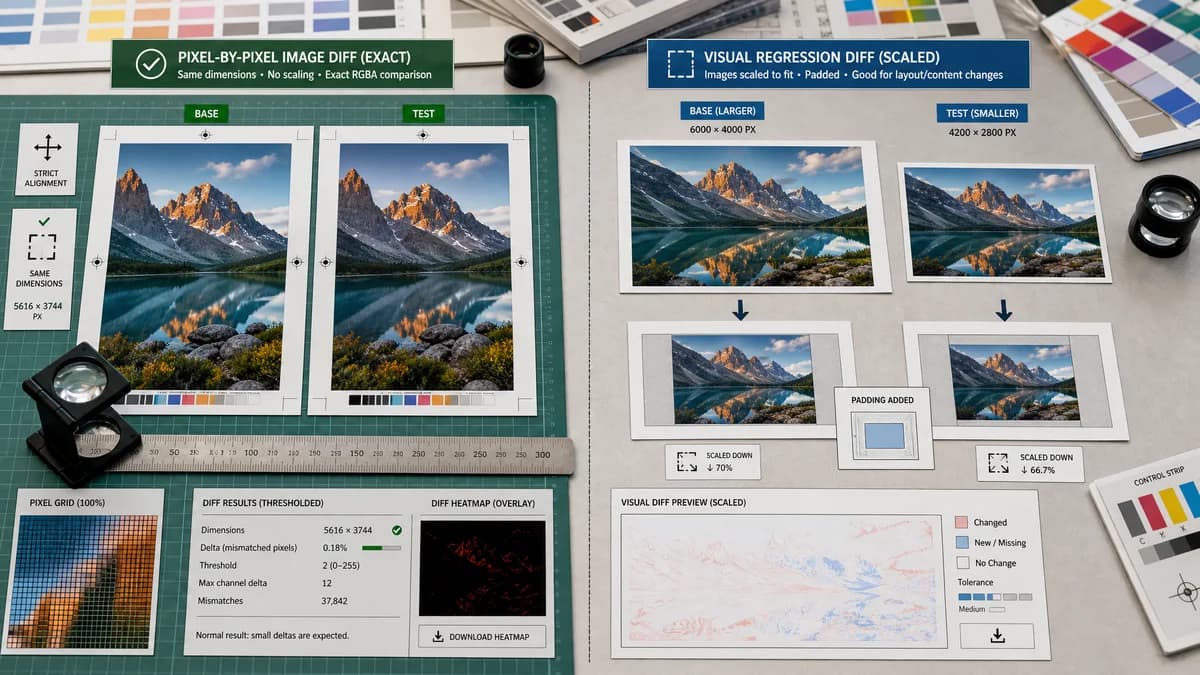
TextFaker intentionally chooses exactness over automatic scaling or padding, because its target query includes pixel-by-pixel comparison and pixel difference checking.
How Pixel-by-Pixel Image Diff fits
Pixel-by-Pixel Image Diff performs strict same-dimension RGBA comparison and explains mismatches as normal results rather than resizing, scaling, or padding for the user. It exposes thresholded metrics and a downloadable diff heatmap.
How WebUtility Image Diff fits
WebUtility's Image Diff page is framed as a visual regression tool. The researched page describes scaling both images using a selected downscale percentage and padding smaller images within the diff canvas.
Side-by-side comparison
| Decision point | Pixel-by-Pixel Image Diff | WebUtility Image Diff | Takeaway |
|---|---|---|---|
| Dimension strategy | Our workflowRequires matching width and height for exact comparison; mismatch gets a clear explanatory result. | Competitor workflowOfficial page summary describes downscaling and padding smaller images within the diff canvas. | TextFaker's strict dimension policy is better for exact pixel-by-pixel intent. |
| Comparison basis | Our workflowCompares decoded RGBA pixel buffers directly after validation. | Competitor workflowVisual regression workflow can involve scaled and padded canvases. | Users understand that scaling changes the meaning of a pixel-level diff. |
| Metrics | Our workflowCounts total, identical, differing pixels and provides channel delta and RMSE or MAE metrics. | Competitor workflowThe page is positioned as image diff for visual regression, with implementation details around scaling and padding in the researched result. | TextFaker is more transparent about mathematical results. |
| Threshold | Our workflowInteractive tolerance slider for suppressing minor channel deltas. | Competitor workflowThe researched page mentions downscale percentage rather than a pixel-delta tolerance as the central control. | TextFaker can target anti-aliasing and compression-noise workflows directly. |
| Output | Our workflowHeatmap preview, side-by-side where practical, copy-all, and downloadable diff PNG. | Competitor workflowThe tool provides a comparison image in its workflow. | TextFaker makes the diff artifact both inspectable and exportable. |
| User education | Our workflowSEO copy explain exact comparison versus visual regression comparison with resizing or padding. | Competitor workflowWebUtility is already framed for visual regression image diff users. | TextFaker can help users who specifically need exact same-size screenshot comparison. |
Use Pixel-by-Pixel Image Diff when
- Exact pixel-level comparison of same-size images
- QA reviewers who need precise dimensions and counts
- Users who do not want resized or padded comparison artifacts
- Alpha-aware image diff reporting
Use WebUtility Image Diff when
- Visual regression preview where scaling is acceptable
- Comparing images that may not already share dimensions
- Users who want a utility-oriented image diff page
Detailed comparison
Exactness Choice
WebUtility's described scaling and padding behavior is useful for flexible visual comparison, but Pixel-by-Pixel Image Diff avoids that for exact pixel math. This distinction is important enough to explain in the page copy.
- State that this tool does not normalize resized images before exact comparison.
- Report both dimensions when a mismatch occurs.
Result Semantics
A dimension mismatch is not shown as a broken upload. It is a valid answer: exact pixel-by-pixel comparison is not meaningful until dimensions match.
- Show baseline dimensions and changed dimensions.
- Suggest cropping, resizing, or using a visual comparison tool if exact pixel comparison is not required.
Test Fixtures
Tests include a mismatch case where two images differ only by dimensions, not by content. The result avoids generating misleading pixel statistics.
- Assert no diff PNG is created for mismatched dimensions unless the implementation creates a dedicated mismatch preview.
- Assert usage counting follows the successful-result policy.
Content Scope
This page does not drift into histogram, average color, palette, or alpha extraction functionality. Alpha is relevant only as a channel in the two-image comparison.
- Keep internal links to related tools in supporting SEO sections.
- Do not reuse transparency checker copy as the main value proposition.
Research notes
- WebUtility is useful as a contrast case because it supports visual regression diff intent but handles size differences flexibly.
- TextFaker chooses strict same-dimension behavior to match exact pixel-by-pixel user intent.
- The comparison page neutrally explain that scaling and padding can be useful but are not exact original-pixel comparison.
- Include WebUtility in competitor pages as an adjacent visual regression image diff tool.
Official source
The only outbound competitor link on this page is placed here for source checking after the comparison.
Official WebUtility Image Diff source