
Open Source Alternatives to Diffchecker
Pixel-by-Pixel Image Diff is a browser-based alternative for users who need this focused result without installing a proprietary desktop app or entering a larger hosted workflow.
This research compares that workflow with Diffchecker while keeping the outbound source link at the bottom after the analysis.
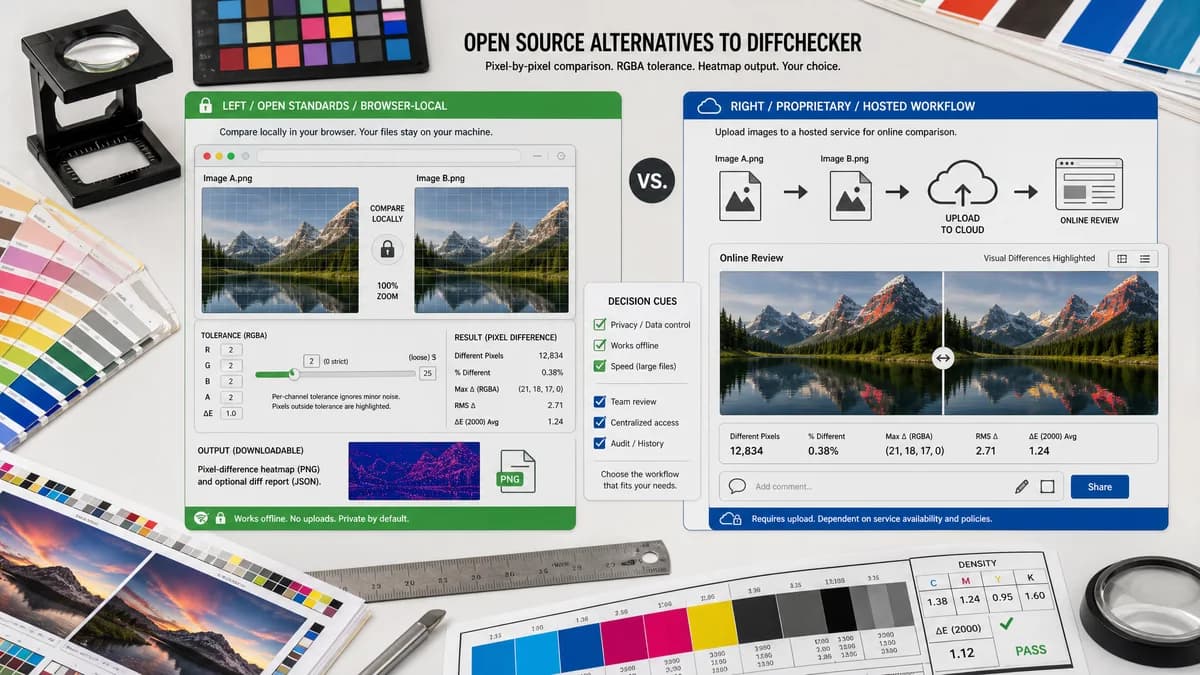
Why Pixel-by-Pixel Image Diff fits
Pixel-by-Pixel Image Diff is a browser-local image comparison tool for uploading two same-size images, measuring RGBA pixel changes with a tolerance setting, and downloading a diff heatmap PNG.
What Diffchecker offers
Diffchecker Image Compare is a hosted image comparison workflow for uploading images and reviewing visual differences online.
Open alternative signals
Source and openness
Pixel-by-Pixel Image DiffBrowser-local workflow built around standard canvas ImageData and PNG export APIs.
DiffcheckerDiffchecker is a proprietary product or hosted workflow for a broader comparison use case.
Deployment
Pixel-by-Pixel Image DiffRuns in a browser for one pair of uploaded files without installing a desktop app or configuring CI.
DiffcheckerDiffchecker is stronger when its full product setup, account workflow, integrations, or desktop app are needed.
Pricing shape
Pixel-by-Pixel Image DiffUses TextFaker tool access: free successful use, one more after signup, then one lifetime payment for all tools.
DiffcheckerThe proprietary product uses its own subscription, licensing, account, or product pricing model.
Data control
Pixel-by-Pixel Image DiffReads the selected image pixels locally in the browser for the comparison workflow.
DiffcheckerThe compared product may involve hosted review, desktop app storage, CI screenshots, or account-based project data.
Best fit
Pixel-by-Pixel Image DiffQuick same-dimension screenshot, icon, transparent PNG, or design-export checks with numeric pixel metrics.
DiffcheckerUse Diffchecker for the wider workflow it is designed to support.
Decision guide
Use Pixel-by-Pixel Image Diff when you have two same-size image files and need an immediate browser-local RGBA diff, tolerance setting, numeric metrics, copyable summary, and downloadable heatmap PNG.
Use Diffchecker when the task needs its broader hosted review, CI, desktop comparison, approval, collaboration, cross-browser, or editor workflow rather than one focused image-pair diff.
Side-by-side open source alternative comparison
| Decision point | Pixel-by-Pixel Image Diff | Diffchecker | Takeaway |
|---|---|---|---|
| Alternative fit | Our workflowFocused browser-local pixel diff for two same-size image files. | Proprietary workflowDiffchecker Image Compare is a hosted image comparison workflow for uploading images and reviewing visual differences online. | Choose by whether the job is one image pair or a broader product workflow. |
| Source model | Our workflowUses browser canvas standards and local pixel reads; TextFaker is not presented as an open-source project. | Proprietary workflowDiffchecker is treated here as proprietary software or a hosted product workflow. | The open-source alternative intent is satisfied by a lightweight standards-based workflow, not by a false source-code claim. |
| Setup and deployment | Our workflowOpen the page, upload two images, adjust tolerance, and compare. | Proprietary workflowUse Diffchecker when its product setup, account, CI, desktop, or review workflow is needed. | A focused browser tool removes setup for small ad hoc checks. |
| Feature parity | Our workflowExact RGBA pixel metrics, tolerance-filtered counts, RMSE, heatmap preview, and diff PNG download. | Proprietary workflowThe proprietary workflow may include broader visual review, approvals, automation, editor features, or collaboration. | Pixel metrics are covered; platform-level review is not the goal. |
| Editing and export parity | Our workflowExports a generated diff PNG, but does not edit or merge the original images. | Proprietary workflowThe compared product may include editing, review states, baselines, folders, or generated reports depending on its category. | Use TextFaker for the diff artifact; use the proprietary workflow for richer project operations. |
| Migration path | Our workflowUse it as a quick preflight or spot-check before adding a case to a larger visual testing system. | Proprietary workflowDiffchecker remains useful when repeated reviews, teams, CI, or desktop workflows matter. | The practical migration path is selective, not full replacement. |
Detailed research
Open-Source Alternative Fit
Pixel-by-Pixel Image Diff fits users searching for open source alternatives to Diffchecker when their immediate need is transparent: compare two image files locally and get numeric pixel metrics plus a diff PNG.
- It avoids account setup for one-off checks.
- It focuses on same-dimension pixel comparison.
- It does not claim full platform parity.
Feature Parity And Limits
The focused tool covers exact RGBA comparison, tolerance-filtered changed pixels, average channel delta, maximum channel delta, RMSE, side-by-side viewing, and a heatmap download. It does not replace semantic visual review, team approvals, automatic screenshot capture, or image editing.
- Best for exported screenshot pairs.
- Not built for automatic alignment or layout understanding.
- Dimension mismatch is reported before scoring pixels.
Data Control And Setup
For sensitive screenshots and design exports, local browser processing is useful because the selected files can be decoded and compared without building a project, installing a desktop app, or adding a CI service.
- Use same-size files for exact positional comparison.
- Keep tolerance at zero for strict QA.
- Raise tolerance for anti-aliasing or compression noise.
Where The Proprietary Tool Still Wins
Diffchecker can still be the better option when the work needs the broader product context: recurring baselines, hosted review, cross-browser capture, team comments, desktop compare workflows, editor tools, or enterprise reporting.
- Use the broader workflow for repeated project checks.
- Use TextFaker when two local files are enough.
- Keep both options when visual QA has both ad hoc and automated needs.
Practical Migration Guidance
A realistic migration is to use the focused browser tool for quick investigations, preflight checks, and manual QA artifacts, while keeping larger visual testing or desktop comparison systems for project-scale workflows.
- Export screenshots at the same viewport size.
- Compare locally with a documented tolerance.
- Save the diff PNG and copy summary for issue reports.
Research notes
- Diffchecker is included because users may search for lighter alternatives when they only need to compare two image files.
- The alternative fit is based on setup, data control, comparison scope, output artifacts, and whether a hosted or desktop workflow is required.
- Pixel-by-Pixel Image Diff is described as browser-local and standards-based; this page does not claim that TextFaker itself is open source.
Official source
The proprietary product link is included once here for source checking after the alternative analysis.
Official Diffchecker source