
PNG to WebP Converter
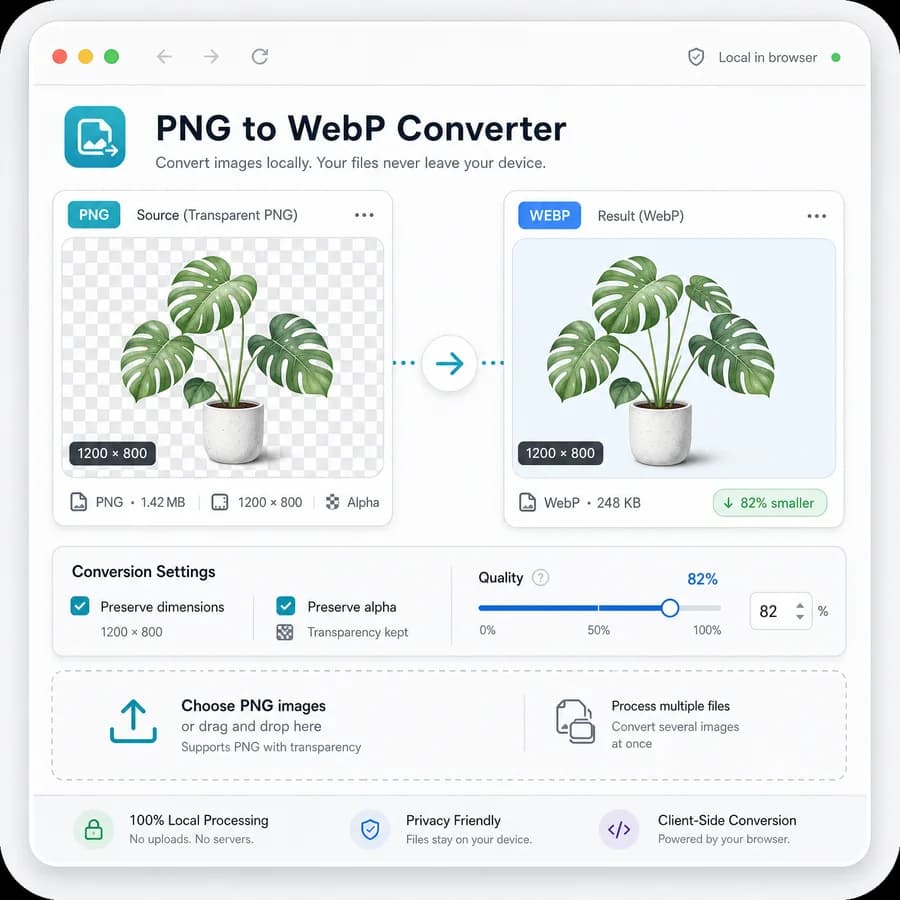
PNG to WebP Converter turns PNG files into downloadable WebP images in your browser without uploading the original image.
It verifies the output MIME type, filename extension, dimensions, Blob result, transparency behavior, and quality setting so the conversion is easier to trust before download.
Choose a PNG image
PNG images up to 50 MB. Transparent pixels stay on the WebP path without a JPEG matte.
WebP output is locked for this dedicated PNG to WebP Converter.
image/webp .webp
WebP conversion result
image/webp MIME, .webp extension, preserved dimensions, file size, filename, quality setting, transparency path, and Blob checks.
No image selected
Choose a PNG image to create a verified WebP output file.
PNG input and WebP output checks
Source images
Output checks
- MIME type matches the selected encoder.
- Download extension matches the output MIME.
- Decoded output dimensions match the source pixels.
- Blob generation succeeds with a nonzero file size.
How to Convert PNG to WebP Safely
What This Tool Verifies
A dedicated PNG to WebP page reuses the shared image conversion pipeline while narrowing accepted input and output expectations to one clear workflow: PNG input and WebP output. The result panel shows the original PNG details beside the converted WebP details so users can confirm that the browser created the expected file.
- Require PNG input by MIME type and extension, with a clear unsupported-file state for JPG, WebP, SVG, AVIF, GIF, and non-image files.
- Verify the generated Blob uses image/webp and that the suggested download filename ends in .webp.
- Report original and output width and height, and flag any unexpected dimension mismatch.
- Show original size, WebP size, and percentage change so users can decide whether the conversion is worth keeping.
- Keep copy and download labels deterministic, for example Copy summary and Download WebP, so tests can assert exact UI text.
Transparency and WebP Quality
PNG often carries transparent pixels, and WebP supports alpha in browser encoders. The tool make transparency behavior explicit instead of treating the result like an opaque JPEG-style conversion.
- Use a generated transparent PNG fixture to confirm transparent and semi-transparent pixels survive WebP export where the browser encoder supports alpha.
- Preview the result over a checkerboard or comparable transparent-background indicator so alpha loss is visible before download.
- Expose a WebP quality slider for lossy WebP output and pass its normalized value into the shared converter adapter.
- Validate that changing the slider changes the conversion options and, for suitable image fixtures, can change output byte size while preserving dimensions.
- Avoid matte-color controls here because PNG to WebP preserves alpha rather than flatten it.
Where It Fits in the Converter Family
This is the fifth browser-local image conversion page and follows the dedicated adapter pattern already used by JPG to PNG, PNG to JPG, and JPG to WebP. The page is specific enough for search intent while sharing core conversion code with the general Image Format Converter.
- Reuse src/lib/image-format-converter.ts for decoding, canvas conversion, MIME checks, Blob creation, dimension reporting, and filename generation.
- Create a focused adapter/config for png-to-webp-converter instead of duplicating conversion logic in the page component.
- Use SEO copy that distinguishes this page from the general Image Format Converter and from JPG to WebP by emphasizing PNG input, alpha support, and WebP output.
- Cross-link internally to Image Format Converter, PNG to JPG Converter, JPG to WebP Converter, Image Transparency Checker, and Remove Alpha Channel where the registry supports related tools.
- Keep all conversion local to the browser and avoid copy that implies server-side upload, compression guarantees, or metadata preservation.
Objective Test Coverage
The highest-risk behavior is not whether a browser can draw an image, but whether the dedicated page produces the exact WebP contract users expect. Tests use generated image fixtures so the assertions do not depend on external assets.
- Generate an opaque PNG fixture and assert image/webp output, .webp filename, non-empty Blob, preserved width, and preserved height.
- Generate a transparent PNG fixture and assert the conversion path does not apply a matte color or route through the JPEG adapter.
- Assert deterministic copy/download strings so future copy edits do not break user-facing workflow assumptions silently.
- Assert the quality slider is visible for WebP output, updates state, and is passed to the shared conversion function.
- Run the shared tool verifier after adding the page and, when a local server is available, repeat verification against that local base URL.
References
- MDN WebP image format documentation
- MDN HTMLCanvasElement.toBlob documentation
- MDN Blob documentation
- MDN File documentation
- MDN URL.createObjectURL documentation
- MDN image/webp common MIME type entry
- Google WebP compression documentation
- Google WebP FAQ
- Google WebP container specification
- Can I use WebP image format support data
- CloudConvert PNG to WebP comparison page
- FreeConvert PNG to WebP comparison page
- Convertio PNG to WebP comparison page
- Online-Convert PNG to WebP comparison page
- Pixelied PNG to WebP comparison page
- Ezgif PNG to WebP comparison page
- Picflow PNG to WebP comparison page
- MConverter PNG to WebP comparison page
- OnlinePNGTools PNG to WebP comparison page
- 11zon PNG to WebP comparison page
- Squoosh open-source alternative
- ImageMagick open-source alternative
- libvips open-source alternative
- Sharp open-source alternative
- webp-converter-browser open-source alternative
- cwebp-bin open-source alternative
- imagemin-webp open-source alternative
- GIMP open-source alternative
- vipsdisp open-source alternative
- ImageMagick WebP format documentation
- Sharp WebP output API documentation
Compare PNG to WebP Converter
Review this tool beside related online utilities, dedicated apps, and adjacent workflows.
Compare PNG to WebP Converter with other toolsOpen Source Alternatives
Compare this focused browser workflow with proprietary software and online tools that solve similar jobs.
View PNG to WebP Converter open source alternatives