
Print Bleed Border Checker
Print Bleed Border Checker helps you verify whether an image has enough bleed, safe margin, and border space for print without uploading the file.
Choose a print size, bleed amount, safe-zone margin, DPI, and border rule, then get measurable pass/fail results, trim boxes, edge-border checks, and downloadable proof files.
Drop one print image here
PNG, JPG, WebP, GIF, BMP, or AVIF up to 75 MB.
Print setup
The DPI/PPI value is a conversion basis for print math. It does not read or prove embedded density metadata.
Upload a print image
The report will show bleed canvas size, trim and safe-zone boxes, edge-border measurements, and downloads.
Check Bleed, Safe Zone, and Border Fit
What the image checker measures
The checker converts the selected print preset or custom trim size into exact pixel measurements using the selected DPI, then compares those targets with the uploaded image dimensions.
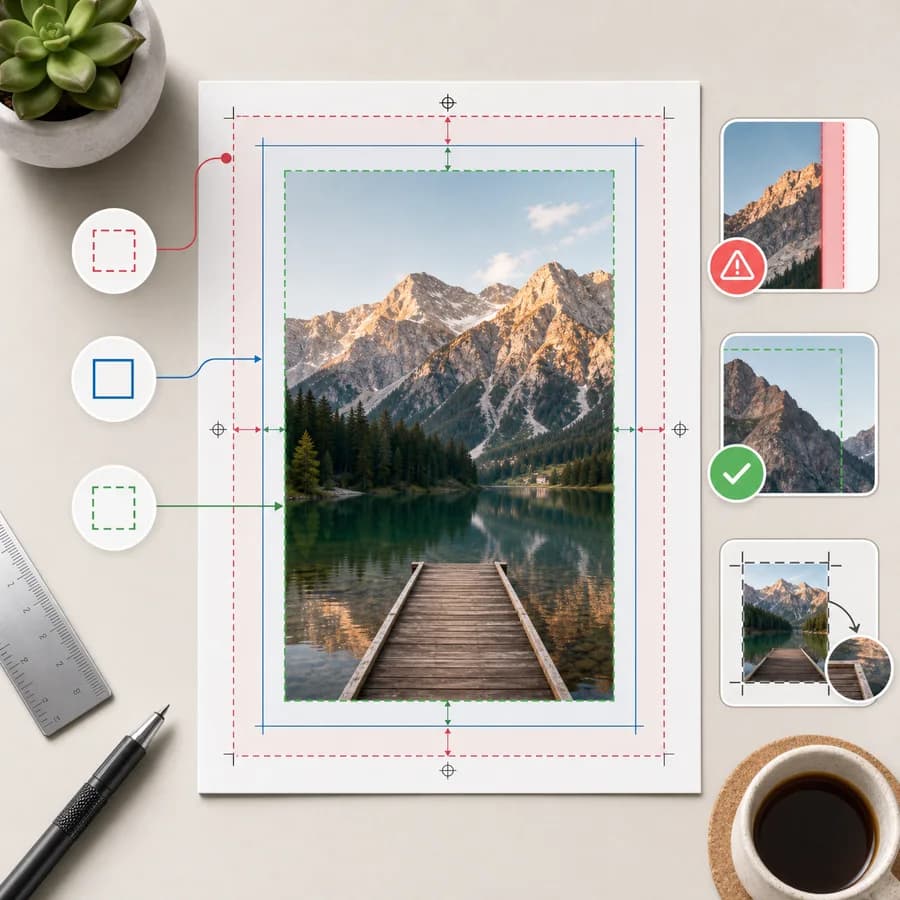
It distinguishes the finished trim box, outer bleed canvas, inner safe-zone box, and likely edge border so users can tell whether a white edge is expected or a setup mistake.
- Report source width, height, aspect ratio, file type, estimated print size, and DPI basis.
- Calculate required full-bleed canvas size from trim size plus bleed on each side.
- Return trim box, bleed box, safe-zone box, and recommended canvas changes in pixels, inches, and millimeters.
- Flag common issues such as missing bleed, wrong aspect ratio, low pixel density, and likely white or transparent edge borders.
Useful print presets
Presets cover common general-user jobs while still allowing custom dimensions because print shops and marketplaces often publish slightly different templates.
Use the preset closest to the finished trimmed piece, then adjust bleed, safe margin, and DPI to match the printer template you received.
- Business card: 3.5 x 2 in trim with 0.125 in bleed.
- Postcard: 6 x 4 in trim with 0.125 in bleed.
- US Letter flyer: 8.5 x 11 in trim with 0.125 in bleed.
- A4 flyer: 210 x 297 mm trim with 3 mm bleed.
- Square photo or sticker: custom trim with custom bleed and safe-zone controls.
Deterministic outputs
The page produces values that can be copied, downloaded, and tested without judging whether the design looks good.
A downloadable proof PNG draws trim, bleed, and safe-zone guides, while the JSON report keeps the core result machine-readable.
- Pass/fail summary for bleed canvas, safe zone geometry, aspect ratio, border symmetry, and minimum pixel density.
- Exact trim box, bleed box, safe-zone box, and border measurements in source pixels.
- Recommended crop or canvas expansion values when the file is too small or has the wrong ratio.
- Copy-ready printer note summarizing final size, bleed size, safe margin, and detected issues.
Privacy and mobile use
All image decoding, measuring, edge sampling, and proof rendering happen with browser APIs, so private photos, stationery, invitations, labels, book pages, and business cards do not need to leave the device.
The mobile workflow emphasizes preset selection, large numeric fields, one-file upload, and a compact pass/fail report because many users receive print proofs and screenshots on phones.
- Use local File, Canvas, ImageBitmap, and Blob downloads for the image workflow.
- Avoid server upload for source files, generated previews, and reports.
- Provide touch-friendly controls for inches, millimeters, pixels, and DPI.
- Make validation messages short enough to screenshot and send to a printer or designer.
Compare Print Bleed Border Checker
Review this tool beside related online utilities, dedicated apps, and adjacent workflows.
Compare Print Bleed Border Checker with other toolsOpen Source Alternatives
Compare this focused browser workflow with proprietary software and online tools that solve similar jobs.
View Print Bleed Border Checker open source alternatives