
Remove Alpha Channel vs Cloudinary
Remove Alpha Channel is the baseline in this comparison: Flatten PNG, WebP, AVIF, BMP, or JPEG images over a matte color and export an opaque PNG or JPEG locally in your browser.
A cloud image platform that can preserve transparency, remove backgrounds, convert formats, optimize images, and deliver transformed assets through URLs and APIs.
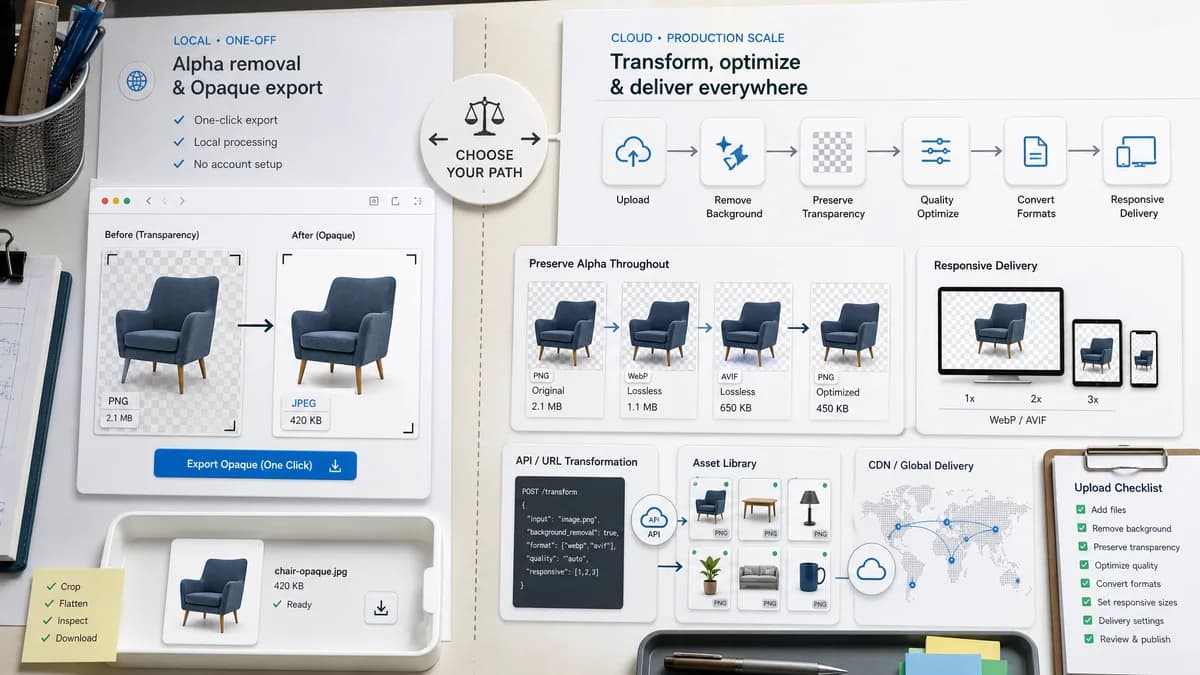
Quick verdict
Cloudinary is best for production-scale image delivery and transformation pipelines. TextFaker be better for local inspection and one-off flattening before upload, publishing, or handoff.
How Remove Alpha Channel fits
TextFaker be a local browser utility for one-off alpha removal and opaque export, with no need to configure a cloud account, upload to a media library, or write transformation URLs.
How Cloudinary fits
Cloudinary's official transparency guide discusses preserving alpha during transformations, background removal, format conversion, quality optimization, responsive delivery, and CDN caching. Its documentation also covers background removal workflows that produce transparent foreground images.
Side-by-side comparison
| Decision point | Remove Alpha Channel | Cloudinary | Takeaway |
|---|---|---|---|
| Processing context | Our workflowBrowser-local upload, decode, matte composite, and export. | Competitor workflowCloud transformations, APIs, optimization, and CDN delivery. | TextFaker is local and ad hoc; Cloudinary is infrastructure. |
| Transparency handling | Our workflowRemove alpha by compositing over a matte color. | Competitor workflowGuide emphasizes preserving transparency during transformations and creating transparency through background removal. | Cloudinary is broader and often preserves alpha; TextFaker intentionally removes it. |
| Setup | Our workflowNo API configuration for a single file. | Competitor workflowCloud platform workflow for configured assets and transformations. | TextFaker is faster for non-production tasks. |
| Reporting | Our workflowPixel counts and percentages. | Competitor workflowDocumentation focuses on delivery and transformation behavior rather than per-file alpha reports. | TextFaker can serve preflight QA. |
| Output formats | Our workflowOpaque PNG and JPEG where supported. | Competitor workflowAutomated format and quality transformations across delivery contexts. | Cloudinary is stronger for production optimization. |
| Access flow | Our workflowCharge only when a transparent source yields an opaque output. | Competitor workflowCommercial platform model; pricing and account details are outside the comparison body. | TextFaker can make single-use conversion value explicit. |
Use Remove Alpha Channel when
- One-off local image flattening
- Users who need alpha statistics before using a file elsewhere
- Designers or developers preparing an opaque asset without API setup
Use Cloudinary when
- Production image pipelines
- CDN-backed transformation and optimization
- Developers managing image assets at scale
Detailed comparison
Positioning
Cloudinary is an adjacent developer-platform comparison, not a direct browser utility. The key distinction is local one-off conversion versus hosted transformation infrastructure.
- Mention Cloudinary for production-scale image delivery.
- Mention TextFaker for pre-upload local flattening.
Technical Angle
Cloudinary documentation reinforces that transparency can be preserved or created in pipelines. TextFaker's niche is the opposite operation: intentionally producing an opaque result.
- Use language like remove alpha for opaque handoff.
- Avoid implying Cloudinary cannot flatten unless directly sourced.
SEO
Developers may search for Cloudinary alternatives when they only need to fix one transparent PNG. The comparison can explain when a lightweight browser tool is enough.
- Use preflight, handoff, and opaque export terms.
- Include internal links to EXIF Remover and PNG Lossless Optimizer where relevant.
Testing
Because Cloudinary is production-grade, TextFaker prove correctness with focused tests and browser smoke checks.
- Run tools verification after implementation.
- Run full test suite.
- Run browser smoke test against local server when available.
Research notes
- Official Cloudinary guide discusses transparency preservation, background removal, format conversion, quality optimization, responsive delivery, and CDN caching.
- Official Cloudinary background removal documentation describes outputs with transparent backgrounds.
- This comparison is framed around platform scale versus browser-local utility.
Official source
The only outbound competitor link on this page is placed here for source checking after the comparison.
Official Cloudinary source