
Remove Alpha Channel vs Ezgif Remove Background
Remove Alpha Channel is the baseline in this comparison: Flatten PNG, WebP, AVIF, BMP, or JPEG images over a matte color and export an opaque PNG or JPEG locally in your browser.
An online tool that removes or replaces background colors in GIFs and other image formats, with custom color and fuzz controls.
Quick verdict
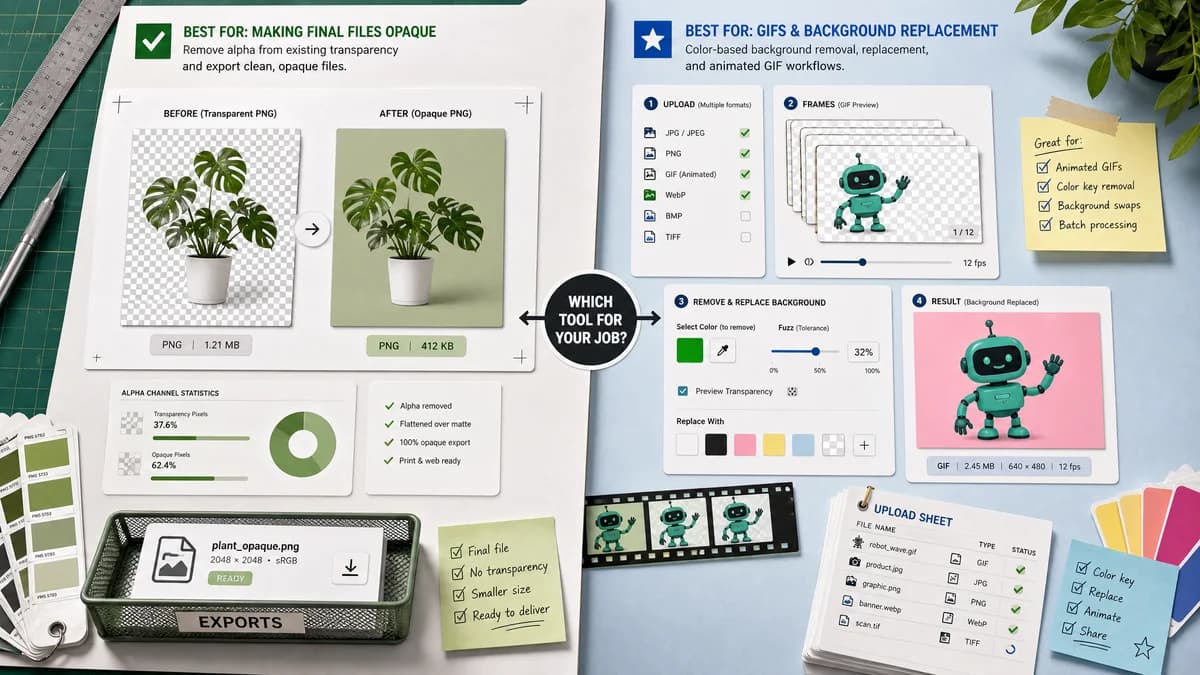
Ezgif is better for animated GIFs and color-based background replacement. TextFaker be better for already-transparent images where the job is to remove alpha and make the final file opaque.
How Remove Alpha Channel fits
TextFaker not try to be a color-key background remover. It flatten existing transparency from decoded pixels over a matte color and export an opaque result with alpha statistics.
How Ezgif Remove Background fits
Ezgif's official page supports many image formats, lets users replace a background color with transparency or swap one background color for another, includes custom color and fuzz controls, and says uploaded files are deleted after one hour.
Side-by-side comparison
| Decision point | Remove Alpha Channel | Ezgif Remove Background | Takeaway |
|---|---|---|---|
| Source problem | Our workflowExisting transparency or alpha channel must be flattened. | Competitor workflowBackground color can be removed or swapped, including in animated files. | Different starting problems: alpha flattening versus color-key editing. |
| Animation | Our workflowStatic image workflow unless future support is added. | Competitor workflowBuilt around GIF and animated image workflows. | Ezgif is stronger for animation. |
| Transparency stats | Our workflowSource alpha counts and percentages. | Competitor workflowPage focuses on background-removal settings and output behavior. | TextFaker highlight diagnostics. |
| Upload and privacy | Our workflowBrowser-local decoding and export. | Competitor workflowOfficial page says uploaded files are automatically deleted after one hour. | TextFaker can offer no-upload processing when implemented locally. |
| Controls | Our workflowMatte color, preview background, output format, and copy-all result. | Competitor workflowPreset/custom background colors, fuzz tolerance, frame compositing, and edge cleanup. | Ezgif has more color-removal controls; TextFaker keep flattening controls precise. |
| Output intent | Our workflowOpaque output with alpha removed. | Competitor workflowCan make backgrounds transparent or change a background color. | TextFaker state it removes transparency, not backgrounds. |
Use Remove Alpha Channel when
- Already-transparent PNG or WebP images that need to become opaque
- Users who need alpha-count reporting
- Users who want a matte color rather than color-key background removal
Use Ezgif Remove Background when
- Animated GIF background changes
- Color-key background removal or replacement
- Users who need fuzz tolerance and edge cleanup for GIFs
Detailed comparison
Positioning
Ezgif is described as adjacent because it can change backgrounds, but it is not specifically a remove-alpha-channel diagnostic tool.
- Make the distinction between existing alpha and selected background color.
- Add FAQ explaining fake checkerboards versus real transparency.
User Intent
A user with a transparent PNG wants all pixels opaque; a user with a solid white GIF background wants color replacement. These is routed differently.
- Mention Image Transparency Checker for detection-only use.
- Mention Alpha Channel Extractor for mask extraction use.
Implementation
TextFaker not include fuzz tolerance unless the scope expands to background removal. The tool only needs alpha-aware compositing.
- Use RGBA pixel data from canvas.
- Set output alpha to 255 everywhere.
- Provide matte color input.
SEO
Comparison copy can capture queries like Ezgif remove transparency alternative and remove transparency from PNG without removing background color.
- Do not claim Ezgif is bad for PNG; explain it solves a different problem.
- Use static image examples in generated images.
Research notes
- Official Ezgif page supports GIF, JPG, PNG, BMP, APNG, WebP, HEIC, MNG, AVIF, and JXL.
- It describes modes for replacing background color with transparency or changing one background color to another.
- It states uploaded files are automatically deleted after one hour.
Official source
The only outbound competitor link on this page is placed here for source checking after the comparison.
Official Ezgif Remove Background source